DC
Cinematographiliac
Let me preface this by saying that I am (supposedly) the only one reporting this problem among successful reports with the same setup, and the seller has been excellent trying to remedy this situation.
Also, I've tested the voltage for all components (including alternate units, cables & batteries) - it should perfectly acceptable. My AF100 is firmware v1.23 (the paid upgrade).
------
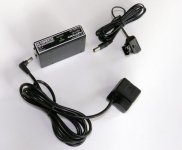
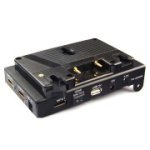
For longer than I'd like to admit, I've been struggling trying to power my AF100 using a Lanparte power pinch and Gold Mount battery. :embarasse The power pinch is the one with the correct circuitry (not one of the cheaply made knock-offs that can cause problems). There is a 7.2v output (actually sending 8.26v) jack on the power pinch; this is supposed to be connected to the Panasonic DC cord via a 4-inch long adapter cable, which in turn connects normally to the battery slot on the AF100.
The problem: when I connect the components from the external battery source and power-on the AF100, I get an almost-immediate error message that says "This Battery Cannot Be Used" followed by the camera powering itself off. :huh:
Some initial research shows that the Panasonic battery terminal has 4 connectors - 2 on the outside for +/- power, and 2 in the middle for communication from the power source.
So, the only thing I can come up with is that there is no "handshake" happening between the AF100 and battery that would normally be expected from the an official (or compatible) Panasonic battery (or A/C adapter). I imagine the appropriate "handshake" would have the AF100 "authorize" the power source. In my case, I don't think this is happening. rogar-Mad(DBG):
Help: What would it take to get this setup to work properly? Is there a way to tell the camera not to check for the "handshake?" Or to somehow send a "handshake" from my power source? :-KnockedOut(D
Thanks!!
Also, I've tested the voltage for all components (including alternate units, cables & batteries) - it should perfectly acceptable. My AF100 is firmware v1.23 (the paid upgrade).
------
For longer than I'd like to admit, I've been struggling trying to power my AF100 using a Lanparte power pinch and Gold Mount battery. :embarasse The power pinch is the one with the correct circuitry (not one of the cheaply made knock-offs that can cause problems). There is a 7.2v output (actually sending 8.26v) jack on the power pinch; this is supposed to be connected to the Panasonic DC cord via a 4-inch long adapter cable, which in turn connects normally to the battery slot on the AF100.
The problem: when I connect the components from the external battery source and power-on the AF100, I get an almost-immediate error message that says "This Battery Cannot Be Used" followed by the camera powering itself off. :huh:
Some initial research shows that the Panasonic battery terminal has 4 connectors - 2 on the outside for +/- power, and 2 in the middle for communication from the power source.
So, the only thing I can come up with is that there is no "handshake" happening between the AF100 and battery that would normally be expected from the an official (or compatible) Panasonic battery (or A/C adapter). I imagine the appropriate "handshake" would have the AF100 "authorize" the power source. In my case, I don't think this is happening.
rogar-Mad(DBG):Help: What would it take to get this setup to work properly? Is there a way to tell the camera not to check for the "handshake?" Or to somehow send a "handshake" from my power source? :-KnockedOut(D
Thanks!!