Printers That Print on DVDs

Yes, the topic title isn't as smooth, but I wanted to make sure I was specific about what kind of printers I was talking about.

I am looking for a printer that can print designs, that I make, on to a dvd. I ask here, because when shopping around online, it was hard to find one that had good reviews.

I looked at the Epson and HP models and neither brand had great reviews.

So, does anyone here know of a good printer ($100-$300 range) that does a good job printing on to dvds?

Any stories about models you have? Any recommendations?
 
Last edited:
You should mention your country, because models differ by country. The Canon Pixus MP630 (I think it's called a Pixma in the US) is inexpensive and prints pretty nicely on DVDs.
 
Epson Stylus Photo R200.

Epsons are quite low cost but the print has never disappointed. This printer accepts DVDs/CDs via a tray that you insert.
 
I used an Epson R300 for a couple years, but it became pretty flaky and fell apart. I wouldn't recommend it except for very light, casual use.

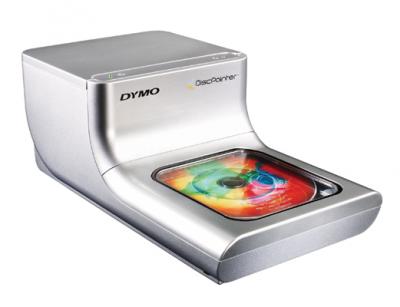
I replaced it with a Dymo Disc Painter which I just LOVE. It is smaller and faster than any conventional back-and-forth paper printer kludged to print on discs.

tn9892_Dymo-DiscPainter.jpg


I just got an ink cartridge refil kit for it (off eBay) and will be trying it out over Christmas.
 
Last edited:
that epson r200 sucks . i have upgraded to the epson 800 artisan . it does a full color dvd in 60 sec . looks great. has a plug for a gig stick so you can do a run of dvds without tying up your computer . i have run about 1500 dvd through my printer. i have connected the continuous ink system in it as well. this is the only thing i could find. i had a industrial bravo dvd printer i sent off to fix and i ended up letting the repair place keep it.
 
Had the Epson R300 and it was awful. It would spend 90 seconds "masturbating" the disc in and out, in and out until it decided it would either print or reject the disc entirely.

I finally bought an HP D5100 and that is fast, fast, FAST. Starts printing right away, print quality a hair less than the Epson, but the productivity is 72,000% better.
 
I guess I have the Epson R280. It prints gorgeous CDs/DVDs. Ink is cheap on eBay. For best results get the Silver finish Taiyo Yuden disks, which creates a semi metallic undercoat which cannot be reproduced except by ink on silver. Unique look.
If the disk will not load smoothly it usually means the rollers need to be cleaned.
The robot printer is very cool but too expensive.
Haven't tried the Dymo but it looks fast, but at $275 I just can't see the R280 breaking before DVDs become obsolete. The Dymo does look like a high tech toilet, oddly enough.
 
Many Canon printers do a fine job. I use a Pixma-series and have been very happy. Here's the catch: Canon doesn't necessarily publicize that all of their printers can print directly to DVD! The hardware is there to get the job done (the slot for the tray) but the firmware is crippled. However, it's a very easy "hack" to get the printer working with DVDs.

Google : Canon DVD printing. My original links to the sites with info on this are dead, otherwise I'd share them.
 
Epson Stylus Photo R200.

Epsons are quite low cost but the print has never disappointed. This printer accepts DVDs/CDs via a tray that you insert.


I've had an Epson Stylus R220 for a couple of years now. Prints flawlessly.

The only problem with printers is they seem to discontinue them and come out with new ones at random. I can't find the R220
anywhere. I sometimes feel if you really like a printer, buy two in case one craps out.
 
i had the same problem with the r200 / work ,didn,t work. in /out. in /out. only worked with some voo doo chance . had it for a year did 100,s but drove me crazy - i actually thought it was haunted. took 3/4 minutes each dvd .if it worked at all. sooooo much happier now with the artisan 800. now i can pump them out a minute a piece . print quality does depend on a good blank white dvd , some of the cheepest dvd,s you can see the dvds has rubbed the white print surface in shipping. it does make a difference in the look , alot like the differences in photo paper.
 
these are great ideas, anybody know where you can get the dvd box cases just like when you buy a real dvd from walmart or best buy? do they sell some type of kit of paper thats already formatted and sized to fit in them, etc?
 
We get our DVD clamshell cases from Meritline.com. Usually $.15-$.25 each in bulk quantities.
Haven't found precut liners that are affordable and have good print quality yet.
 
i've bought mine from tapestockonline.com and supermediastore.com. just be warned. the cheaper cases are cheap for a reason. several will arrive pre-broken.

i'll second the silver taiyo yuden discs. i love those. also used the matte white discs and the premium glossy-white watershield or whatever they call them. the watershield discs definitely look the best, but they also cost about twice as much. that's why i go with silver now. not quite as sharp as on the white, but it looks more professional (in my opinion) than the equally priced matte white finish on a disc. to me, matte white just looks like one of those cheap kits you can buy to put a big printed sticker on the top of the disc.

i use a canon mp600. i think they're a few models past that by now. i just bought a $10 cd tray off ebay that corresponded to the model printer. it came with instructions for how to reset the printer to accept the tray. i've probably printed 1000 discs on mine. i'd definitely recommend it.
 
We get our DVD clamshell cases from Meritline.com. Usually $.15-$.25 each in bulk quantities.
Haven't found precut liners that are affordable and have good print quality yet.

For DVD cover wraparounds, I use about 70-pound "text" glossy paper. It is opaque enough to not see through to the case, and it is shiny enough that when printed with a color laserjet, it looks just as good as commercially printed inserts. I buy it by the ream at the paper supply shop in town (Arvey paper in Portland). It is probably available online, but I've never looked for it.

I print trim marks at the corners (which get cut off) and cut the sheets after printing because I haven't found laser printing to be precise enough to stay in registration on pre-perforated blanks (not to mention that they are very expensivve).

I buy the "premium", "virgin vinyl" DVD cases from SuperMediaStore along with the Taiyo-Yuden discs.
 
I use HP Brochure and Flyer paper, gloss finish for these inserts. Printed on inkjet, the result looks very close to offset printing, particularly if there are no halftones used in the artwork. But it's gotten expensive. Used to be $14 for 150 sheets, now it's $29 for that amount.
 
I use HP Brochure and Flyer paper, gloss finish for these inserts. Printed on inkjet, the result looks very close to offset printing, particularly if there are no halftones used in the artwork. But it's gotten expensive. Used to be $14 for 150 sheets, now it's $29 for that amount.

Ordinary calandered gloss is a fraction of that price, but probably not all that great for inkjet (vs. laser).
 
Yes, I've tried many offset paper stocks, but the ink bleeds terribly and contrast is very poor. Specially formulated inkjet papers are the best for use with inkjet printing.
 
Back
Top