Premiere monitor much brighter than output

rawfa

Veteran
I´ve been doing some tests n Premiere CS5.5 and everything looks perfect on the program screen, but when I export the final file it looks way darker and with much more contrast (I thought it could be the computer monitor but when I´ve viewed the file on my hdtv it still looked way darker and with much more contrast. I will never be able to CC correctly this way.
How can I fix this??
 
Do some more tests but just use a Color Bars clip.

Report back but also state your export settings and codecs.
 
Rule #1 for repeatable, known output for still photography is a monitor profiled with a hardware device to a known value - brightness, contrast, white point - 5500K, 6500K, etc.

I would definitely start there with your computer moniotor. Adjusting by eye can only get you so far.

Xrite Eye One or similar. You could buy an older device used, better than nothing.

Good luck.

Michael
 
I´ve been doing some tests n Premiere CS5.5 and everything looks perfect on the program screen, but when I export the final file it looks way darker and with much more contrast (I thought it could be the computer monitor but when I´ve viewed the file on my hdtv it still looked way darker and with much more contrast. I will never be able to CC correctly this way.
How can I fix this??

You are most likely seeing the difference between the color (working) space of your computer monitor and the color space of your HDTV. If you want WYSIWYG, you'll have to find a way to see Rec.709 from your computer.

The most common way to do this is to use a broadcast monitor. The biggest bang for the buck on the low end of the broadcast monitor spectrum that I've found is the Flanders Scientific LM-2140W. There are certainly other manufacturers.

There are other options. You could also use an actual HDTV. If... you calibrate it. Best results come from an HDTV that's ISFccc compliant. And if you have an interface between your computer and the HDTV that can generate the correct signals for the HDTV. And when you add all that up, you're back to the cost of a broadcast monitor again. Sigh....

Another way is to use a computer monitor that can show you Rec.709. Eizo has a few. HP made one. But they are just as pricey as a broadcast monitor.

Bottom line -- ain't no cheap and easy way to get WYSIWYG for video.
 
I don´t think you guys got it. It ONLY looks brighter on Premiere. When I export the file and play on the COMPUTER it looks darker (like it does on any other tv or computer I´ve played this file on). sO I have find a way to make PREMIERE's in program monitor screen to look the same way the laptop monitor does, not the other way around. If I play any file on my laptop and on other computers and tvs they all look the same. The problem is premiere.
 
Guys, again, the problem is with Premiere. I can darken or brighten my laptop monitor as much as I want but the monitor on Premiere never matches the one on my laptop. BTW, I have other videos on my laptop and they look perfect on it, on other computers and other TVs.

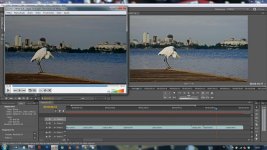
Here is an example of the issue. On the left you can see the video that I exported and on the right you can the the video on Premiere's video monitor (which is how I´d like the video to look when exported).

7724332690_532a2c2252_b.jpg
 
What did you export as?

And did you try what I suggested with the syntheic Color Bars clip. The purpose of which is to establish a comparison without the influence of codecs.
 
I don´t think you guys got it. It ONLY looks brighter on Premiere. When I export the file and play on the COMPUTER it looks darker (like it does on any other tv or computer I´ve played this file on). sO I have find a way to make PREMIERE's in program monitor screen to look the same way the laptop monitor does, not the other way around. If I play any file on my laptop and on other computers and tvs they all look the same. The problem is premiere.

Are you familiar with Photoshop? Do you have CS6 Production Premium? If nopt, download the 30 day trial.

Take the video into Photoshop and color correct there. See how it looks there compared to the export. Photoshop is fully color managed. You can change the color space (from AdobeRGB to sRGB, etc.), apply "soft proof" profiles to emulate any device, etc. The whole purpose of those tools is to make your working screen exactky match what you get in your Export fotrmat (every color space or rendering to a codec changes the look - color mapping, gamma, etc. )

Then see if you can Export directly from Media Encoder using the Photoshop file, bypassing Premiere.

You can also import the Photoshop adjusted video into Premiere. You can keep the color adjustment layer, or just flatten the whole thing and "bake" the layer into the video. See how that looks compared to the look in Photoshop.

Good luck!
Michael
 
I´ve just recorded a 10 second video with the NEX5N and copied the stock MTS file to my laptop:
Premiere monitor - bright
Windows Media Player - exactly like the premiere monitor
VLC - darker
Media Player Classic - Darker
55 Full HDTV - doesn´t play MTS files

This is messed up :-(
 
I wouldn't trust VLC, personally. I've had it show terrible macroblocking in a video that didn't have that problem played anyway else.

it's open-source software, and while open-source can be a great thing, sometimes it's not quite reliable for professional use.
 
Back
Top