GH5 Premier Pro fix for GH5 10 bit to be released "very shortly."

Increase the contrast or make other big changes, do you start to see stripes in the waveform? If so your footage might be handled like 8 bit.

Sometimes it isn't as easy as that in a 32bit float environment. 32bit float will take a good looking shot in 8bits and typically keep it good looking by creating samples in between as needed. This can work in color sampling since we need subtle pixels differences. Fine detail doesn't need higher color depth. That is the opposite of image scaling where gradients can scale well and high detail looks horrible.

So cranking a grade in a 32bit float will likely not show much difference in 8bit or 10bit as long as the 8bit had enough samples for the color.

Only way to really tell if CS6 works with 10bit properly is to shoot a 8bit sample and 10bit sample of a subtle color gradient like a blue sky with the GH5 and see if there is a banding difference between the two. You have to shoot something that would typically fall apart in 8bit. Not always easy to do. This is why 10bit has been kind of a heavily debated subject for a long time. You have to be in just the right condition to make 8bit fall apart. 8bit does not always equal bad. It just doesn't have the overhead to handle difficult situations.
 
Sometimes it isn't as easy as that in a 32bit float environment. 32bit float will take a good looking shot in 8bits and typically keep it good looking by creating samples in between as needed.
Frankly I have not encountered any of that 'auto dithering' in Premiere.
 
Only way to really tell if CS6 works with 10bit properly is to shoot a 8bit sample and 10bit sample of a subtle color gradient like a blue sky with the GH5 and see if there is a banding difference between the two.
Adobe Premiere Pro CS6 is not an 8-bit video editor, it uses a 32-bit floating point internal working color space. Many of its bundled effects, however, are limited to 8 or 16-bit fixed point precision, and most are labelled as such in the user interface. IMO, Adobe should have mothballed these effects long ago, and replaced them all with 32-bit FP versions.

https://forums.adobe.com/thread/825920
 
Increase the contrast or make other big changes, do you start to see stripes in the waveform? If so your footage might be handled like 8 bit.

I don't have the camera or access to any footage. I found a 10-bit file that a user posted online that does not have any gradients in it for me to push around. I'll have to ask someone to upload something.
 
32bit float will take a good looking shot in 8bits and typically keep it good looking by creating samples in between as needed.
That's not quite how it works.

Certain operations can create color values in the 32-bit space that fall between where the 8-bit or 10-bit values lie. In scaling, for example, that can happen, but only at the boundaries between colors. Otherwise, the video software is not creating in-between colors. If you've got big bands in 8 bits, you'll still have them after transformation to 32-bit floating point.

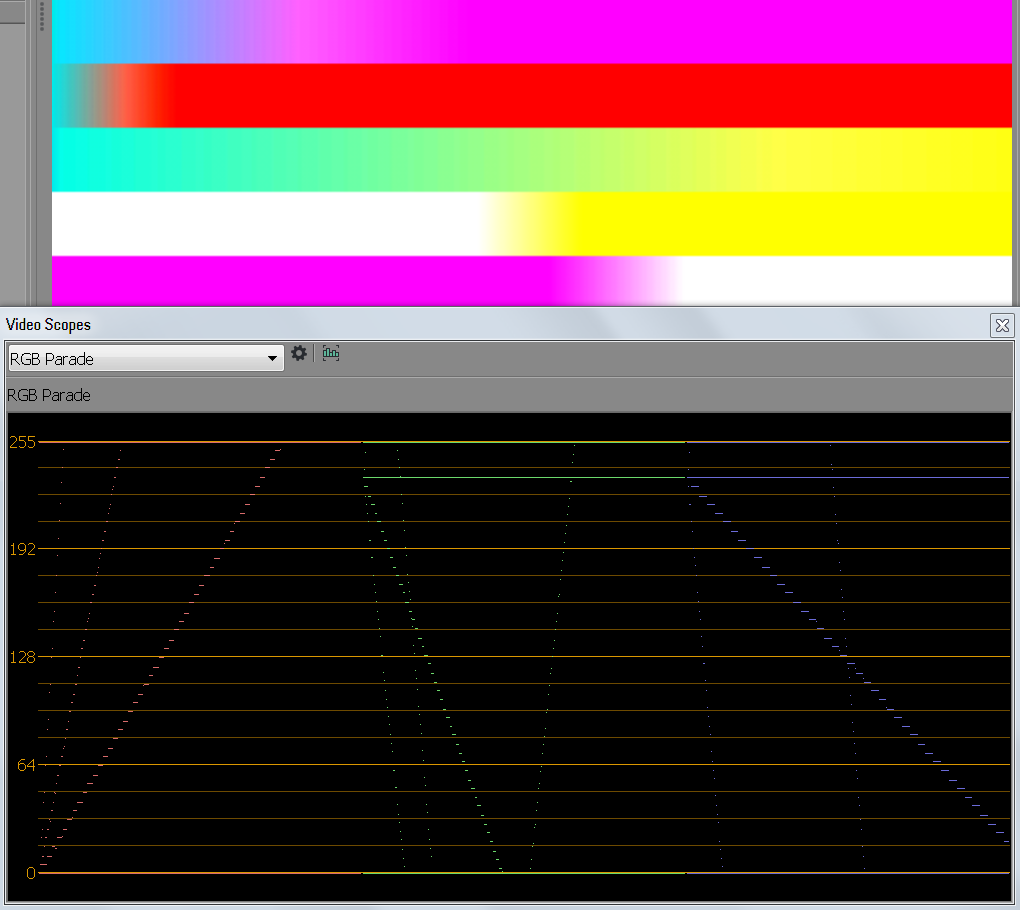
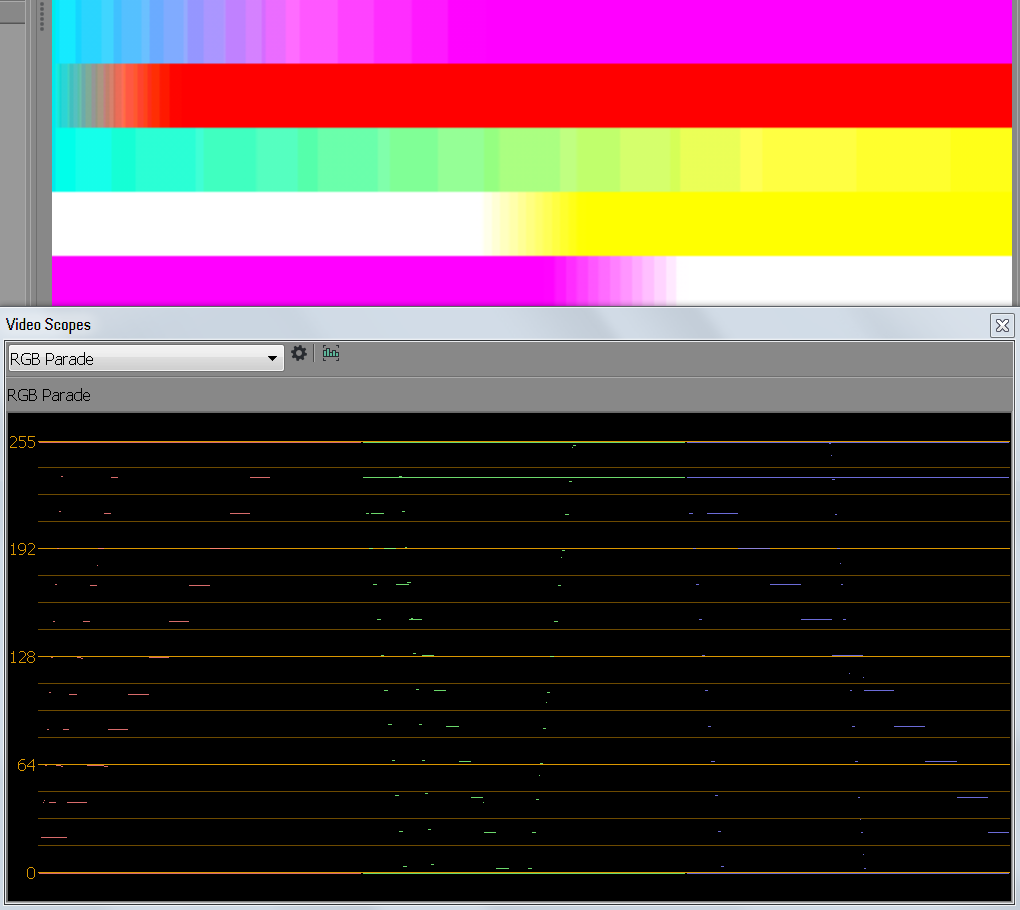
It's difficult to measure color precision by looking at scopes, because the original encoding of the source file is confounded by the transformation your video software does when decoding the file. It gets transformed from YCbCr to RGB, and even the color difference channel scaling from 4:2:0 or 4:2:2 up to 4:4:4 can create intermediate values. In this example I take a set of gradients in uncompressed 10-bit and uncompressed 8-bit 4:2:2 YCbCr, read those in a video app, transform from RGB back to YCbCr and then expand the levels by 18.5x. From left to right, the scope is showing the channels in this order: Y, Cb, Cr. You can clearly see everything falling into nice 8-bit and 10-bit bands in all three channels, with the 10-bit file having four times the bands of the 8-bit file. If I count the number of bands in the scope, I can calculate the precision and see that it is indeed 8-bit or 10-bit in every channel. Note that the Y channel doesn't have the same precision as the Cb and Cr channels. Bonus points for anyone who knows why.

You can right-click these images to open them in new tabs and then flip between them.


That's not quite how it works.

Certain operations can create color values in the 32-bit space that fall between where the 8-bit or 10-bit values lie. In scaling, for example, that can happen, but only at the boundaries between colors. Otherwise, the video software is not creating in-between colors. If you've got big bands in 8 bits, you'll still have them after transformation to 32-bit floating point.

It's difficult to measure color precision by looking at scopes, because the original encoding of the source file is confounded by the transformation your video software does when decoding the file. It gets transformed from YCbCr to RGB, and even the color difference channel scaling from 4:2:0 or 4:2:2 up to 4:4:4 can create intermediate values. In this example I take a set of gradients in uncompressed 10-bit and uncompressed 8-bit 4:2:2 YCbCr, read those in a video app, transform from RGB back to YCbCr and then expand the levels by 18.5x. From left to right, the scope is showing the channels in this order: Y, Cb, Cr. You can clearly see everything falling into nice 8-bit and 10-bit bands in all three channels, with the 10-bit file having four times the bands of the 8-bit file. If I count the number of bands in the scope, I can calculate the precision and see that it is indeed 8-bit or 10-bit in every channel. Note that the Y channel doesn't have the same precision as the Cb and Cr channels. Bonus points for anyone who knows why.

You can right-click these images to open them in new tabs and then flip between them.


That sure is how it works and the entire point why 32bit float exists. I don't care about scopes or synthetic images. I'm talking real world images here which 99% of people actually shoot and grade with. I said if the 8bit shot is good without any banding then 32bit float will tend to help the shot not get any extra banding by grading it very hard. It is only the material where the 8bits wasn't enough that the damage is already done.

Thousands of people have noticed this when grading 8bit material in a 32bit float space and that is what led to the debate over is 10bit really worth it. Well the answer is it depends. If the shot works well in 8bit then it will be good. Yes there may be some loss or rounding error but we are talking about how a person can tell if a shot is 10bit or truncated to 8bits. My answer is it can be hard to tell sometimes.
 
Adobe Premiere Pro CS6 is not an 8-bit video editor, it uses a 32-bit floating point internal working color space. Many of its bundled effects, however, are limited to 8 or 16-bit fixed point precision, and most are labelled as such in the user interface. IMO, Adobe should have mothballed these effects long ago, and replaced them all with 32-bit FP versions.

https://forums.adobe.com/thread/825920


When the heck did I say CS6 was an 8bit editor? I said CS6 can work in a 32bit space when grading and therefore can sometimes be hard to tell if a shot is any worse in 8bits then it would be in 10bits.

I was referring to the 10bit material to the GH5, which is the context of this discussion, which we know in the later versions of Premiere were incorrectly viewing 10bit as 8bit files. The question was how can we tell if the videos really are being treated as 10bit in CS6. At no point did I say CS6 was an 8bit editor.
 
I was referring to the 10bit material to the GH5, which is the context of this discussion, which we know in the later versions of Premiere were incorrectly viewing 10bit as 8bit files. The question was how can we tell if the videos really are being treated as 10bit in CS6. At no point did I say CS6 was an 8bit editor.
That's not my understanding of the Adobe CC problems with GH4 10-bit 422 videos. The reports I've seen had nothing to do with misinterpreting the bit depth of the files, they were basic file handling and transport malfunctions. As far as I can tell, you're alone in conflating those issues with color depth support in an attempt to cast doubt on Premiere CS6 compatibility.
 
Thousands of people have noticed this when grading 8bit material in a 32bit float space and that is what led to the debate over is 10bit really worth it. Well the answer is it depends. If the shot works well in 8bit then it will be good. Yes there may be some loss or rounding error but we are talking about how a person can tell if a shot is 10bit or truncated to 8bits. My answer is it can be hard to tell sometimes.
If your point is that 8-bit is good enough a lot of the time, I'm in complete agreement. If an image looks good, it is good. I make images for people, not for signal analyzers. The fact that people aren't even sure if a file was processed with 8-bit or 10-bit precision illustrates some of the folly in aiming for 10 bits. That's not to say that working 32-bit floating point solves all precision problems. If you shoot in 8 bits, color correct in 32-bit floating point, and deliver in 8 bits, it's possible to get banding in the output that's noticeably worse than in the input. It depends on the specific image and how it is manipulated. A slight increase in contrast in the wrong place can be enough to make two neighboring bands two code values apart instead of one code value apart. In an SDR display color space, most of the 8-bit code values are close to a just noticeable difference apart from their neighbors. 2 x JND is quite noticeable.

And if you're shooting in a high dynamic range camera log space such as S-Log2 or Canon Log 2, it's completely different. Neighboring code values in these spaces are different colors by a lot more than a JND.

That's the last I have to say about the subject in this thread.
 
Last edited:
That's not my understanding of the Adobe CC problems with GH4 10-bit 422 videos. The reports I've seen had nothing to do with misinterpreting the bit depth of the files, they were basic file handling and transport malfunctions. As far as I can tell, you're alone in conflating those issues with color depth support in an attempt to cast doubt on Premiere CS6 compatibility.


Who the heck is casting doubt on CS6 compatibility? I think you need too go back and read the context of the discussion going on. A person asked why is it his 10bit GH5 files work fine in CS6 while newer versions had issues. I said I don't know but maybe it is similar to a previous version of CC where the 10bit files did work but based on what Cinema5D found in their infamous article the 10bit and 8bit files looked like they had the same color depth. I never indicated that CS6 doesn't work and clearly it does if it does for this particular person. Somebody asked for help and since nobody else chimed in I provided a potential reason why the files do work in CS6. Hard for me to know for sure since I no longer use older versions of Premiere. Perhaps the 10bit files are working 100% as 10bit. I never said they don't, just that it may be hard to see if they do or do not on certain types of footage.

All I pointed out was that sometimes it is hard to tell the difference between some 8bit files and 10bit files even if they are handled correctly in the software so a simple grading test may or may not provide a definitive answer to the persons question. I didn't realize pointing out that sometimes 8bit can be hard to distinguish from 10bit would touch such a nerve on here today.

Perhaps you can provide your own explanation as to why the 10bit files seem to work perfectly fine in CS6 while newer versions had an issue. I would love to hear it so I'm not the only one stabbing in the dark trying to help another user.
 
As others have noted, the compatibility issues with GH5 10-bit files have nothing to do with the internal precision of the NLE. The issue arises out of how the NLE tries to parse the H264 data. There are many supported variations (profiles) and variations amongst those profiles (levels.) Only certain H264 profiles support 10bit encoding, and not all encoders and decoders support all profiles. A given encoder (in this case, the camera) may have quirks, as well. Much of Premiere was rewritten between CS6 and CC17, how it handles H264 files changed (probably in an attempt to decode more efficiently.)

Some hardware, notably Intel chips, handle H264 decoding. Some operating systems handle H264 decoding. Some software takes advantage of this infrastructure and offloads the decoding to the OS, or even directly tot he hardware. In these cases, the software inherits the infrastructure's capabilities and limitations. This can explain why some users were able to handle the footage and other not, even using the same software.
 
I never updated from 11.0x on Premiere, so never ran into these problems.

I have seen it is supposedly fixed now in the newest Premiere update. I just wanted to confirm that I am safe to update, and it's not a "oops, thought we fixed it, BUT..."
 
Also interested to know if there is a fix in the latest Premier PP CC? This has been holding me off buying the camera body for B-Cam.
 
Has anyone noticed a click on edits/cuts in Premier. I have these odd clicks in every seems for a clip on some test renders of cine 4K 10bit rendered to 1080.
 
I never updated from 11.0x on Premiere, so never ran into these problems.

I have seen it is supposedly fixed now in the newest Premiere update. I just wanted to confirm that I am safe to update, and it's not a "oops, thought we fixed it, BUT..."

So can anyone confirm that the latest version of Premiere does indeed play nice with GH5 vlog/10-bit/4:22 ?

Still holding out on the update...
 
It appears to play nice although not as smoothly as DNx files from the Atomos. I hardly use the in-camera files much at all, perhaps two or three times since the upgrade. What I did notice is that while in-camera play ok, when I select a frame with the playhead to work on an effect, as soon as I go into the effect control, the program monitor jumps to the first frame of the clip instead of the one where I placed the play-head. The playhead doesn't move. I haven't had time to explore the 'feature' any further, probably pilot error of some sort (although it doesn't happen with the DNx files) as I've been able to complete the tasks and have other fish to fry. . .
 
Maybe I'll just wait for the next patch to upgrade and keep rocking the current version from early 2017, pre GH5 launch. Seems to have no issues. Weird.
 
Maybe I'll just wait for the next patch to upgrade and keep rocking the current version from early 2017, pre GH5 launch. Seems to have no issues. Weird.
You may want to be careful with that early 2017 version of PP. I think I remember hearing that version was implicated in the Cinema5D controversy where their test declared the GH5 10 bit Vlog 'Unusable' and later retracted the test. I vaguely recall reading that what they saw in the test was actually a PP problem, but I don't recall the details. Also seem to recall hearing that had something to do with why the 10bit didn't work in the previous update.
 
Ahh good to know. Alright. If I update before I grade + finish the project and export, all will work well yes? Doesn't matter that it's been started in older version?
 
I had several projects in progress when I upgraded and saw no issues with older projects working in the new version. But I took the risk as a hobbyist and not someone working on a commercial project. Mine was a pretty low-consequence decision.
 
Back
Top