Pre-trimming avchd clips for import into CS5

stevedocmaker

Well-known member
I am working on a long form project, and plan to edit in CS5, and import native AVCHD files into the timeline. This is my first large-scale project on this platform. I have read that there are some issues when CS5 has to load many gigabytes of source material. It is very likely that I will end up with many large clips, from which I will only use a few seconds of footage each. Does anyone know if there is a way to rough pre-trim these files without having to transcode the footage?
 
It's an extra step, but you can use a 3rd party like iskysoft to trim, then bring the converted files into your project folder. iskysoft can open, trim and convert mts files.
 
You can do that in VoltaicHD as well. Trim the files, then convert the MTS bits to ProRes422 or whatever you'd like to use. Only pitfall: VoltaicHD doesn't recognize LPCM audio (yet, I was promised they're working on it), so you'll have to stick to AC3 for now.
 
Don't think you can do this in Premiere.

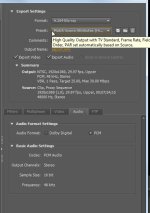
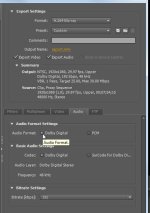
However, you CAN export it as H.264 using all the source settings. I found that this exports very quickly and the end result is indistinguishable from the original. Of course, I haven't done a super close examination of this, but depending upon your final delivery you could do something like this. And to make editing even easier, if you have a bunch of related clips from various footage, you can drop them into a sequence and export that.

Not a perfect solution, but it might help. Here are the settings I suggest:

premiere1.jpg premiere2.jpg

Would love to know if someone finds a better solution, although admittedly I've never had a problem with the software crashing because I had too many or too large files loaded up.
 
Don't think you can do this in Premiere.

However, you CAN export it as H.264 using all the source settings. I found that this exports very quickly and the end result is indistinguishable from the original. Of course, I haven't done a super close examination of this, but depending upon your final delivery you could do something like this. And to make editing even easier, if you have a bunch of related clips from various footage, you can drop them into a sequence and export that.

Not a perfect solution, but it might help. Here are the settings I suggest:

View attachment 33240 View attachment 33241

Would love to know if someone finds a better solution, although admittedly I've never had a problem with the software crashing because I had too many or too large files loaded up.

Have you used these h.264 files in CS5 on a large project?

I gave this a try, along with transcoding to ProresLT using Clipwrap (then trimming in Quicktime). The LT file was over twice the size of the h.264 file, not surprisingly. The h.264 file plays back with lots of compression artifacts, and the Prores files plays back clean, but when I examine a still frame from each they are indistinguishable, to my eye at least. The Prores route takes considerably more disc space (since I have to transcode the whole clip BEFORE trimming), but I'm concerned that using the h.264 files could bog down CS5, and since the Prores transcode doesn't take any longer I may go that route.

I'm going to post in the Premier discussion about h.264 files and see what I come up with.
 
tssniper on windows - cuts are not frame accurate, only GOP accurate , so it's suitable for rough cuts. It relies on directshow, so you need to have your directshow system configured properly

tsmuxer can do this as well, but there is no preview (cut by timecodes)

both do not re-encoding

Do some small tests before you embark on the real thing, and always keep backups
 
After some experimentation, here's the rundown on all the suggestions:

1. VotaicHD. Can trim AVCHD and export to AVCHD. Can also trim and transcode to ProRes. Great in theory, but REALLY slow and does not support LPCM audio. Exported files do look as good as the originals though. No way to contact company that I can tell either, which is always a red flag for me.

2. Clipwrap. Good transcode option (reasonably fast), but no way to trim clips first. I suppose Log & Transfer (fcp) would do the same thing.

3. iSkysoft. Trims clips (awkwardly) and converts to h.264. Fast, but playback of h.264 clips is laced with compression artifacts. Underlying files look OK when I examine individual frames, but I can not tell if the program is reducing the quality of the export. Does not convert to ProRes, but I put in a request for info about adding this feature.

4. CS5 export, h.264 Blue-ray setting. Similar to above, but at least with this method one can specify a bitrate in the export (max. of 35 Mbps). I don't know why the playback has to look so compression-messy on these h.264 files, but it does.

So there you have it. I'm not sure which route I'll take, but I'm leaning towards either #2 or #4. If somebody can come up with something better, please post. If VoltaicHD had decent performance I would go with that, but it's just way to slow.
 
On a related note, how the hell do you pan say channel 1 to center when editing an AF-100 track on the timeline?


I couldn't for the life of me figure this very simple thing out.....
 
Here's a weird one. I fogot to mention that Clipwrap has the ability to export in the same format as the original, not just transcoding to ProRes. But the first time I tried this, playback on the rewrapped file was abysmal in CS5. I was playing more with Clipwrap, and if I trim the file in Quicktime, then save the trimmed file, suddenly the playback is perfect. I can not explain this phenomenon, but it appears that this is the solution I was hoping to find. I'll do some more testing in the next week and report back.
 
Hello,

you can always contact us at support@shedworx.com (Contact form on the web site too).

VoltaicHD does native AVCHD trimming, so will create trimmed AVCHD output.

We can convert to ProRes, but yes - it is slow. You won't find any better quality output than what Voltaic produces though.

iSkySoft is just a FFmpeg app (although these operators go to lengths to hide this), so you may as well use a freebie FFmpeg converter if you want to go that way. FFMpeg output quality isn't always the best.

Regards

Justin
 
On a related note, how the hell do you pan say channel 1 to center when editing an AF-100 track on the timeline?
Probably to late for this project, but for future projects you should use Source Channel Mappings and *always* avoid Fill Left/Fill Right.

If only one audio channel is unused Fill Left/Fill Right is ok, but if you have audio on both channels and need to use both audio channels in the center using the Fill Left/Fill Right method is a pain to use in the long run.

Source Channel Mappings allows you to split out the stereo audio into two separate mono tracks, and now the audio is panned to center for both audio channels and make it much easier to manage. You can use Source Channel Mappings on individual clips or use the setting in the Preferences so all clips you import behaves as you want them to since it happens upon import with the Preference setting, without interrupting you.

But, Source Channel Mappings cannot be used on clips that you have already placed on the Timeline, and thats when the setting in the Preferences is golden.

Once you discover how superior Source Channel Mappings are compared to Fill Left/Fill Right you will never go back to using those filters again. :)

/R
 
I am working on a long form project, and plan to edit in CS5, and import native AVCHD files into the timeline. This is my first large-scale project on this platform. I have read that there are some issues when CS5 has to load many gigabytes of source material. It is very likely that I will end up with many large clips, from which I will only use a few seconds of footage each. Does anyone know if there is a way to rough pre-trim these files without having to transcode the footage?

Wait a minute. Are you sure about this? I've imported and edited single 4GB files and up in CS4 without issue; about to upgrade to 5.5 this week (been sitting on the my desk since it shipped on day one) and I honesely can't imagine that PP would have an issue with this since it can easily edit AVCHD no probs? Do you have a link to this claim for this issue? Maybe these clains are made by people with lower-end rigs and not enough ram?
 
You can bring your clips into premiere, trim them in the sequence and then create what is called a trimmed project which only uses the trimmed clips and you can add a few seconds onto the ends of the clips for transitions, etc. I did this last week slimming a 294gb project down to 8gb.
 
You can bring your clips into premiere, trim them in the sequence and then create what is called a trimmed project which only uses the trimmed clips and you can add a few seconds onto the ends of the clips for transitions, etc. I did this last week slimming a 294gb project down to 8gb.

Sorry this might not actually work with avchd and hdv. I looked at my project and it only copied the source files over. I searched the adobe forums and there is an issue with GOP related codecs. Does work with DV and non gop codecs.
 
Back
Top