Power Windows in After Effects

cardmaverick

Well-known member
Hi,

A while back I posted a clip of video featuring some girls arguing in a car. I recently just finished working on that scene, and I ended up making extensive use of power windows to get the best possible look from the footage. The film had a predominantly black cast, and I've been using this technique to help out some of the darker skin tones (gotta love that DV lattitude....) in certain shots.

Here is the link:

http://www.chrisnuzzaco.com/powerwindowsdemo.html

Please keep in mind that its streaming, so wait a bit, its 75mb, but well worth the wait. Also, I do reveal the power windows later on in the clip.

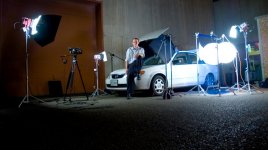
I've also posted a photo of the lighting setup for this scene.

Enjoy!

EDIT

I recently did a noise reduction test on the clip. Here are the results:

http://www.chrisnuzzaco.com/NRTEST.mov
 

Attachments
  • carset.JPG
    carset.JPG
    75.7 KB · Views: 0
Last edited:
PaPa said:
that is a poo pooing serious setup, jesus how do you do that?

What does "poo pooing" mean? LOL well, I always start by asking a simple question, where is the light coming from?

And then I work from there.... :)
 
Cool look mate,
Has that raw 16mm look like in Show Me Love. Keep up that good work. By the way where did you get all that lighting and grip equip from. Don't tell me you own it I'll be so jealous!
 
The actress playing the driver was really good. I enjoyed this. I thought the final had too much grain though. Maybe that was a style choice but that's my opinion. One thing I found funny was, with that massive light set up, it seemed as though the predominant light in the raw fotage was comming from the roof interior light.
 
Want to elaborate on the "power windows"? PowerWindows is a trademark of DaVinci, so were you rotoscoping masks? Using a plug-in?
 
I had no idea that using Power Windows as a technique to grade or correct footage in certain places was trademarked by DaVinci. I've read plenty about them and the technique itself to achieve a better image in a few places. I'd like to say a Creative Cow Color Correcting article featured it.

But, either way, what program did you use? Methods? Elaborating on the thread title might be good for us all.
 
Ok, time to answer some questions...

tatsuo
Cool look mate, Has that raw 16mm look like in Show Me Love. Keep up that good work. By the way where did you get all that lighting and grip equip from. Don't tell me you own it I'll be so jealous!


Cover your ears, yes I do own it. I consider owning grip and lighting an investment for life, almost like buying a Nikkor prime, it'll be worth just as much in 30 years as it is today, however the camera sitting on the backend, not so much, I still haven't bought my first video camera yet....

c.g._eads
what is power windows and what does it do?

Power windows are basically shapes that you put on top of the footage to create a zone that can be controlled very carefully. Basically, its like doge and burn in photoshop, only it can move and change shape. This technique can be VERY hard.

I spent about 7 hours making my windows.

Rocksteady
The actress playing the driver was really good. I enjoyed this. I thought the final had too much grain though. Maybe that was a style choice but that's my opinion. One thing I found funny was, with that massive light set up, it seemed as though the predominant light in the raw fotage was comming from the roof interior light.

The grain, it just noise, and well, thats DV for you! All post processing will accentuate it no matter what you do, its always there. The lighting setup is quite large, but the photo is a bit deceptive, those lights are all just fills. The two massive china balls (30 inchers!) are just 200 watts each, and they act as moonlight from the side. The lights from front, agian, more fill, the small unit on the front, that was just for the actress in the passenger seat. The dome light is actually a piece of white posterboard tacked to the car roof. I rigged a small inbetweenie (200 watt fresnel) inside to bouce off it. The actress in the back seat had to be careful to not come into the lights beam.

Barry_S
Want to elaborate on the "power windows"? PowerWindows is a trademark of DaVinci, so were you rotoscoping masks? Using a plug-in?

I thought someone might bring this up. Yes, they are hand rotoscoped masks. I call them power windows anyways, its like "Kleenex" everyone seems to just use it. It's also very similar to doge and burn. I feather the edge to smooth it out. Again, this technique is VERY HARD!

I spent about 7 hours making my windows.

But hey, it looks great, and quality is my goal.
 
Last edited:
Kholi said:
I had no idea that using Power Windows as a technique to grade or correct footage in certain places was trademarked by DaVinci. I've read plenty about them and the technique itself to achieve a better image in a few places. I'd like to say a Creative Cow Color Correcting article featured it.

But, either way, what program did you use? Methods? Elaborating on the thread title might be good for us all.

Straight up masking. I like to call it "masking like a man!"
 
With all that light I would've assumed it would've been a lot less noisey. I also notice that the female in the backseat seems to be free of the same noise exhibited in the two front-seat passengers. Is that just me? Or is that because of your Power Windows?

Also, is After Effects your program? You didn't make mention of the program or anything about the actual technique. I know of it, it's pretty straight-forward and honestly an easy concept. Actually doing it is another thing, though! LoL

Just think a bit of speak about what you're showing might help those out who've never even heard of it.
 
By the wya, thanks ofr posting the example. I like how you broke it down into four sections at the end. I saved the file for reference for myself, though I have to say that I personally think the skin-tones in the original footage were better. Maybe because the power windows added a good bit of noise to your overall frame?

Why did you decide to use power windows instead of a solid color overlay or difference for your final scene?
 
OH! And, by the way, those reading... if you think you can fake DOF with a technique like this? You can. But, you'd need a good amount of practice at rotoscoping to pull it off convincingly, and a great deal of understanding on why/how DOF benefits your frame composition as opposed to be another gimmick or trick.
 
Thanks for the details. I asked because you never know when there's a new plug-in for AE, but I see you did it the hard way. :) The shot looks pretty good, but I wonder if you couldn't have just lit a little differently and graded the whole scene to get something you liked. That roto work is murder.
 
Barry_S said:
Thanks for the details. I asked because you never know when there's a new plug-in for AE, but I see you did it the hard way. :) The shot looks pretty good, but I wonder if you couldn't have just lit a little differently and graded the whole scene to get something you liked. That roto work is murder.

That's exactly what I thought. With all that light, gel'ing or even laying over a solid color layer would've helped to keep the image clean. As it sits, there's a lot of grain floating around and it's actually a bit distracting.

How this places out to an audience that wasn't looking for power windows or anything is a different story.
 
Kholi said:
With all that light I would've assumed it would've been a lot less noisey. I also notice that the female in the backseat seems to be free of the same noise exhibited in the two front-seat passengers. Is that just me? Or is that because of your Power Windows?

The fill light was tough on this one. Basically, it needed to have an certain quality to it, directionless, soft, and ONLY where I needed it. Any less, and it would have been far to directional, which quickly kills the effect. That was my issue, getting good fill in a really cramped space! No small kino units were available for me to use. So this technique saved me, err, well, it helped improve things.

Keep in mind, the cast was predominantly dark skinned, and that really became an issue for some actors who were VERY far down on the scale, and DV is noisey in the shadows, so dark skin in DV can look noisey.

Also, this is compressed! I used H.263 if remember right, came out pretty good, but the resolution doesn't quite seem right and it ususally makes the image look a bit noisey, its much better looking in AE. I'll have to post a high quality screen grab.
 
Totally understandable on all levels. And, it's not just DV: DVCproHD is the same way with darks and I'd like to see someone dispute that. The only way to deal with it seems to be post processing, aka Crushing Blacks. Even though it's compressed, the uncorrected portions still look noticably "Cleaner" than the Windowed segments. That could be totally subjective, though.

I'm in no way a DP, so I'm not authroized to give opinions on such things. My apologies!! It was just a wild guess that it could've been gel'd. I can see how the lack of smaller lights to work with could've cramped your lighting style.

All in all, you used the technique and technology, and gave us a good example of what could be done with rotoscoping and other grading, or in this case correcting, techniques.

I think a few people will benefit from your post and the time that you took chopping up your example to show the differences and how they worked! Thanks for sharing, defintely.
 
Kholi said:
Totally understandable on all levels. And, it's not just DV: DVCproHD is the same way with darks and I'd like to see someone dispute that. The only way to deal with it seems to be post processing, aka Crushing Blacks. Even though it's compressed, the uncorrected portions still look noticably "Cleaner" than the Windowed segments. That could be totally subjective, though.

I'm in no way a DP, so I'm not authroized to give opinions on such things. My apologies!! It was just a wild guess that it could've been gel'd. I can see how the lack of smaller lights to work with could've cramped your lighting style.

All in all, you used the technique and technology, and gave us a good example of what could be done with rotoscoping and other grading, or in this case correcting, techniques.

I think a few people will benefit from your post and the time that you took chopping up your example to show the differences and how they worked! Thanks for sharing, defintely.

You're welcome! I have launched a private project to creat a large wealth of lighting and post processing knowlege online, for free with tutorials, video, quicktime VR set tours, its gonna be awesome. Looking at in After Effects, its the curves tool that really hit the noise up. I may pull back on the overall contrast in the sene. Thanks for mentioning it though.
 
Hey Barry_S I see that your in DC Metro? Me too! I live in Loudoun. The car scene was all shot behind the Arlington Career Center TV studio. Thats how I powered up all the light! :) Send me an email or something, I'm always looking for people to Gaff or DP for.
 
cardmaverick said:
You're welcome! I have launched a private project to creat a large wealth of lighting and post processing knowlege online, for free with tutorials, video, quicktime VR set tours, its gonna be awesome. Looking at in After Effects, its the curves tool that really hit the noise up. I may pull back on the overall contrast in the sene. Thanks for mentioning it though.

I was on the way to asking you about your contrast punching. I notice all-too-often that when punching Contrast with DV footage from the DVX the noise leaps out at you. That is, when raising the contrast in a scene that was probably lit to it's best.

Think that's the benefit of shooting flat and all that noise when the lights just aren't there, and then correcting in post like you've done.

Keep us updated on your private project.
 
Back
Top