posting photos?

New_Zealand

Veteran
I use to be able to use PhotoBucket to post photos on here. But now I can't do so without paying them $72 a year. Yeah I know I sound cheap but I only post a couple photos a year so this is the only forum that I have to use a different way of posting a photo vs just uploading it from my desktop.

So anyway to get away from a long boring story, does anyone know of any other way to post photos on this forum that not going to be costing?

Thanks
 
You should be able to upload photos from your computer onto here. I do it regularly. But they can only be so large(you’ll get a warning that it can’t be uploaded).
 
I use imgur (free) when posting something of a higher quality (the embedding is a little tricky for the less-savvy but super high-quality), otherwise just use the 'insert image' feature here for 99% of everything else.

A common issue people have here on DVXuser is with JPEGs vs JPGs.

[Cannot be the .jpeg extension and needs to be .jpg]
 
I use imgur (free) when posting something of a higher quality (the embedding is a little tricky for the less-savvy but super high-quality), otherwise just use the 'insert image' feature here for 99% of everything else.

A common issue people have here on DVXuser is with JPEGs vs JPGs.

[Cannot be the .jpeg extension and needs to be .jpg]

Mobile devices also make it more difficult. When trying to upload a picture from say, my iPad. I've never been able to, until recently, when for some reason I tried unchecking the box below the box where you paste the file. Bam, works most of the time, now. But there are still times I have issues with linking/embedding photos from websites via my iPad, but can do it without issue from my laptop.
 
I've found the process confusing myself. I don't post pics often so every time I need to re-learn it. I'm also cautious about posting pics of current projects and putting client images on a public forum, although am I right if you upload it through dvx website only members can see?
 
... although am I right if you upload it through dvx website only members can see?

Only if it's an "attached file". Otherwise, an embedded photo is visible for everyone.

FWIW, I find that regular links work most of the time, as I don't upload from my computer. If one selects a photo off Facebook, then it won't embed and only a separate link without an image will do.
 
I look the page over but can't find where you can upload a photo?

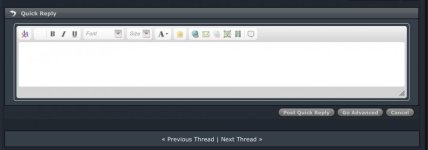
Look at the top bar from right to left - a quotation mark (if you want to post an attributed text), a film strip for videos (YouTube or Vimeo) and the next is the thumbnail for the photo uploads.
 
Look at the top bar from right to left - a quotation mark (if you want to post an attributed text), a film strip for videos (YouTube or Vimeo) and the next is the thumbnail for the photo uploads.

I look the page over and see nothing. can you screengrab the page and post it? Thanks
 
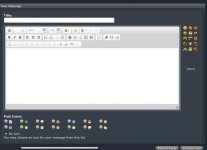
These are the two Reply screens on DVX. The Quick Reply that most people probably use the most that is at the bottom of every page and the default when you quote someone(click the quote button on their post). The next is the Advanced Reply screen, but they both have the icons/buttons for attaching/embedding links, photos, videos and quotes.

And as NorBro said, DVX does not like .jpeg, it has to be .jpg, which is why I can't post photos directly from my iPad(it saves as .jpeg).


IMG_0024.jpg

IMG_0025.jpg
 
These are the two Reply screens on DVX. The Quick Reply that most people probably use the most that is at the bottom of every page and the default when you quote someone(click the quote button on their post). The next is the Advanced Reply screen, but they both have the icons/buttons for attaching/embedding links, photos, videos and quotes.

And as NorBro said, DVX does not like .jpeg, it has to be .jpg, which is why I can't post photos directly from my iPad(it saves as .jpeg).


View attachment 142495

View attachment 142496

Mine is like the top one BUT - it doesn't have B / U Font Size A etc...that you have showing. My setting must be off some how.
 
- In the top right corner of the site go into "Settings"
- On the left hand side click "Forum Actions", which will show a drop down tab. Click "General Settings". (If you can't see this make sure the "Forum" tab is selected at the top, rather than "What's New?")
- In the General Settings page, at the very bottom is the "Miscellaneous Options" box. The "Message Editor Interface" gives you two options - "Basic Editor - A simple text box" and "Standard Editor - Extra formatting controls".

I'm assuming you had basic editor selected. The standard editor should give you the options people have been referencing.
 
- In the top right corner of the site go into "Settings"
- On the left hand side click "Forum Actions", which will show a drop down tab. Click "General Settings". (If you can't see this make sure the "Forum" tab is selected at the top, rather than "What's New?")
- In the General Settings page, at the very bottom is the "Miscellaneous Options" box. The "Message Editor Interface" gives you two options - "Basic Editor - A simple text box" and "Standard Editor - Extra formatting controls".

I'm assuming you had basic editor selected. The standard editor should give you the options people have been referencing.

THANKS that work.
 
Back
Top