Portable Grey Cards - Use them?

DDirector

Veteran
I was thinking, is it worth getting a cheap grey card for a few bucks on eBay to expose the images when shooting C-Log or a very flat picture style?

If I'm going run n' gun style, and in environments that change drastically from one location to another, I want to expose to the best I can as quickly as possible.
This seems like a great solution, but maybe not so great?

I don't have THAT much knowledge on exposing very flat picture profiles.

*Assuming I cannot apply a LUT in camera for viewing purposes only.

 
I'd get one of the little fold-up grey/white cards. They're really handy as you can just keep them on your belt or in a pocket. Personally, I almost never use mine, I prefer to set a manual white balance. But I'm recording 10-bit at a minimum, so it's not such a problem if the actual temperature in a room is warmer than 3200k or cooler than 5600k, I can grade it back if I really need to.

Shooting 8-bit (as you do with Canon cameras) I think it's wise to nail your white balance in camera.
 
More trash to carry - but very useful IMO esp for 8bit cams..

I have an A4 kodak card

try to get it in shot preroll and it makes a great grading aid.

S
 
If you are handing off the footage for someone else to edit, a ChromaDuMonde chart might be a better tool to carry.

I'd love one, but that's one very expensive piece of cardboard (I have their offset printed version, cheap and seems a little washed out). Pretty awesome the first time you scope a DuMonde though. Talk about the "lightbulb of knowledge" going off in your head...

But I agree for 8-bit, especially in mixed lighting - do a manual white balance and shoot the card for future ref. Really handy for testing your daylight sources, too. All of my stuff - flos, LEDs, HIDs - need subtle gelling to match (or not so subtle...). Couldn't have dialed them in without a decent gray card.
 
aside from the costly chromadumonde, is there a preferred grey card?

thanks in advance.

be well.

rob
smalltalk productions/nyc
 
I do carry a grey card and a white reference with me and I would love to say that I use it on every set up, but that is not practical in the fast paced, usually run and gun shoot thats I do. I do like to get a shot of a grey card and a white reference at the head of a days set ups. When I have my druthers, and the way I used to do it when I shot film was to expose a shot of the grey card reference at my chosen exposure based on an incident light meter reading of the key light of the scene. I would then shoot my white reference under the same light. This establishes my exposure and color references. Now, with color correction software, I can pull up the reference shots and look at them on the scopes. This makes it so much more easy to balance the color and exposure in post, for me. I would love to have a ChromaDuMonde chart but I seem to always find other things to spend the money that those things cost on. To me the starting point for consistency is having a point of reference and an inexpensive grey card and a white reference can serve that purpose very well.
 
White balance I don't ever use a white card. Id do it by eye pretty much to whatever looks best.
Most of the time I work in mixed lighting conditions too.

Because all the greys, blacks, and whites are not in their normal spots (bottom, middle, top), wont getting a proper exposure be tough?
Chances of clipping or underexposing.

*Assuming that they are UNCONTROLLED environments. As in you are not doing any lighting. Go to a location and shoot what you see.

If Id be getting a grey card, it would be 5x4". Its a bit bigger than wallet size, which seems to be way too small. And smaller than a 5x7" which is too big to carry around
 
White balance I don't ever use a white card. Id do it by eye pretty much to whatever looks best.

What "camera Knob" do you adjust to set the white balance by this eye method?
 
What "camera Knob" do you adjust to set the white balance by this eye method?
huh?
I mean, I don't hold up a white card and adjust the kelvin each time.
I just adjust the kelvin temp until its close enough to what looks good on the monitor, like most people probably do.
 
I assume my monitor is completely innacurate.

With cameras with RGB histo or WFM I may equalise the three colour peaks when pointing at a grey card, but I dont trust the monitor..

S
 
huh?
I mean, I don't hold up a white card and adjust the kelvin each time.
I just adjust the kelvin temp until its close enough to what looks good on the monitor, like most people probably do.

Who are most people? Amateurs, hobbyist, soccer mom shooting kids?

You mention in a few of your other posts that you would rather shoot than do post work, which means handing off the footage to someone else.

My thoughts on that.... I have used different shooters over the years for different projects. And the ones that eyeball to an un-calibrated monitor no longer shoot for me. There is nothing worse for an editor to receive a boat load of footage which needs to be cut together, and find out each shot was eyeballed to a different color balance, and there is not a chart shot in the bunch to build a baseline standard from.

I see you are moving up to a much more expensive camera, great! Unless those old bad habits are carried forward as well.

Hey, if you are just uploading videos to youtube, or are doing a project yourself from start to finish, it's not that big a deal. But when you talk about doing union work, and handing off projects, you will get dropped faster than a hot potato, no matter how expensive a camera you shoot with.

All the best!

Dave
 
Michael, I see you have decided on C300 camera as your choice! Congrats...

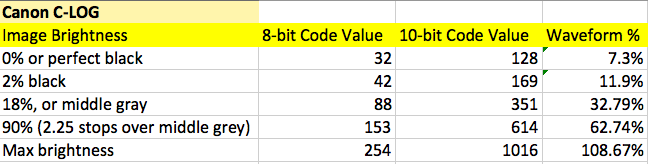
With the C300 shooting slog middle grey drops down to a value of 32% IRE.

canon_c-log.png


Consider however that on-set or while shooting, and with each lighting setup or change, if using a grey card you would have to have someone hold your grey card while on the camera you add ND's until you get the f-stop you want using the waveform monitor to make sure that grey card is 32%. Then comes the problem that if you are on a wider lens, how easy to see that grey little speck on your waveform monitor will be. You can't necessarily bring the grey card closer to the camera as you would be taking the card out of the "light", and moving the camera seems equally to be less than idea.

In a nutshell I would strongly suggest to just use your light meter.

This is what I like to do because I don't need someone to hold the grey card, and the camera doesn't even have to be setup just so that I can use it as an expensive light checking device. Even more true for scouting locations.

To use your light meter all you have to do is perform a camera speed rating test once with your C300, light meter, grey card and waveform monitor in your house or studio. By determining your own working ISO of your camera you can be sure that when you're meter reads f4 that with the taking lens iris also on f4 you are getting 32% for middle grey. If you don't do this there is a chance that the camera ISO and your meter ISO WILL BE DIFFERENT for various various reasons - so you can not just use or trust the ISO on the camera itself and set your meter to that. That would be quite assuming and in fact I recently rated the Sony F55 and found out it is only 640 ISO in slog2 mode, not 1250 as Sony has claimed. Likely they rated the camera with the shutter mode "OFF" but normal film people shoot with 180 degree shutter or 1/48th which right there cuts the light by HALF. I will be publishing my complete tests on that soon.

An article that might be of interest to you is one I wrote on getting exposure for the Canon C-series which was published by a Canon affiliated website: http://cinetiny.com/X8SWd6cq In my article I also have a link to a Canon resource page where you can get the white paper on c-log, and some other PDF's on data management, etc.. on the Canon c-series cameras.

Cheers,
 
Last edited:
I colour correct. Not edit. Sometimes I do though, depending on the project.
Anyways, what Im saying is, when I have a shoot that I can take my time to do it right, or even have a few minutes then I can properly colour correct with a white card.
But Im talking about situation where I dont have the time. You need to get a shot quickly before its too late. So just crank your kelivin to what looks close enough and just shoot.
No need to bash now..
 
I colour correct. Not edit. Sometimes I do though, depending on the project.
Anyways, what Im saying is, when I have a shoot that I can take my time to do it right, or even have a few minutes then I can properly colour correct with a white card.
But Im talking about situation where I dont have the time. You need to get a shot quickly before its too late. So just crank your kelivin to what looks close enough and just shoot.
No need to bash now..

No bashing needed. I rarely color balance my camera(s), and in the case if you are shooting slog on some cameras the white balances are locked to either 3200 4400 or 5600 so you pick one and grade later.

Bottom line it depends on many things, there is no right or wrong.
 
THere are four points of "reference" I consider for every shot when lighting and exposing.

Shadows, Mids , Highlights and...White.

These are start points for every thing the D.P does ( and subsequently the colorist). Knowing where these sit is key to control.

The camera must know Black and it must know White before the DP can "paint the image" with the various tools. I would include the eye and the monitor as a tool.

Color temp K adjust on cam is a global effect over the image. Great images may have many color temps ( fruit salad) by design or by situation.

A D.P will control these parts of the image and will work from "reference points" as well as accurately set up cameras.

I use grey, grey scale, white and color cards for various purposes. I even hava a pure black reference device. Certainly not on every shot. Depends on what I want to know or do with the shot.

Sometimes fjust or the colorist or for testing.

All above easy to do in full production situations.

Then , that said... plenty of time in a rush run and gun situation one resorts to an educated guess.
 
You might have a look at a DSC Labs OneShot chart, which is an affordable easy to carry chart that provides the needed basics for shooting/color correction. You get the essential white/black/grey/flesh tones/6 vector colors, for around $290. The back of the chart has cam white and 18% grey.
 
Michael,

Unless your shooting multicam consider not shooting LOG on a C300.

I'm a fan of the C300, but 8-bit is a little anaemic for LOG.

-B
 
Back
Top