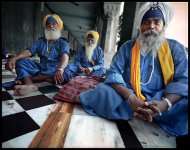
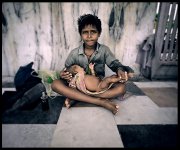
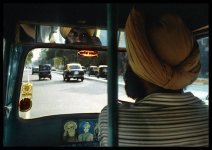
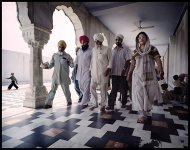
Plz help to get this look! possible

crazyboyworking

New member
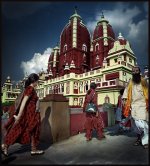
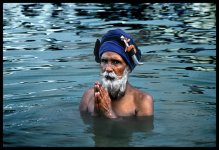
Hi! i am rahul from new delhi, india currently working on a documentary titled "In a Delhi's belly" its about how city transforming from traditional to a more cosmopolitan form temples to shaping malls from auto rickshaws to metro train etc . currently i am in the process of pre-production, i have no experience what so ever, what ever i have learn is through some web sites like this and i am planning to shoot it on dvx100 i have few technical query like
  1. How to get this contrast or metallic look (i have attached few picture), is it possible to get this look with dvx100 a or b if yes what kinds of filters
  2. I am planning to buy a new pc for editing purpose let me know what is the best configuration for fast pace editing.
  3. Common camera accessories filters lights and tripod
  4. I need some lighting tips for out door shoot (to get this kind of look)
  5. Common mistakes that i can avoid.
If Anybody can satisfy these quarries. i will be very gr8ful
 

Attachments

  • Three Sick.jpg
    Three Sick.jpg
    219.2 KB · Views: 0
  • Baby sitter.jpg
    Baby sitter.jpg
    211.2 KB · Views: 0
  • Sikh Driver.jpg
    Sikh Driver.jpg
    244.2 KB · Views: 0
  • Under the Porticos.jpg
    Under the Porticos.jpg
    200.8 KB · Views: 0
  • Birla Temple.jpg
    Birla Temple.jpg
    305.5 KB · Views: 0
  • Prayer.jpg
    Prayer.jpg
    252.9 KB · Views: 0
Last edited:
i'm not very knowledgeable on filters and stuff. but are the frame grabs from a video or still photos ?

getting images like these will be very hard to do i guess
 
I'm not very knowledgable about filters either, but for an outdoor shoot if you have assistants working with you it'll be very helpful to have reflectors. I hear in india there is some harsh sunlight, so you should either shoot under shade or try reflectors to bounce some light onto the subject's face to reduce the unsightly hard shadows.

Those images you attached look very much like photographs rather than video captures. If they are then dont expect the same amount of resolution and quality from the dvx. The hvx would give you a better approximation of that look if its within your budget. For color correction i suppose its desaturated some and lots of contrast, but i can't be sure. I'm sure someone more knowledgable will be able to shed some more light on this.

As for accesories, it is absolutely imperative that you get yourself a good tripod and case for the camera. YOu won't want your 3 thousand dollar investment crashing to the floor and breaking due to a bad case or tripod.

Cheers and good luck!
 
Okay those are more than likely digital still shots or grabs from film due to the latitude, you won't get that much latitude out of a DVX without some filters and matte box, and some good light control. It should be possible to get a decently close look from the DVX with a little bit of work. First off get a good polarizer filter and use that outside to help get some more latitude in your shots. Then when there are shots with sky consider adding a gradient ND filter or gradient blue filter to help keep the sky from blowing out.
Also some good overhead scrims and reflectors will aide in controlling harsh overhead light and bouncing some fill back toward the subject as mentioned. White balance to get approximately the right color range you are looking for in camera and then plan to fine tune the look with a little color correction in post.
 
"i have no experience what so ever, what ever i have learn is through some web sites like this and i am planning to shoot it on dvx100"

I will be like the good friend who tells you the truth no matter how painful it might be. And I'll do it using an analogy:

Your request is like asking

"Listen to the attached Mozart Piano Concerto. I will be going to Vienna to write a similar compostion for Oboe. Can you tell me how to do it? I have no experience whatsoever, but I will be buying an oboe!"

Even if sombody could (unlikely) tell you how to reproduce each of those pics with a DVX (or any other camera), you would have a long list of settings and instructions that would bog you down when you shoot.

Unfortunately, you might be jumping into the fire too soon. Spend some time becoming familiar with the camera, its settings, and how those settings can change an image dramatically depending on the environment.

As far as editing goes .. wow, another big question. If you haven't done ANY editing at all. I would suggest starting with iMovie (is that what it's called?). Cheap, learn the basics. Milk before the meat, ya know? Then, after you get a feel for the wheel, you'll know what you want/need in an editing program.

If you have the money to buy a pro editing set up...hire a solid DP for your India shoot instead ... at least one part of the equation will be sweet instead of two so-so parts which might equal crap.

Hope that didn't come off as "negative", but rather "serious things to consider".

(BTW .. I think those are National Geographic pics, right? I've seen at least 2 of them before).
 
Bravo Toaster:

Not harsh, just realistic. To obtain moving images of the quality of these images, you would have to be a very talented DP with a crew and all of the correct gear. Shooting in India alone has got to be difficult because you must navigate crowds and very little industrial infrastructure like shaded shopping malls and concrete sidewalks.

Achieving images like these might be a more realistic goal for your career, rather than this shoot.

As far as editing, same points Toast made, becoming a good editor takes years not weeks.

Not discouraging you from trying, by all means, learn and learn by doing, experimenting and trial and error. But it will take time.

Best,

Dan
 
As pointed out by others, your utter lack of experience is your number 1 problem.

Here's what is hopefully a bit of practical advice.

You want a particular look? Cool. Don't worry about how to get it... that's right, put it out of your mind completely. Instead, talk to a DP. You'll need one on your shoot anyway (unless you intend to be cam operator and DP rolled into one, which, given you have zero exprience, is a fine idea, if you study hard and do your project 2 years from now). Now, once you have a DP, tell HIM what you want, and let HIM worry about getting the look... he in turn will tell you what he needs (including what camera, light package and any other equipment and/or personnel). If you are smart/charismatic/convincing you can even get a DP to work for you for nothing or next to nothing.

Editing. Somebody recommended iMovie. Bad idea. Good application, but it's for mac. And I know for a fact that working with macs is a no-go in India. Forget it.

You want a PC. Of course, best would be to hook up with an editor and again, he'll tell you what and how (see above, like with the DP!). However, the situation is a bit less dire with editing, and given that your film will by then already be shot, you can presumably at your leisure learn to edit, without running up huge bills or destroying your material. In which case, I recommend Sony Vegas as the editing suite - it is dead simple, extremely intuitive and very powerful... in fact it is a very worthy rival to FCP (which I use)... some would even say, it is more user/newbie friendly than FCP.

The hardware is basically a PC with a decent chip (no celerons, please!), because you'll be doing a fair amount of rendering and encoding (if you want to, say, output to DVD at some point). So, a good higher end Intel chip will do (you don't have to go absolutely top of the range either). Plenty of RAM - I'd recommend minimum of 2GB. Plenty of Hard Disc space. If you want to go hardcore, get a terabyte of 2-3 HDD raided. However, at a minimum, you should have one internal drive with your PC that's at least 100GB, and at least one external HDD of 300GB capacity... this obviously depends on how much material you have shot. However, it is always easy to buy more hard drives. As far as hard drives, look for Seagates or Western Digital (Maxtor has a deserved reputation for higher failure rates), 7200 RPM, 16MB cache (or 8MB cache minimum). You should have a decent CDRW/DVD burner, and make it a double layer DVD burner (you can make this an external). Make sure your PC has at least 3 USB 2.0 and preferably also a FW400. A reasonable video card (i.e. not one of those integrated Intel crappy ones), and a decent soundcard.

Key - a good LCD monitor - preferably 2. IMHO, it should be a minimum of 20" each. Dell and Samsung are good and cheap (and will get cheaper yet)... the more monitor space you get, the better you'll work - remember however that if you want to hook up a bunch of monitors to your PC, you'll need a video card that can handle that - when you're buying your PC make sure to ask for that.

Do not forget to good sound. For indie productions, good sound vs bad sound separates the men from the boys. Audiences will forgive an iffy picture, but will hate you for poor sound. Spare no expense in getting good sound during production, and in post. Biggest downfall of indie productions is poor sound... all the $ goes into picture, and too little is left for sound. SO: for editing, you will need decent quality speakers. You cannot work on sound using onboard speakers (laptop) or those dinky little computer speakers. Use studio monitors - you can get ones adequate for your task for $400 here in the U.S. (f.ex. M-Audio BX8a), don't know about India.

If money were unlimited, I'd recommend getting a calibrated broadcast monitor (Sony makes decent ones), because what you see on your computer screen will have little to do with what you'll see on TV once you burn to DVD. However, since you'll likely be strapped for funds, at least have access to a new TV or 2 or 3 to check out your work - color, brightness, lettering, etc.

Well, I (or anyone here) could go on like this for pages, but really, there are plenty of good books written about the whole process and there's no way we can cover that in a post or a 1000 posts. Finally, the fact is, that doing is worth much more than reading. Take your equipment out, and do some shorts. Volunteer on other productions. Learn by doing - there's no substitute... you'll not only learn, you'll make contacts and you'll be able to ask questions in real time and learn on the job.

Key mistakes to avoid, things to keep in mind? Simple. If there's only one thing you were to remember, remember this:


IT IS ALL ABOUT THE STORY.

Full stop. If folks put as much effort into writing the story or getting the story (for doc/journalism), as they do into all the technical aspects of the mechanics of filmmaking, they'd be way, way, way ahead of where they are.

Audiences don't care about your camera. They don't shout out: "Wow, great reverse angle!", "fantastic dolly/pan". They don't care about your directing one bit.

They are looking for a story to involve them. Blair Witch was shot on a dinky Hi8 - and not only was that not a handicap, it was part of the look and the charm. Story.

Now, once you are sure that you have a story so strong and involving that the audience will forgive you for every technical fault with your film, you move on to number two in importance.

ACTORS.

Yes, an actor can bring out your story, and we'll watch him/her, and not pay attention to the decor or the set, because audiences care about characters and humans on the screen, not camera angles.

And only now do we move to things way, way, way lower on the priority list: directing style, look of the film (lighting, sets, etc.), music, and so on.

I hope this is helpful in some way. Good luck!
 
Well first off i can tell you this. you will need a High quality 35 adapter. And you need to get a NON Fisheye 17mm or 18mm Wide angle lens. One that doesnt distort the edges. Shoot CinegammaD and try you damndest to keep the highlights as protected as possible. The lighting looks pretty natural, so try a higher shutterspeed. to make it Crisp like that. Then if you have money have the footage professionally color corrected in a REAL CCstudio, like Niceshoes in NYC. THey can make it look like that, or well close anyway. just shoot flat; a high Master pedestal im talking -1 maybe -2. shoot with the chroma level at +2 so you can collect as much CHroma information as possible without over loading the sensor with over saturated color, this is what i would do.
 
notice that 5 of the shots the subject are NOT in direct sunlight ..
the shot that is in direct sunlight looks to be using a polarizer - and i would say by the shadows sun is slightly diffused ( could be from air pollution ) ..
the shot taken of person driving -again looking out window it appears the sun is very diffused ( again could be heavy pollution or thin layer of clouds or both)

IMO shoot in a progressive mode ... shoot in open shade , shoot in diffused lighting outdoors ( use polarizer when effective outdoors) , shoot under arwnings or walkways that are open to daylight on one or both sides like photo's 1 & 4 .. photo 2 looks to be under same type walkway with child facing the light ) .. if shooting interiors use natural window/door light to light subjects - so move subject to where window light is best ...

also notice that the photo's tend to be dominated by 2-3 colors ... i would call it towards a mono tone ... so choose scenes with 2-3 colors or that looks sort of mono tone with a dominate color on subject ...

if your camera has a knee setting - use it ( 80ire if possible) ... if camera has a cine gamma -use it ... you can fine tune color satuation in post ...
 
Thank you so much all of u for qucik and very informative response. i really didn't know that the look i want is that big deal may be now i need to do some test shoot . Let's see how things pan out. if all thing remain same and favourable,we will strats shooting in november. As far as editing software is concern, how about adobe premier, i have some expierence of grappling wid it .
 
Last edited:
Adobe premier is fine. If you know how to use it, it means you already know the basics of editing.

The problem with the look you want to acheive is, its not a single dial, or switch that you can just turn to get the look you want. It comes from a combination of multiple techniques aquired as experience over a large time-frame, and dedicated practice.

Over time you will get it, but just dont expect to get everything right in the first shot (or first movie). On your first movie, the most important thing is to focus on the story, as many people pointed out. Make sure its good, and you can slowly learn the other techniques to make your story stronger along the way.

Good luck!
 
google "dragan effect". probably you´ll find a photoshop tutorial. you can TRY to achieve this look using a dv camera and after effects.
 
well i took these with a regualr Sony Digital still cmaera. nothing fancy.

but the trick is manuipulation in post. it was so easy its retarded. just crush the blacks. and make sure youre shooting something with lots of variation in its surface texture. the crushed blacks makes the texture pop.

http://www.bolt.com/TimurCivan/photo/14th_street_Market_Meat_s/857961

http://www.bolt.com/TimurCivan/photo/46th_street_water_tower/857967

http://www.bolt.com/TimurCivan/photo/An_alley_in_Istanbul/857965
 
Back
Top