Please really need help

tdadvertising

New member
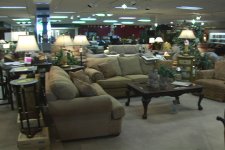
Guys I really need help understanding this issue with the green halo around light sources. Has nobody else experienced this?

I have attached two screen grabs that show what I'm talking about.

I am in commercial production and really need to know if this camera should go out for repair, please anyone who can help I would greatly appreciate it.
 

Attachments

  • green glow.jpg
    green glow.jpg
    84.3 KB · Views: 0
  • green glow 2.jpg
    green glow 2.jpg
    90.8 KB · Views: 0
Last edited:
Perhaps your white balance is set a bit closer to 5500k and the green FL lights are doing something weird in an over exposed situation? In the furniture store, it looks like you might have a window behind you as evidenced by the mirrored column on the left. Don't know about the shop photo though.
 
I'm assuming you're using some kind of supplemental lighting, right? Halogen? LED? Something that's a different color temperature than the overhead fluorescents.

If that's true, then your camera is white balanced for the primary light source. That's going to make those fluorescent lights look green, because the fluorescents are a different (greener) color temperature.

A couple of solutions for that. One is to turn off the fluorescents and just use your primary lights. Or you might be able to put gel material on the insides of the fluorescent fixtures to color the light to a closer match to your primaries. The only other alternative is to gel your primaries to match the color temp of the fluorescents -- or use fluorescent primaries. Keep in mind, though, that not all fluorescent tubes are equal. Some are warm white, some are cool white, and some are 'daylight'. Check the stamping on the tubes.

Or I could be totally wrong. :)
 
Look at the second picture -- the one in the furniture showroom. I see visible in the shot 3 different light temperatures. The lamps on the table are incandescents. The overheads are fluorescents. And even they have two different colors of bulbs -- some look blue, the rest look green. Mixing of these different colors of light is a white balance nightmare.

Oh wait.....there are FOUR color temps of light. I can see daylight through those distant windows. And this is revealing, because it looks to me like the daylight outside is properly white balanced. So that means whatever your primary lighting source here is, that source is a daylight color temperature. It could be lights, or it could be daylight flooding in from windows behind you. But your camera is definitely white balanced for daylight. That's why the light from the table lamps is warm, and the light from the fluorescents is cool -- and two different colors. I'm guessing there are a mix of bulbs in the overhead fixtures. The ones that appear bluish are "cool white" bulbs, and the greenish ones are regular fluorescents.

Again, very hard to white balance so many different colored light sources. But I highly doubt your camera is the problem.
 
Last edited:
green glow

green glow

Thanks for the insight. I guess I'm white balanced to daylight... I wasn't using lights of my own there. It's at least good to know the camera isn't a problem, but my question is this; my friend's Cannon XL2 does not do this in exactly the same situation. If we're sure the camera isn't a problem, how do I deal with this and fix it? I had another guy respond that his DVX has never done anything like this.
 
Back
Top