
africanmarty
Well-known member
i tried my shuttle 2 today with my af100 and have run into nothings but problems so far... hopefully you guys can help me out..
i am using the shuttle 2 with utility version 3.0.1 with OCZ 'Agility 3' 120GB SSD connected with SDI to my AF100
i have tried recording in 25p and 24p(23.976p) in compressed DNxHD.mov format (also tried uncompressed but looking at the files the SSD is not fast enough the footage looks terrible )
For 25p i am given a 50i (or 25 frame, upper field first first, interlaced file ) DNxHD.mov file. With this must i edit in a 50i timeline or can i edit it in a 25p timeline ?? or must i de-interlace the footage first and then place the de-interlaced footage into a 25p timeline ? When playing the footage back in quick time everything looks great, and media info shows all the right info however when i load this file into premier pro cs5.5 things get ugly... i start a 1080i50 timeline and put the footage captured from the af100 on the timeline and get ugly interlacing lines.. i checked the field ofer of the clip i imported and cs5.5 says 'fields: unknown dominance' so i then conformed to 'upper field first' and the interlaced lines went away but i am left with a line that goes through the video every so often ( will post pics for example - seen going through hands on video ), the only reason i can think of maybe the SSD is simply not up to scratch ??? but i don't understand why when i played back the files in quick time they played back fine.... has anyone else experienced this ??? what project settings are you guys using ??? is premier not getting the field order right ???
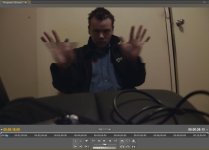
also the final problem is when i import the clip to the timeline it imports several audio tracks with the DNxHD.mov file and not just 1 stereo audiop as expected... 16 audio tracks total... What the hell ??? Also when i shoot 24p mediafile see's the file as 10-bit/4:2:2/23.976p wich is good but in cs5.5 when placed onto the timeline i get those ugly interlaced lines unless again.. i conform the field order to 'upper field first...' and i too get those stupid lines through the video...
what do you guys think ?
i am using the shuttle 2 with utility version 3.0.1 with OCZ 'Agility 3' 120GB SSD connected with SDI to my AF100
i have tried recording in 25p and 24p(23.976p) in compressed DNxHD.mov format (also tried uncompressed but looking at the files the SSD is not fast enough the footage looks terrible )
For 25p i am given a 50i (or 25 frame, upper field first first, interlaced file ) DNxHD.mov file. With this must i edit in a 50i timeline or can i edit it in a 25p timeline ?? or must i de-interlace the footage first and then place the de-interlaced footage into a 25p timeline ? When playing the footage back in quick time everything looks great, and media info shows all the right info
however when i load this file into premier pro cs5.5 things get ugly... i start a 1080i50 timeline and put the footage captured from the af100 on the timeline and get ugly interlacing lines.. i checked the field ofer of the clip i imported and cs5.5 says 'fields: unknown dominance' so i then conformed to 'upper field first' and the interlaced lines went away but i am left with a line that goes through the video every so often ( will post pics for example - seen going through hands on video ), the only reason i can think of maybe the SSD is simply not up to scratch ??? but i don't understand why when i played back the files in quick time they played back fine.... has anyone else experienced this ??? what project settings are you guys using ??? is premier not getting the field order right ??? also the final problem is when i import the clip to the timeline it imports several audio tracks with the DNxHD.mov file and not just 1 stereo audiop as expected... 16 audio tracks total... What the hell ??? Also when i shoot 24p mediafile see's the file as 10-bit/4:2:2/23.976p wich is good but in cs5.5 when placed onto the timeline i get those ugly interlaced lines unless again.. i conform the field order to 'upper field first...' and i too get those stupid lines through the video...
what do you guys think ?
Last edited:
