
Navigation
Install the app
How to install the app on iOS
Follow along with the video below to see how to install our site as a web app on your home screen.
Note: This feature may not be available in some browsers.
More options
You are using an out of date browser. It may not display this or other websites correctly.
You should upgrade or use an alternative browser.
You should upgrade or use an alternative browser.
Please compare other cameras to the HMC40 here, Thanks.
- Thread starter BobDiaz
- Start date
Amazing that Adobe was getting away with it in 2010. In comparison, this article was written in 2000: http://www.hometheaterhifi.com/volume_7_4/dvd-benchmark-part-5-progressive-10-2000.htmlAdam Wilt's is probably using an Adobe product for those screenshots, which has a broken h.264 decoder (even for progressive material).
Good:
Bad:

By the way, 1080p24 is native on the HMC40, but 1080p30 is over 60i. Does the camera use interlaced chroma for that mode?
The issue initially brought up in that other thread is the broken decoder , which affects native progressive footage (24pN) , as well as interlaced. It affects all h.264 , even from different encoders, sources, cameras, etc...It's separate from the interlaced chroma issue that inherently affects YV12 interlaced content
This is the addendum to that article (still 2003, LOL, thanks Adobe)
http://www.hometheaterhifi.com/volume_8_2/dvd-benchmark-special-report-chroma-bug-4-2001.html
This is the addendum to that article (still 2003, LOL, thanks Adobe)
http://www.hometheaterhifi.com/volume_8_2/dvd-benchmark-special-report-chroma-bug-4-2001.html
Yeah, I know. I was just wondering, whether the HMC40 records 1080p30 with interlaced chroma like Canon cameras do. If yes, it would look suboptimal even with a correct chroma decoder. AFAIK, some decoders correct interlaced chroma for PsF content. I believe Cineform does it. But a decoder does not have to do this in order to be considered a correct decoder. I could see interlaced chroma in my 30p files off a Canon camcorder in Vegas.The issue ... [is] separate from the interlaced chroma issue that inherently affects YV12 interlaced content.
Yeah, I know. I was just wondering, whether the HMC40 records 1080p30 with interlaced chroma like Canon cameras do. If yes, it would look suboptimal even with a correct chroma decoder. AFAIK, some decoders correct interlaced chroma for PsF content. I believe Cineform does it. But a decoder does not have to do this in order to be considered a correct decoder. I could see interlaced chroma in my 30p files off a Canon camcorder in Vegas.
Sorry Cranky, I'm not sure what the HMC40 records.
When you say "I could see interlaced chroma in my 30p files off a Canon camcorder in Vegas" , what do you mean ? ie. specifically what artifacts are you seeing? and are you importing this natively into vegas and letting it take care of pulldown removal?
Sorry Cranky, I'm not sure what the HMC40 records.
When you say "I could see interlaced chroma in my 30p files off a Canon camcorder in Vegas" , what do you mean ? ie. specifically what artifacts are you seeing? and are you importing this natively into vegas and letting it take care of pulldown removal?
Like these:

Image from http://provideocoalition.com/index.php/awilt/story/review_canon_vixia_hf11_avchd_camcorder/
I don't remember the details whether these artifacts were visible if I set project to progressive, as I sold the HF100 long ago.
I suspect he's using the same broken decoder on that comparison
I just opened some 30p (30p in 60i) footage from HF11 , and tried in vegas 9, and those same issues persist, but not to the same extent when using a proper decoder. (Ignore the slight color differences, vegas is using a slightly different YUV=>RGB conversion, just concentrate on the edges). Again these were taken from 1:1 crops, then zoomed 2x with a point resize:

You can "interpret" the footage in vegas as progressive (I tried), change project properties etc.., but it doesn' t matter, you still get the artifacts. The problem is with the decoder
Vegas doesn't have issues with progressive h.264 (unlike adobe) in my testing, only interlaced
If someone wants to upload some HMC40 footage to a free hosting site (e.g. mediafire.com) , I can check that out if you want
I just opened some 30p (30p in 60i) footage from HF11 , and tried in vegas 9, and those same issues persist, but not to the same extent when using a proper decoder. (Ignore the slight color differences, vegas is using a slightly different YUV=>RGB conversion, just concentrate on the edges). Again these were taken from 1:1 crops, then zoomed 2x with a point resize:
You can "interpret" the footage in vegas as progressive (I tried), change project properties etc.., but it doesn' t matter, you still get the artifacts. The problem is with the decoder
Vegas doesn't have issues with progressive h.264 (unlike adobe) in my testing, only interlaced
If someone wants to upload some HMC40 footage to a free hosting site (e.g. mediafire.com) , I can check that out if you want
Barry_Green
Moderator
Confirmed that Adam used FCP7 for those shots.

Robert M Wright
Well-known member
Barry, do you know if recording 1080p30 with the HMC40 does indeed give you broken 4:2:0? By broken, I mean as in chroma recorded as if it were interlaced source images (skipping a line for encoding 2x2 chroma blocks). I'm not sure how it could be otherwise, if recording 30p source in a 60i stream.

GrahamH
Well-known member
By the way, 1080p24 is native on the HMC40, but 1080p30 is over 60i. Does the camera use interlaced chroma for that mode?
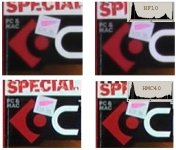
I ran a quick test tonight, comparing the HMC40 with my HF10, which is known to have interlaced chroma. My conclusion is that the HMC40 does NOT exhibit this problem in either 30P or 24P mode - good news!

The top four images are pixel-for-pixel crops from 1920x1080 orginals (example shown). The original AVCHD clips were transcoded to Cineform avi, and frame grabbed using Virtualdub. (I can't comment on how Premiere or Vegas might have decoded the clips.)

I think that the HF produces cleaner image. The HMC's image has noticeable mosquito noise. The HF100/10/11 could be at least as good in progressive mode as the HMC40 if it used progressive chroma. In interlaced mode it rivals the EX, as Adam Wilt found out.
Last edited:
GrahamH-
Are you sure the HF10 example you posted wasn't just a decoder issue , or faulty pulldown removal ?
What decoder did you use to decode AVCHD to encode to cineform? and how did you do the pulldown removal?
I agree with cranky, big difference in mosquito noise, almost as if HMC40 was shot at a much lower bitrate
Are you sure the HF10 example you posted wasn't just a decoder issue , or faulty pulldown removal ?
What decoder did you use to decode AVCHD to encode to cineform? and how did you do the pulldown removal?
I agree with cranky, big difference in mosquito noise, almost as if HMC40 was shot at a much lower bitrate
Last edited:
Robert M Wright
Well-known member
Those look really close in raw quality to me, aside from the horky broken 4:2:0 chroma from the HF. I took that image (the first version, not the blown up version) into Paint Shop Pro and (quick and dirty - not real carefully) crushed the black from the HMC40 down similar to the black from the HF10. That negated the lion's share of the apparent difference in what looks like mosquito noise from the HMC40 and HF10. Doing that pretty much eliminated the difference in color saturation too.
Were the cameras at default settings, as if fresh out of the box, for that test comparison?
Were the cameras at default settings, as if fresh out of the box, for that test comparison?
I changed levels in Photoshop and resized to 400% with "nearest neighbor". Even with crushed blacks the Canon is cleaner. Both 30p and 24p look very clean, and if not for interlaced chroma, these would be just perfect. The Panasonic looks noticeably better in 24p mode, almost as good as the Canon, and rather noisy in 30p mode. I had the HDC-SD100 before, and it exhibited similar mosquito noise, though a more pronounced one.
Interesting, that a downsized image hides noise but still shows interlaced chroma. Downsized HMC images look better, crisper.
Imagine if Canon came up with a low-prosumer model similar to the HMC40 and used proper progressive mode. I expected such a model from Canon last year - nope. This year - still nothing. Instead they keep offering the stone-aged GL2. This is just sad.
Interesting, that a downsized image hides noise but still shows interlaced chroma. Downsized HMC images look better, crisper.
Imagine if Canon came up with a low-prosumer model similar to the HMC40 and used proper progressive mode. I expected such a model from Canon last year - nope. This year - still nothing. Instead they keep offering the stone-aged GL2. This is just sad.
Attachments
Last edited:
I think the interlaced chroma issue is only encountered with certain workflows. I suspect whatever decoder Graham used for AVCHD "thought" the 24p or 30p footage was interlaced , and thus passed these artifacts on to the cineform intermediate.
I downloaded some HF10 footage from an old review, and didn't get those issues using a proper decoder. This is 30p from HF10 (30p in 60i).
From here
http://av.watch.impress.co.jp/docs/20080206/zooma344.htm
Direct link to the file
http://av.watch.impress.co.jp/docs/20080206/ezroom.m2ts
The same interlaced chroma results using vegas, or any other mainconcept based AVC decoder. I suspect FCP would have the same results, and any reviews based on similar decoders would encounter the same issue
If you use a proper decoder, then encode to cineform for import into vegas or premiere, there are no artifacts. Again, these are 1:1 .png, cropped, and resized using point (nearest neighbor) 2x width/height

I downloaded some HF10 footage from an old review, and didn't get those issues using a proper decoder. This is 30p from HF10 (30p in 60i).
From here
http://av.watch.impress.co.jp/docs/20080206/zooma344.htm
Direct link to the file
http://av.watch.impress.co.jp/docs/20080206/ezroom.m2ts
The same interlaced chroma results using vegas, or any other mainconcept based AVC decoder. I suspect FCP would have the same results, and any reviews based on similar decoders would encounter the same issue
If you use a proper decoder, then encode to cineform for import into vegas or premiere, there are no artifacts. Again, these are 1:1 .png, cropped, and resized using point (nearest neighbor) 2x width/height

GrahamH
Well-known member
PDR - the decoding was done by the Cineform HDLink app's internal decoder. I suppose it may be doing it wrong, although that would surprise me as Cineform are a smart bunch of guys. HDLink applies pulldown removal to the HF10's 24P, but not to the 30P.
The pair of clips you posted seem promising, but there's no explanation of what we are looking at. ... which decoders were these?
Robert - both cameras were set to 1/60 shutter, auto 'iris', auto WB, and with the default 'Scene 1' for the HMC40 (i.e., HD Norm gamma, Norm1 matrix, no DRS, everything else 0 or OFF). As you say, the resulting levels of the two do differ, which has emphasised the HMC's noise.
EDIT: By the way ... if the HF10 chroma is 'just' a decoder issue, why has everyone been piling on Canon for the past couple of years for putting their HF- and HFS-series 24P into a 60i stream? I mean, one of the features they are prominently advertising for this year's HFS21 and 200 is 'native' 24P. I fully admit to understanding little about all of this - confusing!
The pair of clips you posted seem promising, but there's no explanation of what we are looking at. ... which decoders were these?
Robert - both cameras were set to 1/60 shutter, auto 'iris', auto WB, and with the default 'Scene 1' for the HMC40 (i.e., HD Norm gamma, Norm1 matrix, no DRS, everything else 0 or OFF). As you say, the resulting levels of the two do differ, which has emphasised the HMC's noise.
EDIT: By the way ... if the HF10 chroma is 'just' a decoder issue, why has everyone been piling on Canon for the past couple of years for putting their HF- and HFS-series 24P into a 60i stream? I mean, one of the features they are prominently advertising for this year's HFS21 and 200 is 'native' 24P. I fully admit to understanding little about all of this - confusing!
Last edited:
GrahamH - If you scroll back to last page or 2 there is a discussion and some examples posted illustrating the problem. To summarize, the "interlaced chroma issue" isn't as bad as people have been portraying it to be. The underlying footage is fine, it's the decoder or process that you are using that is at fault. If you use a proper decoder, there is no issue.
The screenshot in post #56 has the decoder labelled; the left is using adobe (which is based on mainconcept avc decoder), the right uses libavcodec. The clip link was just a link to the native sample, you can test it for yourself. If you run that through your cineform decoder, I'm willing to bet you see the artifacts such as the screenshot on the left (interlaced chroma). The correctly decoded picture was decoded with libavcodec through ffdshow . It's the same open source decoder that ffmpeg, vlc, many other open source applications use.
If you post your HF10 sample, I can check with a proper decoder to see if those issues exist (I doubt they do)
I guess it might be because people have blind faith in "professional" products ...
Note, even true native 24p AVCHD exhibits that interlaced chroma issue with Adobe's decoder ! The links on the previous page show examples.
The screenshot in post #56 has the decoder labelled; the left is using adobe (which is based on mainconcept avc decoder), the right uses libavcodec. The clip link was just a link to the native sample, you can test it for yourself. If you run that through your cineform decoder, I'm willing to bet you see the artifacts such as the screenshot on the left (interlaced chroma). The correctly decoded picture was decoded with libavcodec through ffdshow . It's the same open source decoder that ffmpeg, vlc, many other open source applications use.
If you post your HF10 sample, I can check with a proper decoder to see if those issues exist (I doubt they do)
EDIT: By the way ... if the HF10 chroma is 'just' a decoder issue, why has everyone been piling on Canon for the past couple of years for putting their HF- and HFS-series 24P into a 60i stream? I mean, one of the features they are prominently advertising for this year's HFS21 and 200 is 'native' 24P. I fully admit to understanding little about all of this - confusing!
I guess it might be because people have blind faith in "professional" products ...
Note, even true native 24p AVCHD exhibits that interlaced chroma issue with Adobe's decoder ! The links on the previous page show examples.
Last edited: