
Navigation
Install the app
How to install the app on iOS
Follow along with the video below to see how to install our site as a web app on your home screen.
Note: This feature may not be available in some browsers.
More options
You are using an out of date browser. It may not display this or other websites correctly.
You should upgrade or use an alternative browser.
You should upgrade or use an alternative browser.
Pix 220/240 Firmware 1.05
- Thread starter nsoltz
- Start date

Tata Steva
Well-known member
Thanks Ned,
upgrading as I type this...
upgrading as I type this...
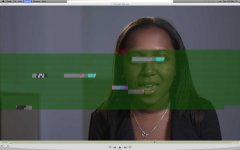
I am beginning to wonder whether we are seeing some kind of pattern. On "the other board" there was some Samurai ProRes footage with the same glitch. ProRes encoding thing?
I just shot about 90 minutes of ProRes 422 S-Log with the new firmware so we'll see if I have anything similar. May not be editing it, though, for 4 to 6 weeks.
Ned
I just shot about 90 minutes of ProRes 422 S-Log with the new firmware so we'll see if I have anything similar. May not be editing it, though, for 4 to 6 weeks.
Ned
Last edited:
lasikdenver
Well-known member
I had a frame that looked like this with the Samurai! It was one frame half green and then the audio did not sync with video after that. I put it to Samurai help and they denied any knowledge of a problem and told me to check cables, etc. I have only seen it once but very disturbing. When the Samurai has a "skip" it is supposed to give an error on the screen but there was no error. Did you have any audio sync problems with this?
Paul Isaacs
Active member
Hi All
In firmware prior to PIX v1.04, there was the potential for corruption, although relatively rare. This problem was fixed in v1.04 which was released about 2 weeks ago. Today's v1.05 firmware release fixes a number of other bugs, introduces a couple of new features and improves overall system performance. I highly recommended upgrading to 1.05 at your earliest convenience.
Visit www.sounddevices.com to download latest firmware.
Paul Isaacs
Technical Development Manager
Sound Devices
In firmware prior to PIX v1.04, there was the potential for corruption, although relatively rare. This problem was fixed in v1.04 which was released about 2 weeks ago. Today's v1.05 firmware release fixes a number of other bugs, introduces a couple of new features and improves overall system performance. I highly recommended upgrading to 1.05 at your earliest convenience.
Visit www.sounddevices.com to download latest firmware.
Paul Isaacs
Technical Development Manager
Sound Devices
LeavingTheCandy
Well-known member
I'm glad I still have my KiPro...AJA has had this gig for YEARS and it JUST WORKS. 
Tata Steva
Well-known member
I'm glad I still have my KiPro...AJA has had this gig for YEARS and it JUST WORKS.
Show off!
I am sure PIX will be there much faster. There, happy?
Hi All
In firmware prior to PIX v1.04, there was the potential for corruption, although relatively rare. This problem was fixed in v1.04 which was released about 2 weeks ago. Today's v1.05 firmware release fixes a number of other bugs, introduces a couple of new features and improves overall system performance. I highly recommended upgrading to 1.05 at your earliest convenience.
Visit www.sounddevices.com to download latest firmware.
Paul- just downloaded 1.05, but this corruption in the photo I attached happened while using 1.04, so hopefully 1.05 solves the issue...
Did you have any audio sync problems with this?
I haven't had any sync issues- audio coming via SDI.
Paul Isaacs
Active member
Paul
I haven't had a chance to upgrade from v1.02 yet, can I go straight to v1.05 or do I need the other ones first?
Yes - you can go straight to 1.05.
Paul
Paul Isaacs
Active member
Paul- just downloaded 1.05, but this corruption in the photo I attached happened while using 1.04, so hopefully 1.05 solves the issue...
If you experience this with v1.05, please let us know. The quickest way to resolve most issues is to speak with one of our Tech Support Engineers:
http://www.sounddevices.com/support/
Paul
SquareDealPro
Member
"We noticed that when rolling long takes, the picture lags behind the audio at an increasing rate of ~ 1 frame every 3 minutes. So an interview of 35 minutes will end up half a second out of sync."
http://vimeo.com/37398471
Please check this vimeo PIX 240 audio test out: Has anyone experienced this problem and does anyone know how one can fix this issue in FCP or any other way? We have recorded interviews that are out of sync because of this bug and they need to be fixed. The problem of trying find sync when there is an accumulative problem of more audio frames being produced over time. Perplexing to say the least. Is there a pattern that can be precisely identified to help solve this? Could it be adapted to an Automator script or Compressor somehow to apply to these takes? Or even away to adjust each long take in FCP? It seems like an unbelievable oversight that the PIX 240 would be released without proper syncing happening for any takes over three minutes. To their credit SD has at least fixed the problem now and they are looking to see if there is a way to re-conform sync for footage impacted by this issue.
How was it that the PIX was stretching the audio to run ahead of picture over time? The fix is in 1.07 but that does not help those of us left with interviews on current productions.
We are using a F3 and recording 1080PsF 23.98 and scaling that to 1080p 23.98 in the PIX.
Thanks for any help and insights to try to resolve this.
http://vimeo.com/37398471
Please check this vimeo PIX 240 audio test out: Has anyone experienced this problem and does anyone know how one can fix this issue in FCP or any other way? We have recorded interviews that are out of sync because of this bug and they need to be fixed. The problem of trying find sync when there is an accumulative problem of more audio frames being produced over time. Perplexing to say the least. Is there a pattern that can be precisely identified to help solve this? Could it be adapted to an Automator script or Compressor somehow to apply to these takes? Or even away to adjust each long take in FCP? It seems like an unbelievable oversight that the PIX 240 would be released without proper syncing happening for any takes over three minutes. To their credit SD has at least fixed the problem now and they are looking to see if there is a way to re-conform sync for footage impacted by this issue.
How was it that the PIX was stretching the audio to run ahead of picture over time? The fix is in 1.07 but that does not help those of us left with interviews on current productions.
We are using a F3 and recording 1080PsF 23.98 and scaling that to 1080p 23.98 in the PIX.
Thanks for any help and insights to try to resolve this.
I was using the PIX240 (pre 1.07) for interviews that were up to 3 hours long and never saw this issue, although they were all 50i. Maybe the frame rate and scaling had something to do with it? Anyway, are you using the footage as one continuous shot? If not, can't you just loose a frame of audio every 3 minutes? You might even be able to do this on one shot if it's cut out during a pause?
SquareDealPro
Member
It's something to do with the 23.98 PsF being scaled to true 24P in the PIX 240. I upgraded to 1.09 but should have run a clapper test do determine the pattern of the issue in 1.05. Might have to re-flash back to that version if that's possible without issues. Apparently there has been some success with the free QtSync to fix this when other programs failed. I am not sure if it's exactly 3 minutes to the frame when this occurs, and I have nothing but moving lips to determine the exact point of sync. If anyone has any ideas of how to solve this or set up QtSync to address the sync issues incrementally building up and drifting the farther one goes into a long interview, it would be really appreciated if you can help solve this PIX 240 nightmare we've experienced. Other than this one nasty issue with the recorder and another unit we sent back with other issues, it's been rock solid, and SD is the best company I've ever dealt which goes out its way in trying to help you solve whatever problems might occur with their products. They promised to look into it and see if they can find a fix for those who were caught in this trap like me recording long interviews with the specs we were using.
SquareDealPro
Member
Still tackling this problem. Any help or suggestions would be great. I've broken everything down in FCP and exported into 3 minute segments and used the formula below; Is this what you did and how you prepared each in QtSync?:
Based on 60 minutes of footage (59.57 sec). ApplePro Res HQ 1920x 1280 23.98 as recorded on my PIX240 from our Sony F3, scaling from 23.98 PsF.
Qtsync settings: offset each segment by adding 1 frame for every 3 min. segment:
from 0 to 19 segments.
0 = (0 frames added)
1 = 1 (1 frame shifted forward on the audio track on this segment to the audio tracks)
2 = +1 (etc.)
3 = +2
4 = +3
5 = + 4
6 = +5
7 = +6
8 = +7
9 = +8
10 = +9
11 = +10
12 = +11
13 = +12
14 = +13
15 = +14
16 = +15
17 = +16
18 = +17 frames (17 frames shifted forward on audio tracks in this segment)
This seemed to work, not sure how precisely as I was only guessing at lip sync being on with no clappers or reference sync points seen in any of the frames being a head and shoulders interview.
However joining this back together messes up the audio via Qtsync where for a few frames it seems where it is joined with the tracks of each segment being offset. Salvages only what lies within these three minute segments.
Ideally, I'd like to conform and correct sync so as not to lose any audio at the joints between the segments. Perhaps there is better way to figure this out. I could try two eyes software and take the audio off the SXS cards and conform that to the PIX footage. Any other suggestions?
Based on 60 minutes of footage (59.57 sec). ApplePro Res HQ 1920x 1280 23.98 as recorded on my PIX240 from our Sony F3, scaling from 23.98 PsF.
Qtsync settings: offset each segment by adding 1 frame for every 3 min. segment:
from 0 to 19 segments.
0 = (0 frames added)
1 = 1 (1 frame shifted forward on the audio track on this segment to the audio tracks)
2 = +1 (etc.)
3 = +2
4 = +3
5 = + 4
6 = +5
7 = +6
8 = +7
9 = +8
10 = +9
11 = +10
12 = +11
13 = +12
14 = +13
15 = +14
16 = +15
17 = +16
18 = +17 frames (17 frames shifted forward on audio tracks in this segment)
This seemed to work, not sure how precisely as I was only guessing at lip sync being on with no clappers or reference sync points seen in any of the frames being a head and shoulders interview.
However joining this back together messes up the audio via Qtsync where for a few frames it seems where it is joined with the tracks of each segment being offset. Salvages only what lies within these three minute segments.
Ideally, I'd like to conform and correct sync so as not to lose any audio at the joints between the segments. Perhaps there is better way to figure this out. I could try two eyes software and take the audio off the SXS cards and conform that to the PIX footage. Any other suggestions?
Last edited:
If you've got an interview of 60 minutes and you want to use as one continuous long shot, why can't you just lose 1 single frame of audio every 3 minutes? I realise that will be 20 extra edits, but if you perform the cut during a pause nothing will be noticed?
Oh and make sure you're not using 1.05 any more! (They're up to v2 now)
Oh and make sure you're not using 1.05 any more! (They're up to v2 now)
SquareDealPro
Member
You have to shift the audio ahead by one frame every three minutes to a max of a 17 frame shift on the last three minutes of a 60 minute interview. You can't just lose audio frames or you will be cutting into a continuous the audio reply from an interview subject and producing a mangled result with obvious audible holes in the audio track.
If it happens on 23.976p and 29.97p (59.94i), but not on 25p/50i modes than it's an issues with real time against frame count. It can be also related to 23.976psf only as it looks like Sound Device is unable to handle it properly 
In this case apply to your audio 0.1% speed change (make audio longer- at least by my logic)- Adobe Audition v3 is good for this- can do simple resample without touching pitch (which in this case is better option) and allows for high precision adjustment.
In this case apply to your audio 0.1% speed change (make audio longer- at least by my logic)- Adobe Audition v3 is good for this- can do simple resample without touching pitch (which in this case is better option) and allows for high precision adjustment.
Last edited: