Pink Line and Pixelation

Orson

Member
Hi there,
Firstly, I just want to say what a great resource this forum is and long may it continue.

I am currently editing my first short, shot on the DVX 100 BE and have noticed a couple of strange occurences...

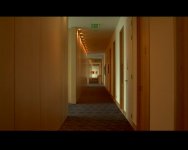
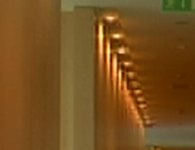
1) There is some strange moving pixelation that appears for a few seconds around the lights on a corridor scene. Then after this time the footage seems fine.

2) I shot letterbox and I have noticed a small fine pink line running just above the lower black bar in some of the scenes.

(Screen grabs should be attached)

The cam is 6 months old so if there are any serious problems I would like to get it repaired.

Any tips would be much appreciated, this was a once off opportunity to film at this location so I have to work with the footage that I have.

Many thanks,
Orson
 

Attachments

  • pink line.jpg
    pink line.jpg
    94.4 KB · Views: 0
  • pixelation still.jpg
    pixelation still.jpg
    104 KB · Views: 0
Hi,

Does anyone have any suggestions or ideas?

...or even a place where I may find a solution?

Thanks,
Orson
 
Lines on the edge of the bars in "letterbox" mode footage are usually caused by sharpening, either in camera via the detail setting being too high or in post.

Did you sharpen in post?

I would just matte the whole thing a little more to cover up the line. It may not even be visible on a tv screen.
 
Hi,

The image is a little small to see the pink line, but if it is the last line or so of the picture, it is out of the viewing area anyhow.

As far as the noise, it may be just the fact that you are shooting with too much detail, and thus having a bit of aliasing, or you are shooting in interlace which would also introduce some artifact.

Doesn't sound like there is a problem with the camera overall. But as I said the samples are pretty small. Look at the rest of your footage, do you see the line on the bottom there. If not, have a service guy take a look.

Hope that helps,

Jan
 
Thanks for the reply master151

master151 said:
Lines on the edge of the bars in "letterbox" mode footage are usually caused by sharpening, either in camera via the detail setting being too high or in post.

Did you sharpen in post?

I would just matte the whole thing a little more to cover up the line. It may not even be visible on a tv screen.


No, didn't sharpen in post

And my scene file settings were:
Detail: -3
VDetail: -3
Coring: +7
Chroma Level: -3
Master Ped: -6
Gamma: Cine
Matrix: Norm
Skin Detail: On

Shot on 25P
 
Hi Jan,
Thanks for the help.
I have attached a couple of images...one is a close up of the bottom right of the frame where the letterbox meets the image (pink line) and the other is a close up of the pixelation I encountered in the centre of the frame.
Hope this helps.

Detail was at -3
VDetail at -3 too.

Thanks,
Orson.

:dankk2:
 

Attachments

  • pink line-blow up.jpg
    pink line-blow up.jpg
    29.3 KB · Views: 0
  • pixelation still-blow up.jpg
    pixelation still-blow up.jpg
    57.9 KB · Views: 0
Thanks Owen,

Owen said:
The pixelation you describe sounds like a possible drop-out on the tape...


This could explain how the pixelation was 'in motion' around the centre of the screen.

If this was the reason for the pixelation, could I have damaged the heads with a bad tape....which was (and is always) Pany pro 63 tapes.

And is this a regular proplem that a pro tape will let you down?

Thanks.
O.
 
Pink line is out of the normal viewing area. This is DV? There is nothin wrong with your camera, it is all normal in DV pictures. Also, I question the settings. Coring shouldn't be so high and color shouldn't be so low. You are already working with 4:1:1, seems like you are adding additional handicap to the picture. Also with the Pedestal at -6 you are crushing the blacks. Keep in mind you have a scale in the picture, the scale always goes from ) to 100. If you say all of the black info is going to happen in the first 25%, then all the rest will have to take place over the remaining 75%. That can work when you have a scene where there is tonal scale to fill. But here that is not true. Try not to be so heavy handed on the Master Pedestal, the Coring and the -Color.

Your camera is fine, it is just DV that is the problem. The light problem would not have happened in DV50, where you just simply have more data to work with the information around the lights. Bring up the black level and you can get some detail around those counches/chairs in the foreground.

Anyhow nothing is wrong with your camera, just rethink your settings.

Best,

Jan
 
Hi Jan,
Great tips for the settings, thanks, will adapt the Master Pedestal, Coring and Colour as suggested for the next filming (got my original settings from a post re: reduced noise/film look!).

Regarding the crazy pink line... :-)
when you say it is out of the normal viewing area do you mean if i was to uprez to 16:9, removing the black lines?
As it stands now I used the letterbox function in the camera and would like to make screenings and dvds as letterbox...as the pink line is running the length of the screen just above the lower black bar it will be visible when projected. I tried masking in FCP with widescreen at 1.78:1 and it removed the pink line nicely but took a decent chunk off the top of the screen!

I'm a little confused for future films...do you recommend shooting in 4:3 with a tape mask over the lcd and masking in post? it would be much nicer to use the letterbox function on the dvx but if i keep getting the pink line its not really great.

thanks again,
Orson.

PS: would you know the actual ratio of the letterbox on the dvx 100B?
 
Back
Top