PilotFly H2 Gimbal

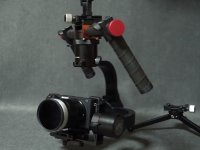
First impressions: I've not used a gimbal before and I'm certainly aware that there's a learning curve. That said, out of the box it took about ten minutes to get an okay balance and go shoot some test footage. With the two handles it feels like I can hold it up for a while without getting tired. It got some jitters when I put my Tokina 11-16mm on, but I only took a minute to rebalance between lenses and I probably could have done a better job. So far I'm very happy with it.

Here's a little test video: https://vimeo.com/168993441 pw:h2 -- please excuse the horrendous exposure.

Thanks for posting the info for all of us. So you just balance the cam and lens and power it on? No software needed?
 
Thanks for posting the info for all of us. So you just balance the cam and lens and power it on? No software needed?

That's not a reasonable expectation from ANY gimbal.

In order to be able to use a wide range of camera and lens pairings, the system must be tuned in a "generic" manner. Fine tuning the PID software for your specific load will ALWAYS result in better performance. Until adaptive software is invented this is just how it is.
If you want it perfect right out of the box then the Maker must restrict what cameras you can use - or provide ONLY their own - like the DJI OSMO.
But it's not really that hard once you have the basic PID function explained to you CORRECTLY. That's where most fail. There has been a real problem with Makers not providing clear, and easy to understand directions for the PID software.

Maybe I'll make a video like that one of these days.... add it to my list I suppose.
 
Flapjack, thanks for the photos! Very helpful. And the video is pretty smooth for something straight out of the box without any tweaking.
 
That's not a reasonable expectation from ANY gimbal.

Yes, up until now, the lower cost gimbals have not made efforts to invent anything to automate the PID settings. But with the inclusion of encoders, there is no reason that PID settings should not become fully automated as they can now get feedback as to how the control signals are affecting the response. But then, that would require memory and perhaps a better controller and more software. It will come.
 
That's not a reasonable expectation from ANY gimbal.
Hell yeah it is. My glidecam balances and goes. No software lol. Really though. My Ronin M requires very little software (the DJI app) I know for sure PID matters but with all the competition coming from pistol grip gimbals you would expect one to be able to function without software or atleast make it alot easier. Technology in video products is advancing at an incredible pace. These expectations are reasonable. The person that does find a way (I'm sure all the companies are trying as I type this) will make a killing.
 
I didn't do any PID settings but I plan to get into all of that soon. DPStewart, I'd be interested to hear any advice you've got.

A few things to note:
-With the pistol grip, I mounted a Manfrotto quick-release plate underneath and had no problem placing it down on a table with the balanced camera on top. So you can easily put it down on a flat surface when you're not using it.
-The pistol grip has two 1/4 20 mounts to either side of the joystick toward the top. You could potentially screw in some kind of 15mm rod/handle configuration of your own and DIY a two-handle grip in case the two handle accessory remains perpetually out of stock.
-You can unscrew the pistol grip and screw in the two handle accessory, but you lose those three 1/4 20 mounts with the pistol grip. So instead the two handle accessory has a middle handle that resembles the top handle of a cage, and that has one 1/4 20 mount. You can put a QR plate on that, but you'll need to put it on a tripod for it to stand. What this means is that it's trickier to quickly put it down on a table. Or at least I had some trouble. I saw a video where a guy had everything resting on a table by the handles, but the problem with that position is that the handles would be horizontal and pointing toward your body, which doesn't seem too comfortable. I want them up and down, so it's not as easy to place on a table as the pistol grip.
 
Also, I was able to position my camera (A7Sii) so I can change out batteries easily. It would be a pain to have to rebalance every time I swap those out.
 
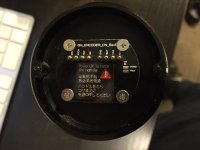
Keylight, I'm not sure what kind of wiring you're thinking of, but here's a photo of the detached pistol grip--they labeled the contacts.

I'd probably try to take the gimbal mount off of the two handle and mount it at the end of a jib and cut the wire that connects the mount to the battery and handles. Then I'd splice in a cable (Cat 5 might work) and use the 2 handle down at the operator end of the jib. That's the basic thought.

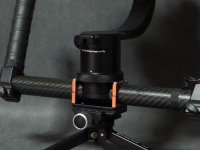
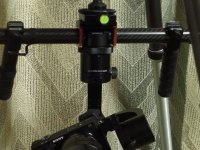
I'm seeing people do some very interesting things with their 2 handle setups. I like the brackets this guy is using to mount it to a QR plate:

1.jpg

2.jpg

3.jpg

These are grabs from this video: https://www.youtube.com/watch?v=DPd7b1Td2KA
 
Last edited:
First announced over 1/2 a year ago, yet to actually be seen actually operating, a mock up of the vaporwarish Bluetooth remote makes an appearance in this video:

 
An update on my H2: I've spent a few hours on PID settings and so far my H2 pretty much goes haywire no matter what I do, even when I restore the factory settings. Pilotfly tech has been very responsive and helpful, but it's still a massive headache.

If I could find some rhyme or reason in these settings it would be a huge help, but nothing seems to correspond with the results I see people get in other videos. I zero out the PID and inch up values like the "power" and/or P or D, I also tried "auto" in different ways, tried using the recommended settings, default settings, factory settings, changing each in small increments one value at a time, pretty much anything I can think of. The problem is that my results seem completely random no matter what I do, rather than making gradual changes in a predictable way. Also, it keeps banging the camera around, beeping like crazy, YAW motor is overheating...you get the idea.

Any advice would be much appreciated.
 
Not good to hear, but it is good to know that Pilotfly is at least being responsive. Perhaps you got a bad unit? Not sure if this will help, but here's a video from Dave Dugdale on the original Pilotfly where he goes step by step into tuning, which settings to tackle first, second, third.....

 
An update on my H2: I've spent a few hours on PID settings and so far my H2 pretty much goes haywire no matter what I do, even when I restore the factory settings. Pilotfly tech has been very responsive and helpful, but it's still a massive headache.

If I could find some rhyme or reason in these settings it would be a huge help, but nothing seems to correspond with the results I see people get in other videos. I zero out the PID and inch up values like the "power" and/or P or D, I also tried "auto" in different ways, tried using the recommended settings, default settings, factory settings, changing each in small increments one value at a time, pretty much anything I can think of. The problem is that my results seem completely random no matter what I do, rather than making gradual changes in a predictable way. Also, it keeps banging the camera around, beeping like crazy, YAW motor is overheating...you get the idea.

Any advice would be much appreciated.

Was the H2 working well before using the software? What was it that made you want to change the settings from the original out of the box settings?
 
At first I used a light lens and it worked great. The payload was about 950 grams. Then I switched to a heavier zoom lens, then another, both around 1300 grams, but well below the 2200 gram max limit. At the third lens I got a lot of vibrations and decided it was time to set it up right.

My Yaw axis is overheating and generally acting nuts. In the SimpleBGC GUI, it's spinning out of control. My working theory is that there's a defect with that motor.

At present, I may still just barely be able to use it at 950 grams, though that YAW motor gets pretty hot. Pilotfly tech support has been very fast to respond so I'll let you know if we work it out. The Dave Dugdale video that Keylight posted is actually pretty helpful, by the way.
 
The overheating can't be normal. It could very well be a defective unit. On their facebook group, a person is having the exact same problem as you and according to him, his unit is "still unusable" because it freaks out on him. Hopefully they help you find a solution or replace your unit. I think Dave Dugdale mentioned he had an issue with his and customer support techs helped him solve the issue. Thanks again for providing us with the information.
 
Update: I've been corresponding with Pilotfly tech support and we've determined that my H2 needs to be sent back for fixing. It's a crappy situation, but made infinitely better by their tech support.

Generally people's H2 experiences have gone one of two ways: Either it works great out of the box and they never touch the PID settings, or they're stuck in hours, days, weeks of PID settings hell, weird glitchy behaviors abound. And I have two theories: One is that people who fly with less than 1000 grams payload tend to fall into the former camp (like Dave Dugdale) and that Pilotfly may have greatly exaggerated the max payload of 2200 grams. The other theory is that Pilotfly is sacrificing quality control to get these out to market asap, and there's just a lot of duds being sold to folks.
 
And I have two theories: One is that people who fly with less than 1000 grams payload tend to fall into the former camp (like Dave Dugdale) and that Pilotfly may have greatly exaggerated the max payload of 2200 grams. The other theory is that Pilotfly is sacrificing quality control to get these out to market asap, and there's just a lot of duds being sold to folks.

I've been wondering about the true weight limit of the H2. The motors they are using look to be very similar in size to the motors on the Came-TV Optimus, which has a much lower weight limit the weight limit. Of course, there's no way to tell if the motors have the same weight limits from photos, but your exaggeration theory could hold some serious weight (even if the gimbal might not be able too). I'd actually ordered the Came-TV Optimus and later cancelled it given the weight limits, but your experience is making me wonder a bit more about this.

I saw a comment on a youtube video from someone who wrote:

I need urgent help on getting the factory profile back for the shoot tomorrow...

I have connected H2 into PC using simple BGC GUI v2.59 b5


Clicked "AUTO" button for Motor COnfiguration and the H2 went CRAZY!


Anyone know a fix? PLEEEEEASE!

Any chance you can share a video that shows the problem you're having?
 
There is nothing to tweak on these things when manufacturing. There is virtually nothing to go wrong in manufacturing either. It's bearings, motors, and a very well known set of chips and software. So if is not behaving well, it is the design. Your thoughts about it being an exaggerated load rating may be the correct diagnosis.

If the motors are all the same size, it would make sense that the yaw would overheat first as it has the heaviest load of all the motors.

The H2 has a load rating 2x the rating of the CAME TV Single (2.2 vs 1.1kg), yet they weigh the same (1.2kg). It makes one think something is amiss.
 
Keylight, here's a video of the issue I'm having. https://vimeo.com/169327863 (password: H2)

Tech support says the problem is that I downgraded the firmware, and now I need to send it back to the factory. I'll point out that in the video you can see I'm running the most up-to-date firmware on both the GUI and my H2, but maybe there's something I'm missing. At any rate, there's very little documentation out there and there's a ton of ways for things to go wrong, and a small slip up can render the whole unit unusable. I'm running a small simple setup, well under the weight capacity in a controlled environment, haven't taken it out on a shoot yet. At a certain point, equipment has to be able to work, and in real world circumstances under pressure where things can go wrong, and you shouldn't need advanced engineering and software degrees to get basic functionality. In the video you can see the dials spinning--my actual camera was spinning that fast! Don't want that happening on the job.

That said, I haven't given up on the H2 yet. If I can get it working with an under 1kg capacity, this can still be a great piece of equipment. I can fit the entire pistol grip setup in a 10" x 5" x 2" compartment in my camera bag which is just incredible! That said, if my theory about weight capacity is correct, that puts it on a level playing field with the Came Optimus. And if the H1 vs Came Single reviews are any guide, people have less issues with the Came gimbals.
 
Back
Top