Picture is not always consistant

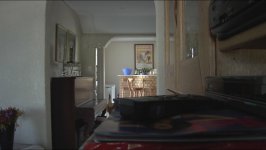
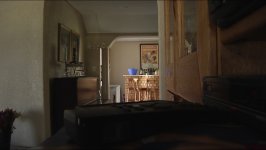
I find that the HVX in my hands does not give a consistant picture between various setups. I find even outdoors all my shots feel very "milky"

Below are 2 shots shot with the same settings, only thing differing was perhaps an iris adjustment and a white balance. Please note the "milky" feel to both pics.

My custom settings that I have saved to SD card are as follows:

Film Cam
Synchro Scan 180.0d
Detail Level +3
V Detail Level +1
Detail Coring +4
Chroma Level -4
Chroma Phase 0
Colour Temp 0
Master Ped -7
A. Iris Level +2
News Gamma OFF
Gamma Cinelike V*
Knee AUTO*
Matrix Cine Like
Skin Detail Off

* Sometimes I will switch between B.Press and Cinelike D, with B.Press I try to adjust the knee but it does not stretch as far as I want it to.:)

Anyway are my settings anything to worry about, I am trying to reduce some of the noise and overall "murkiness" of the shots as the contrast is not quite there??
Shooting to 16GB P2 card in either 50fps 720P 25PN or 1080i 25P


Thanks for the advice!
 

Attachments
  • Pic 1.jpg
    Pic 1.jpg
    155.9 KB · Views: 0
  • Pic 2.jpg
    Pic 2.jpg
    164.5 KB · Views: 0
Last edited:
thats white balance. The picture looks fine.

What exactly are you looking for in the image?
 
1189182132.jpg


I color corrected the Milky one to looks as close to the warmer one, as i could in 3 minutes.... as im on a 5 minute break.

with a couple more minutes you be hard pressed to tell them apart.
the Milky one is the image on the Right side, the imageo nthe left is the warmer of the two origionals.
 
What are you using for a monitor?
To me your settings loook like the blacks would be crushed.
Do you have a waveform monitor?
- Lenny
 
Turn your chroma up some. You're zapping a lot of the color out of the image with it way down there in the -'s. It's personal preference, but try it with your chroma at 0 and see if you like it better.

Jason
 
Thanks guys!! :-)

Ok those pics were shot 1080i 25P using available light. I am just not happy with the whole picture, it seems soft and milky. Look at the wall it lacks any form of detail. I was just expecting more dynamic range and a very clean image.

Noise is prevalent even in outdoor shots which is a bit sad, but I am not here to rant I am here to find out if my shots are consistant with everyone else...??

I thought that my preset could be causing it is the same with most things. I am looking for a nice contrast and a clean image to work from. I heard the chroma value increases noise...?

Thanks for the help!
 
Chroma *can* increase noise if you take it up too much. But, if you think of 0 as the default... -4 is zapping a lot of the color out of the image. likewise +4 chroma would add a lot of color to the point (depending on the situation) that it could introduce more noise into some of the really saturated colors.

You just need to practice, practice, practice. It is quite doable to get clean, relatively noise free images that are sharp, detailed, etc, etc.

You just have to practice a lot, and light properly. It's certainly not meant to be a point and shoot anything kind of camera that you can turn on and get beautiful imagery with everytime.

Also, (depending on what you are monitoring your footage on) you shouldn't necessarily trust your computers lcd screen to tell you how much noise is/isn't in the picture.

Jason
 
Well I was hoping the LCD's were showing a bit more noise than usual, I feel a bit better now.

I have shot a lot of camera's except the HVX I do not have more than a month on it and I am happy so far. :D I just want to get the optimal out of it, I should have an experienced DP (on film, video, & HD) help me out with my next shoot. I have a few years experience but not 20 years like him ha ha ha.

I know there is no ultimate setting for any camera, it is all subjective if you like it then you like it you know? I just want to get a feel for what other users are doing with the camera setting wise. What do you guys mainly shoot on (B.Press, Cine D, Cine V, Spark...) nad what do you guys tweak the most?

I really appreciate the feedback.

Can I ask how one restores the camera to it's default factory settings. I want to clear everything to day 1 and start fresh? Is this a bad idea? The little reset button does not do much.

Thanks again!
 
You can restore scene files individually by going into the scene file and choosing 'init' I believe... it's been a while since I've done that. You can also restore everything to the factory default if you want... Refer to your Manual :)

I use CineV alot.

Timur is part of the B.Press crew.

From the factory default... some variation of (I think F2) that I used in the past when I was first toying with the camera gave clean results.

Laer,
Jason
 
Viewing on camera LCD and PC LCD...

this is why youre seeing noise and a lackluster picture. The hvx200 got a bad rap for producing "more" noise than other cameras, in a way yes it is noisier, but its not really more, its just different. its more chroma noise, where other caeras have Luma noise.

watch your footage on a real moitor you will be surprised by how much better it looks.


Timur is part of the B.Press crew.

FOREVER!!!!!!
 
Thanks Jason.

I want to reset all the camera's settings not just scene files. Looked at the manual and on page E-125 there is the heading: System Resetting.

I am not having the problems as described by the manual, and it says the reset does not clear all settings, I want this pupppy to reset to the the first time I used it.:D
 
Back
Top