Photozoom Uprezzed Grabs

Bigmagic

Well-known member
I uprezzed a couple of grabs using disjecta's photozoom method. I can't say I have the hang of it yet but I'm getting better. I increased the strength and intensity of the s-spline settings to get this result. I'm still experimenting with the settings. If disjecta would chime in here with his s-spline settings it would be much appreciated.

01.jpg
01uprezzed.jpg
52.jpg
52uprezzed.jpg


I hope the difference is obvious or I'm really on the wrong track! lol
Still learning the camera so excuse the composition etc.
 
I shot the footage in 24pa letterbox with a -6 pedestal 0 detail and -1 iris. I did not white balance. I put the footage in Premiere Pro and exported to tiff files just as disjecta suggested on a 720 x 480 timeline. I ran the batch in Photozoom to 720 x 640 just as disjecta suggests. With the standard setting there was very little difference so I did it again adjusting the s-spline settings hence the sharpening you didn't like. Thanks the response and I will try with other subjects and settings.

I am not sure at this point if the results are worth it except for small projects. If I were making a feature they could probably do something similar on the blow up with far better results. I am intriqued by the technique and nobody does it better than disjecta.
 
Correct me if I'm wrong, but I thought this technique was supposed to give these kinds of results?

The two photozoomed grabs are VERY detailed, which looks alot better to me than the two source grabs. Am I missing something?
 
I think Eyebite's point is that he prefers the softer images. I like the second image softer myself, I appreciate all the feedback! I am going to shoot some footage and burn it to dvd and play it back on my bigscreen which is the real test to me. I am simply trying to learn how to do it and explain anything I find out to those who may be struggling with it. Thanks all for the input!
 
I agree. Your computer monitor isn't really going to give you the correct resolution.

But the images look good to me. I'd personally go with the photozoomed footage over the original, but that's just me.
 
hmm, i wanna try this.

anyone know how to export an image sequence from vegas in a lossless format rather than jpeg?
 
I found out what caused the uneven jagged edge on the middle support post in the first uprezzed jpg. The unsharp mask radius setting was too high.
 
I personally have found that a slight unsharp mask gives very similar results and is much faster, and comes with most NLE's. This one was done in photoshop, but same principle. I took your original "soft' uprezzed file, applied the unsharp filter. I tried to match the results you got with photozoom, swtiching back and forth from my browser to Photoshop. here is what I got. Personally I don't think photozoom does much more than what you can already do with what you have.

Here is the original
01.jpg


Here is your Uprezzed
01uprezzed.jpg


Here is the original but with an Unsharp mask applied
sharp.jpg
 
Interesting. I've wanted to do this for a while. What is the render time on this? And is it a tedius process?

-rook
 
Rendering didn't take me very long I only rendered around 280 frames so it went in under a minute or two. I have a Dual Processor Pentium from Dell the only render problems I have are with some Magic Bullet effects.

scharky I still see a little more sharpness in the uprezzed version but its very close! I'm definately going to play with the unsharp mask in Premiere if it has one.
 
Definitly do. I have done some extensive tests with photozoom vs unsharp mask, and for the most part I can get them pretty close. I could have gone a little sharper with the mask as well, but I felt the photozoom one was a llittle to sharp and edge enhanced for my tastes. but that's what it boils down to, personal taste.
But you also have to remember, renderng 280 frames means, you first have to export them as individual tiff files, then render them, then recompile them. Wheras, using the unsharp mask will let you apply it directly to the clip, with no rendering at all, except for the final render.
I personally don't think Photozoom is worth the effort, but that's just me.
 
scharky, post some before and after examples of your unsharp mask tests.

Love to see them.

-rook
 
Pretty much any grab that I have ever posted has some unsharp masking applied. I usually shoot pretty soft, maybe at -2 or so, and then use the unsharp mask to bring it back up to taste.
 
I still think the photozoom is a tad sharper, but it also involves a monumental effort - especially if you are dealing with a feature film - it would take forever! I have never used the unmask filter before, but I guess now I have something else to test. Thanks Scharky!
 
Being sharp and looking good are two totally different things. If you wanted to you could make it as sharp as can be, I personally feel that the uprezzed photozoom shots are way over sharpened, but that is just my preference. Of course both photo zoom and the unsharp mask will allow you to control how sharp they are. I believe that photo zoom may be better in some situations, but from my experiences not in all situations, and unless you are comparing frame by frame, there would not be a single person that could tell the difference in a moving image. But don't let me discourage anyone from trying this out for yourself. Experiement, that is the way you find out what works best for you.
 
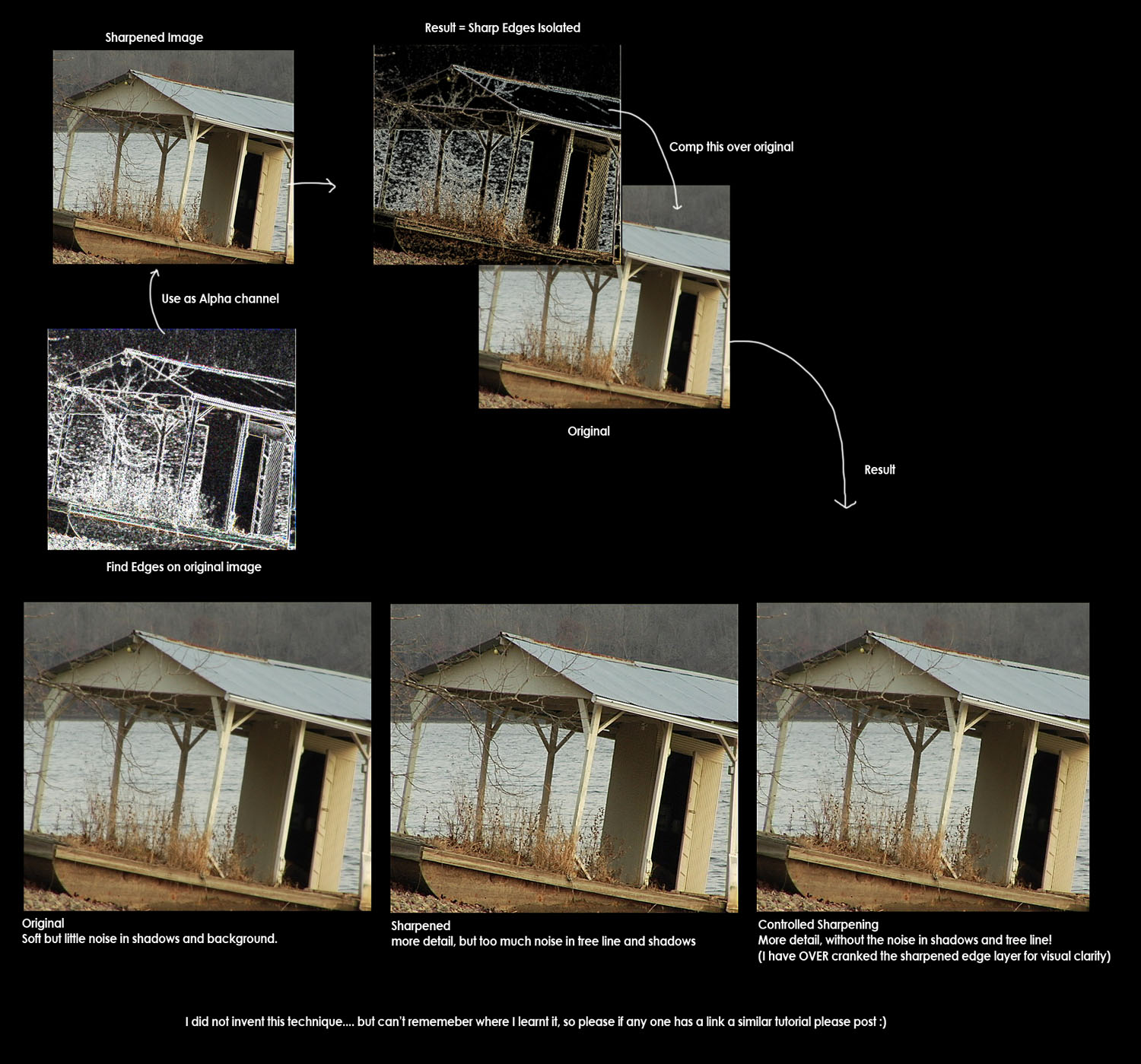
Sharpening without sharpening... bruce lee style

Sharpening without sharpening... bruce lee style

Well sorry that I have lurked for sooo long without posting... but thought I'd share this with yall.

edge_sharpening.jpg


The result is VERY different from using the default PS or AE edge sharpening. You can aslo now tweek the sharpening levels on the edge layer and the lower (original) layer.

L8tr
 
Moblur what NLE did you use and what were your methods. I'm interested in trying different methods.
 
I did this in photoshop, but also use it in Afterfx when I am doing CC work and general image enhancement. I imagine however you could recreate this in any NLE that has a find edge plugin, and the ability to set channels from one elemnt to another (in this case the R, G or B, channel of the find edges layer to the alpha of the sharpened).

Out ;)
 
Back
Top