Perspective Resolution Problem

Kuhndog

Member
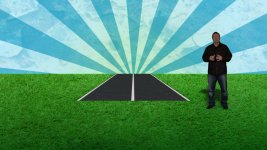
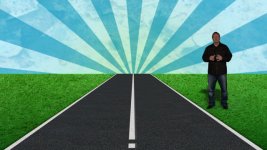
OK, I made a road in PS for a project in AE. It looks fine in AE on 1/2 res but it cuts the road in half when I view in full res. Please take a look and let me know if you have any ideas. This is a 3D project but I have Quadruple checked and there are no layers cutting the road off. I have turned all of the layers off multiple times and the clipping still happens even if the other layers are not turned on. Please see pics. 1/2 Res, then full Res.

Thanks for any help.

-KuhndogHalfRes.jpgFullRes.jpg
 
Does it cut off in the viewer when you go 50%=>100% or do you mean only on export ?

What format is the road? .psd ?

Does it cut off if you change the layer stack order ?

Try precomping the layer

It's a long shot, but do you have the collapse transformations button activated on the layer
 
In the viewer and on export. The road is a .psd. Layer stack order does not effect it. Tried to PreComp as well. This one is frustrating. Thanks for the input though.
 
Try exporting a .tiff from photoshop , and swap the .psd layer out

Clear the AE cache before you try it

Also try swapping in some other layer asset (instead of the road) , so see if the behaviour is the same for the cut off
 
When you do 3d in AE layer stacking is not really going to do much.

Are you switching the camera modes from Front to Camera or Active Camera? it looks almost like the road is rotated at by a couple degrees and you might be switching between camera modes. Make sure the road is rotated 90 degrees and not 89.

Can you also include some of your settings in the screen caps and not just the viewer.
 
yeah, I think Mr. Blue is right. You are probably changing the camera, not the res. Is the road a 3d layer? Like Mr Blue said, you degree maybe off on either the road or grass.
 
He said that if the other layers are off (grass, too, I'm assuming), it still cuts it off. I don't think it's a rotation thing.

Try this (as odd as it sounds). Make a new adjustment layer and drop it between the road and grass layers. AE has a weird rendering thing that will sometimes fix.
 
Try this (as odd as it sounds). Make a new adjustment layer and drop it between the road and grass layers. AE has a weird rendering thing that will sometimes fix.

I thought about this, but the thing that doesn't fit in this puzzle is changing the resolution. Breaking the render order with a 2d object should still show in half and full rez.

It actually looks like the guy is the 2d layer (acting the same as the adjustment layer) breaking up the render order. Still not sure why changing the rez would change this, but to test it drop the guys layer below the road. Place the road as the top most layer and see if it persists. or change the guy to a 3d layer.
 
True, true ...

So if it's specifically a resolution thing, is it possible the project / comp size is too big? I know there are limitations, so maybe at half res it still falls below the limit, but at full resolution it's too big?
 
It might be, I've seen small details get lost at half rez and some layers not function properly, but nothing as large as the second half of that road. That's why I was asking for him to post more screen shots of the settings so we can dissect it more. Hope he gets time to do that, my curiosity has now been peaked.
 
Back
Top