
Navigation
Install the app
How to install the app on iOS
Follow along with the video below to see how to install our site as a web app on your home screen.
Note: This feature may not be available in some browsers.
More options
You are using an out of date browser. It may not display this or other websites correctly.
You should upgrade or use an alternative browser.
You should upgrade or use an alternative browser.
People changing clothes/look in the shot
- Thread starter hjrt
- Start date

Michael Carter
Veteran
If the BG is CG, your set would just be the man & table & handle in front of green...
Key in the person or people. When you shoot them, use a system to keep them aligned, as far as where their hands are, which way they're facing, etc... I'd put some static cling material on a monitor and draw sharpie alignment outlines on it. So a person moves "into" the position where the change comes... then change wardrobe or talent even, and align them where that "out" point was - then they react to the change.
When you assemble it, use the puppet tool to align things perfectly.
Note the wind blows the guy's hair & clothes at the change - use that and maybe some post camera shake to blur the people so the transition is blurred. Think about masks in motion to change wardrobe, like from the cuff, up the sleeve, and the full top - even if that's a few frames, it should still "read" as a transition and not a blink.
Hope you have good artist & renderer for the set - the example looks really slick. Realistic sets are hard to pull off.
Key in the person or people. When you shoot them, use a system to keep them aligned, as far as where their hands are, which way they're facing, etc... I'd put some static cling material on a monitor and draw sharpie alignment outlines on it. So a person moves "into" the position where the change comes... then change wardrobe or talent even, and align them where that "out" point was - then they react to the change.
When you assemble it, use the puppet tool to align things perfectly.
Note the wind blows the guy's hair & clothes at the change - use that and maybe some post camera shake to blur the people so the transition is blurred. Think about masks in motion to change wardrobe, like from the cuff, up the sleeve, and the full top - even if that's a few frames, it should still "read" as a transition and not a blink.
Hope you have good artist & renderer for the set - the example looks really slick. Realistic sets are hard to pull off.

hjrt
Active member
Thanks a lot!
Yes indeed, my set is only man and table and the rest is green screen. I am partnering up with a pro 3D artist so I am confident the 3D result will look great. Now of course we should match the lighting in 3D an real life perfectly, which will probably not be easy.
What exactly do you mean by a 'system to keep them aligned'? I was thinking of simply comparing it with a screenshot of earlier footage (or draw on an overlay laid over the monitor?). I already figured that there would be some action necessary to be able to hide the transition, but it is good that you think it is possible with kind of subtle movement (rather than something like: jump in the air and turn around).
Yes indeed, my set is only man and table and the rest is green screen. I am partnering up with a pro 3D artist so I am confident the 3D result will look great. Now of course we should match the lighting in 3D an real life perfectly, which will probably not be easy.
What exactly do you mean by a 'system to keep them aligned'? I was thinking of simply comparing it with a screenshot of earlier footage (or draw on an overlay laid over the monitor?). I already figured that there would be some action necessary to be able to hide the transition, but it is good that you think it is possible with kind of subtle movement (rather than something like: jump in the air and turn around).
Michael Carter
Veteran
Yes, I meant the monitor overlay, which I've found really handy. I use inkjet static cling sheets, which you can use a sharpie on.
I've had shots where the perspective of the shot was really important, so I made clings of my previz comps in advance and had them in a binder with the storyboards. Really handy.
Like this shot, I used a roll of seamless paper so we didn't have to key the runway. (We did want a sort of cartoony/illustrated style for this so paint rollers and seamless worked great). The previz also made it clear I'd need to use forced perspective on the painting, we used a chalk line and everything was at a slightly converging angle. Worked really well.
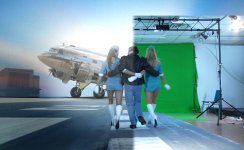
I've had shots where the perspective of the shot was really important, so I made clings of my previz comps in advance and had them in a binder with the storyboards. Really handy.
Like this shot, I used a roll of seamless paper so we didn't have to key the runway. (We did want a sort of cartoony/illustrated style for this so paint rollers and seamless worked great). The previz also made it clear I'd need to use forced perspective on the painting, we used a chalk line and everything was at a slightly converging angle. Worked really well.
hjrt
Active member
Looks impressive I must say. Did the forced perspective not cause a strange feeling in the sense that the actors would seem to walk faster than they are? (Apparently not, because otherwise you would not have done it this way)
Will make sure to have the 3D set completely done (at least the geometry) before shooting. Would be ideal to have some kind of live keying on set I guess. Now to rent a hardware mixer for just that is a bit too much maybe, but maybe some software applications can be looked into. A few years back, Adobe had OnLocation, with which such a thing would be possible I guess.
Will make sure to have the 3D set completely done (at least the geometry) before shooting. Would be ideal to have some kind of live keying on set I guess. Now to rent a hardware mixer for just that is a bit too much maybe, but maybe some software applications can be looked into. A few years back, Adobe had OnLocation, with which such a thing would be possible I guess.