
Navigation
Install the app
How to install the app on iOS
Follow along with the video below to see how to install our site as a web app on your home screen.
Note: This feature may not be available in some browsers.
More options
You are using an out of date browser. It may not display this or other websites correctly.
You should upgrade or use an alternative browser.
You should upgrade or use an alternative browser.
Pegasus II mini DV seadicam + GH1
- Thread starter jpygmy
- Start date
Hey guys!
Just finished the first test shoot and over all I have to say the Pegasus II is a very sweet stabilizer for the money. I literally just finished so I will try to find a decent raw clip to post on vimeo. The thing I hate about AVCHD is removing pull down takes time but I'm hoping the footage captures some of the potential uses for the Pegasus II.
Basically, today I just wanted to do some quick tests. It took a little while to figure out how to configure the rig partly due to the English manual was a little confusing. I may post a simpler break down of instructions on how to put it together. Once, I figured it out I was like, "Duh!"
So hopefully I'll try to tell the manufacturer to get some clearer English instructions.
I wanted to do the lowest common denominator for the shoot. So I set the GH1 in auto focus and of course used the stock lens wide open. Impossible to focus on the stabilizer without it making your footage a little buoyant looking with the gimbal being so sensitive.
I also work with youth at a community arts center here in Philly which is also why I wanted to set the GH1 on auto to sort of bench test and see if in untrained hands how well is the auto focus on the GH1 as well as how well the stabilizer works for someone who just picked it up for the first time.
The footage shot was a rehearsal of a B-Boy crew (break dancers) and a few of them were skaters in training so we shot some footage of one of our youth instructors and a few novice skaters.
Since it will probably take a little while for me to post the footage. Maybe sometime late tonight. I will say for those who are interested in picking up a "mini steadicam" it works pretty well with the GH1. There are a few issues which I'll explain later. I've used a steadicam and with a steadicam you have much more control and ability to finesse your shot. Obviously, there's a huge price difference. I have not used the merlin so I can't make any comparisons.
However, with a little practice and a little guidance from your other hand you can still get some pretty nice shots with it and it doesn't weigh a ton and can fit in my messenger bag with no problem.
I should be posting a little more in depth review on my componentgeek blog but I wanted to just provide users here with some immediate information on the rig for those who need something now.
I think I also mentioned that if you buy now, UPS has a deal from Hong Kong to the U.S. and Frederic Cheung who is the main distributor for Wondlan was able to ship me the Pegasus II on Saturday and I received it on Monday. So I'd hop on that deal-- think shipping was like $39 but don't quote me on that because I don't have my paperwork in front of me to confirm.
Skater and B-boy raw footage uploading soon. I'm not going to fancy it up, I'll just pick a decent clip or two to remove pull down and to upload. I'll also leave the real audio that was recorded off the camera mics so people can get a sense of the camera mics abilities which of course aren't great but can be usable if you are in a bind.
Just finished the first test shoot and over all I have to say the Pegasus II is a very sweet stabilizer for the money. I literally just finished so I will try to find a decent raw clip to post on vimeo. The thing I hate about AVCHD is removing pull down takes time but I'm hoping the footage captures some of the potential uses for the Pegasus II.
Basically, today I just wanted to do some quick tests. It took a little while to figure out how to configure the rig partly due to the English manual was a little confusing. I may post a simpler break down of instructions on how to put it together. Once, I figured it out I was like, "Duh!"
So hopefully I'll try to tell the manufacturer to get some clearer English instructions.
I wanted to do the lowest common denominator for the shoot. So I set the GH1 in auto focus and of course used the stock lens wide open. Impossible to focus on the stabilizer without it making your footage a little buoyant looking with the gimbal being so sensitive.
I also work with youth at a community arts center here in Philly which is also why I wanted to set the GH1 on auto to sort of bench test and see if in untrained hands how well is the auto focus on the GH1 as well as how well the stabilizer works for someone who just picked it up for the first time.
The footage shot was a rehearsal of a B-Boy crew (break dancers) and a few of them were skaters in training so we shot some footage of one of our youth instructors and a few novice skaters.
Since it will probably take a little while for me to post the footage. Maybe sometime late tonight. I will say for those who are interested in picking up a "mini steadicam" it works pretty well with the GH1. There are a few issues which I'll explain later. I've used a steadicam and with a steadicam you have much more control and ability to finesse your shot. Obviously, there's a huge price difference. I have not used the merlin so I can't make any comparisons.
However, with a little practice and a little guidance from your other hand you can still get some pretty nice shots with it and it doesn't weigh a ton and can fit in my messenger bag with no problem.
I should be posting a little more in depth review on my componentgeek blog but I wanted to just provide users here with some immediate information on the rig for those who need something now.
I think I also mentioned that if you buy now, UPS has a deal from Hong Kong to the U.S. and Frederic Cheung who is the main distributor for Wondlan was able to ship me the Pegasus II on Saturday and I received it on Monday. So I'd hop on that deal-- think shipping was like $39 but don't quote me on that because I don't have my paperwork in front of me to confirm.
Skater and B-boy raw footage uploading soon. I'm not going to fancy it up, I'll just pick a decent clip or two to remove pull down and to upload. I'll also leave the real audio that was recorded off the camera mics so people can get a sense of the camera mics abilities which of course aren't great but can be usable if you are in a bind.
Last edited:
Ouch! What a shame. Muddy B-Boy footage!
I got severe mud in the footage damn.
Weird thing is it's not as muddy until I send it out to compressor for vimeo. That's where it's mudville!
Vimeo is doing a server update this morning so no uploads until after the morning. The Pegasus II did a real nice job especially because they were dancing off the cuff and I had to anticipate their moves.
Muddy footage will upload shortly.
I got severe mud in the footage damn.
Weird thing is it's not as muddy until I send it out to compressor for vimeo. That's where it's mudville!
Vimeo is doing a server update this morning so no uploads until after the morning. The Pegasus II did a real nice job especially because they were dancing off the cuff and I had to anticipate their moves.
Muddy footage will upload shortly.

Martti Ekstrand
Veteran
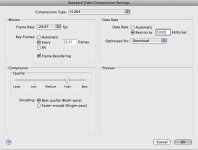
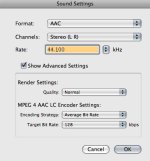
Thanks Martti for that. I had all those settings set just as you have it but instead my frame rate is set at 24 with keyframes at 24 too.. Hmm..
Once vimeo is back up I'll post the muddy version and then I'll try to update my settings with frame rate at 29.97 and keyframes at 29.97 and see if there is a difference. I'm also assuming you have frame controls in compressor set to off. If you have it on let me know what were those settings and I'll try it again.
-G
Once vimeo is back up I'll post the muddy version and then I'll try to update my settings with frame rate at 29.97 and keyframes at 29.97 and see if there is a difference. I'm also assuming you have frame controls in compressor set to off. If you have it on let me know what were those settings and I'll try it again.
-G
Okay the footage is up you can see details about my findings here:
http://www.componentgeek.com/
Strange I did the recommended settings you gave me and I still see more mud then in the original footage. Oh well, I'll also try to shoot at 720/6op to see if that helps.
Overall had fun using the Pegasus II and I'm sure to use it on a number of my gigs. I got my test footage coming. It's just that the pull down removal and then encoding to H.264 takes like forever!!!
http://www.componentgeek.com/
Strange I did the recommended settings you gave me and I still see more mud then in the original footage. Oh well, I'll also try to shoot at 720/6op to see if that helps.
Overall had fun using the Pegasus II and I'm sure to use it on a number of my gigs. I got my test footage coming. It's just that the pull down removal and then encoding to H.264 takes like forever!!!
Last edited:
Sounding pretty good...
Would you be able to post some basic moves like walking forward and backward (at normal, fast and slow speeds) for a few seconds, turning, panning, tilting and maybe even the good old jumping test?
I'd like to see how it performs under controlled circumstances. The main issue I am having with my own is quick, jerky side to side movement when I walk - it seems this type of design would minimize this issue.
Thanks for all the detail and work so far, I really appreciate it!
Would you be able to post some basic moves like walking forward and backward (at normal, fast and slow speeds) for a few seconds, turning, panning, tilting and maybe even the good old jumping test?
I'd like to see how it performs under controlled circumstances. The main issue I am having with my own is quick, jerky side to side movement when I walk - it seems this type of design would minimize this issue.
Thanks for all the detail and work so far, I really appreciate it!

commanderspike
Carbonite Member
Mark Hensley in the Panasonic GH1 group on Vimeo has this one and seems happy with it. It certainly has the best looking gimbal of all low cost options.
http://balvanzenterprises.com/MiniDV Steadycam.html
Here's Mark's film where he uses it: http://vimeo.com/groups/gh1/videos/5519364
Wow that floats well, very smooth.
I noticed Mark's film was shot with the kit lens, I presume with OIS turned on. I wonder if these low cost steadycams work as well with the GH1 and a heavier, none-OIS lens such as my Zeiss 85mm F1.4 or Leica 25mm F1.4. Then I might consider it... would be great.
Martti Ekstrand
Veteran
Strange I did the recommended settings you gave me and I still see more mud then in the original footage. Oh well, I'll also try to shoot at 720/6op to see if that helps.
My bad, if you shoot 1080 with the NTSC version you should use 24 fps. Here in PAL land we only have to worry about one frame rate - or rather not worry about it actually - so I didn't think about that. That said with h.264 and a 5000 kbit/s limit you will always add macroblock compression artifacts to a 1080 file - no way around it and doesn't matter if your source is a GH1, Red or 35 mm movie camera.
But pretty please don't mix this up with the GH1 'mud' artifact, it's a similar but not the same error.
Regarding the Pegasus it looks a lot smoother than if you had gone handheld but most of the time it bank either right or left - did you force it to look downwards by the gimbal?
Eddy Robinson
Well-known member
Okay the footage is up you can see details about my findings here:
http://www.componentgeek.com/?p=166&preview=true&preview_id=166&preview_nonce=6398841926
FYI, that link currently gives a wordpress error about not being able to view draft pages.
Good point. I'll make note of that. I think the challenge is identifying what is GH1 mud and what is macroblock compression artifacts. Going from AVCHD, then removing pull down and then encoding to H.264 or MPEG2, it's really hard to see what is mud from the GH1 and what is macroclock artifacts from pull down or compression.But pretty please don't mix this up with the GH1 'mud' artifact, it's a similar but not the same error.
Yeah, we had to tilt it slightly and move the plate forward in order to capture the floor work. I mean literally there were moments where I was leaning or crouching down, it's kinda nice to know that for the most part you don't see that the camera operator is also moving around to get the shots, it generally looks pretty smooth. The gimbals sensitivity did make it bank left or right so it was a matter of luck as well as getting used to using that other hand to lightly turn the camera to where you needed it to go.Regarding the Pegasus it looks a lot smoother than if you had gone handheld but most of the time it bank either right or left - did you force it to look downwards by the gimbal?
Good idea. I'll do that either tomorrow or Friday.Would you be able to post some basic moves like walking forward and backward (at normal, fast and slow speeds) for a few seconds, turning, panning, tilting and maybe even the good old jumping test?
Thanks for sharing your thoughts and opinions it's all part of the process. The way I see it the GH1 and others that will be coming out are setting some new trends even indisystem has just released a few interesting products including a fig rig type product called the indisquare and a monopod with follow focus called the indirails pro mp. Interesting stuff...
gmoe, can't view anything at that link. We get an error about draft pages.
EDIT: I got to it by just going to you website's main page. Watched the video. Honestly, this video doesn't really show how good or bad the Pegasus is. The main purpose of a a Steadicam is to walk around with a camera. Meaning tracking forwards and backwards, even running, and even side to side dollying-type motions. What you are showing here could easily be shot the same or even better with a simple shoulder mount.
EDIT: I got to it by just going to you website's main page. Watched the video. Honestly, this video doesn't really show how good or bad the Pegasus is. The main purpose of a a Steadicam is to walk around with a camera. Meaning tracking forwards and backwards, even running, and even side to side dollying-type motions. What you are showing here could easily be shot the same or even better with a simple shoulder mount.
Last edited:
gmoe, can't view anything at that link. We get an error about draft pages.
EDIT: I got to it by just going to you website's main page. Watched the video. Honestly, this video doesn't really show how good or bad the Pegasus is. The main purpose of a a Steadicam is to walk around with a camera. Meaning tracking forwards and backwards, even running, and even side to side dollying-type motions. What you are showing here could easily be shot the same or even better with a simple shoulder mount.
This made me think of this music video: http://www.youtube.com/watch?v=1mt3vZHDiM8
You might want to look there for some example shots to try.
Sorry for the lost link.. you can get to the reviews via componentgeek.com
Everyone's comments and suggestions are well noted thank you. There are always challenges in doing these kinds of reviews. To post a full and complete review or to piece meal it out. Because of time constraints it's broken into pieces but also it allows for a bit of a dialogue and interaction and I'm always open to suggestions by folks here.
Other footage with the more traditional tracking shot stuff just didn't get posted yet because I'm still trying to figure out work flow with AVCHD and the best way to minimize muddy footage as well as compression artifacts. Coming from DVCPro HD and even XDCAM working with AVCHD is a big pain and a much longer process of workng so things are posting a little slower than I anticipated.
I think my personal motto for this week is "I'm still rendering..."
Everyone's comments and suggestions are well noted thank you. There are always challenges in doing these kinds of reviews. To post a full and complete review or to piece meal it out. Because of time constraints it's broken into pieces but also it allows for a bit of a dialogue and interaction and I'm always open to suggestions by folks here.
Other footage with the more traditional tracking shot stuff just didn't get posted yet because I'm still trying to figure out work flow with AVCHD and the best way to minimize muddy footage as well as compression artifacts. Coming from DVCPro HD and even XDCAM working with AVCHD is a big pain and a much longer process of workng so things are posting a little slower than I anticipated.
I think my personal motto for this week is "I'm still rendering..."
Cool this just in... I spoke with Tim Ovel from IndiSYSTEM and we'll be receiving a few of their new products to test out and review including the new indiSLIDERmini Deluxe.. I don't know what other goodies he's going to throw in the mix but should be exciting to test out with the GH1.
Also, based on observations that people have posted here I went through the B-Boy footage and found better examples of the Pegasus II in action hope that helps
Also, based on observations that people have posted here I went through the B-Boy footage and found better examples of the Pegasus II in action hope that helps
Hi gmoe,
I'm wondering if you don't need a little more weight on the bottom of your Pegasus II. It might prevent your stabiliser's apparent tendency to lean to one side or the other. Have you tried the "1-second drop test " shown in the Merlin setup videos that give you the right degree of bottom heaviness?
Thanks for your posts.
I'm wondering if you don't need a little more weight on the bottom of your Pegasus II. It might prevent your stabiliser's apparent tendency to lean to one side or the other. Have you tried the "1-second drop test " shown in the Merlin setup videos that give you the right degree of bottom heaviness?
Thanks for your posts.
Last edited:
Will do! Yes, after I got home I put a little more weight on the Pegasus II and although it made the unit a little more heavy it was much steadier and the camera didn't seem to loosely sway to the right or left. I'd like to try the new weight with our crew of skaters to see if that helps stabilize the unit as they ride on their skateboards. I have some footage that will post shortly where the camera wanders a bit and I think a little more weight will help do the trick.I'm wondering if you don't need a little more weight on the bottom of your Pegasus II. It might prevent your stabiliser's apparent tendency to lean to one side of the other. Have you tried the "1-second drop test " shown in the Merlin setup videos that give you the right degree of bottom heaviness?
Just a side note--
And I may post this on a new thread but after a day in a half of figuring out NeoScene I got much, much better results. I was so unhappy with the compression initially but it looks to me that when you got a lot of movement choosing Prores is your best bet for clean footage when doing pull down and not the Cineform codec. The file size is ginormous but I can say that it is worth it and it is now possible to shoot with the GH1 with lots of dance movement. I've re-uploaded the footage and it's so much cleaner than before. Whew!
Yes, I've just finished posting a few more clips. Here is one that shows the unit weighted down more as I track one of our students who gives a tour of our community center. There's also some comparison footage to show the difference between the weighted footage and the footage shot earlier during the week on vimeo and my componentgeek blog.How is the Pegasus after a few days of use? Did you get it weighted better, perfect your technique, etc? Do you have any more footage to share? Thanks a lot for sharing your experiences.
The skater footage was just horrible so I only put a few examples to show what happens when you don't balance the unit and weight it down properly.
I could not do the zero gravity test properly. I actually think the Pegasus II needs a little more weight with the GH1. I might be wrong on that one and I'm talking with one of the Wondlan guys to see if they can provide some specifics to help get it just right.
Basically, using all the weights in the system it does help out tremendously and for slow to moderate movement you can achieve some real nice results. I was hoping to have the ability to track someone running or walking fast but it seems that may be out of its league. I have one more final shoot scheduled on Tuesday so between now and then I'm going to figure out if there's any way I can stabilize the unit for faster movement.
Otherwise, despite it's limitations I'm pretty happy with the improved results. it not perfect by any means but I think the Wondlan guys want to do it right so I'm sure they will be seeing what the problems are and figuring out a way to make the unit better especially for use on the GH1.
http://vimeo.com/6123711