Cory Braun
Well-known member
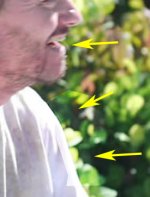
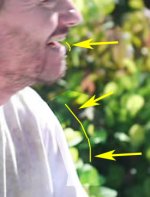
I was on a shoot this morning and ran into a problem when I switched to my 50mm Nikon f/1.8 lens. A duplication of certain parts of my image were visible. It was very faint and at first I thought it might have been lens flare but when I looked closer it was my actors tie/chest showing up. It was definitely a duplication of my actor because as he would move the duplication would move. It only showed up with my 50mm lens and I have used it with my GH1 before with no problem.
I also had an ND9 and ND3 on there so I took off the ND3, thinking maybe that was the problem (doubling up ND filters) but it was still there (and doubling up my ND filters worked fine for my other lenses).
I didn't record any of those shots so I can't post footage or stills but I am wondering if anyone else has experienced this and knows what can be done to fix it. It wasn't the angle I was at either, because I switched to the kit lens and did a very similar shot and had no problems. I am shooting again tomorrow morning so if anyone can help, I'd greatly appreciate it.
Thanks,
Cory
Update (in case you don't feel like reading through the entire thread):
I thought I had figured out the problem, in that it was my UV filter. I was filming a few weeks ago and with the filter on the overexposed areas would be doubled and when I'd take it off there would be no problem.
However, I was filming again this weekend, and noticed the problem again without the UV filter on. I thought maybe it was my ND filters. I took them off and I still had the problem. I then put on a different lens, 100mm, and noticed the problem again with and without filters on it.
Now that it has happened with two different lenses, 50mm & 100mm (both Nikons), I feel like it may be a problem with my GH1. The thing is, it still hasn't shown up on my 200mm or the kit lens. I thought maybe my Nikon adapter wasn't on correctly or that the lenses were not on the adapter correctly, but removing both and putting them back on did not help.
Anyone have any similar issues or any suggestions to what I could do to solve this problem?
I also had an ND9 and ND3 on there so I took off the ND3, thinking maybe that was the problem (doubling up ND filters) but it was still there (and doubling up my ND filters worked fine for my other lenses).
I didn't record any of those shots so I can't post footage or stills but I am wondering if anyone else has experienced this and knows what can be done to fix it. It wasn't the angle I was at either, because I switched to the kit lens and did a very similar shot and had no problems. I am shooting again tomorrow morning so if anyone can help, I'd greatly appreciate it.
Thanks,
Cory
Update (in case you don't feel like reading through the entire thread):
I thought I had figured out the problem, in that it was my UV filter. I was filming a few weeks ago and with the filter on the overexposed areas would be doubled and when I'd take it off there would be no problem.
However, I was filming again this weekend, and noticed the problem again without the UV filter on. I thought maybe it was my ND filters. I took them off and I still had the problem. I then put on a different lens, 100mm, and noticed the problem again with and without filters on it.
Now that it has happened with two different lenses, 50mm & 100mm (both Nikons), I feel like it may be a problem with my GH1. The thing is, it still hasn't shown up on my 200mm or the kit lens. I thought maybe my Nikon adapter wasn't on correctly or that the lenses were not on the adapter correctly, but removing both and putting them back on did not help.
Anyone have any similar issues or any suggestions to what I could do to solve this problem?
Last edited: