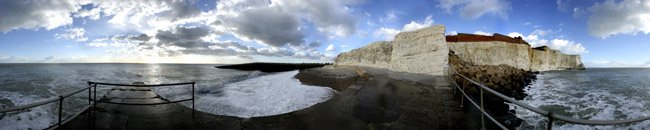
Panoramic Galore!

Cool. Heres my first attempt at using Auto-Align and Auto-Blend in CS3. Pretty powerful tools!

1stPanorama.jpg
 
Watson, you are one well traveled dude. I really like the Creator Lake shots. One of my fav places I've visited. I'm going to Ireland at the end of the month, so I'll have to remember to take some shots like this for panoramic merging. Most of the places I visited were in the era of film and not digital, so not sure if I would be able to have thought of this anyway.

I'm impressed you had the forethought to take shots in all these places to use for different panoramic images. I wish I had done the same.
 
Very nice shots!! So for panoramic images would I use tripod and take some shots, pan the tripod take more then photomerge them together? That is the correct way right?
 
triplej96 said:
So for panoramic images would I use tripod and take some shots, pan the tripod take more then photomerge them together?

Yes. Overlap the shots about 20-25 percent and let the program put them together. It's interesting in Photoshop CS3 after the merge to turn off each layer, one at a time and see the path that the algorithm chose. It's not a straight line.

Larry
 
BTW, you can do the same vertically. I've done some shots with both. Zoom way in on something and just take your shots across, come back and move down and go across again. Overlapping should be 20-25 percent on the vertical as well. Once they are merged AND blended (exposures are adjusted to be very close to the same on all the images), crop to your heart's delight.

Larry
 
triplej96 - using a tripod is ideal, but i didnt use a tripod on a single one of thoses because I always try to travel light. But sounds like you have the idea, get out there and try some!!!
 
Yes. Overlap the shots about 20-25 percent and let the program put them together. It's interesting in Photoshop CS3 after the merge to turn off each layer, one at a time and see the path that the algorithm chose. It's not a straight line.

Larry

thanks :)

Wow Watson you didn't use a tripod ver nice very very nice!
 
Panoramics with Fisheye Lens!

Panoramics with Fisheye Lens!

Try doing some panoramics with a fisheye lens! You get some very interesting results from the distorition.

The trouble is that the right hand side of your 1st image doesn't match up with the left hand side of the 2nd image (as the fisheye lens makes the verticals bend completely the opposite way!), so Photoshop's cannot Auto-Align them at all. You've got to do it fully-manual yourself, using a bit of creative blending!
 

Attachments

  • Yello Balolia Cliffs.jpg
    Yello Balolia Cliffs.jpg
    77.8 KB · Views: 0
  • Yello Balolia Imax.jpg
    Yello Balolia Imax.jpg
    77.4 KB · Views: 0
Pretty interesting Yello Balolia. It's like real photos of a world that doesn't exist. (I mean that in a good way. :) ) I did one (not fisheye) of my living room ... stood in the middle and went 360. Interesting world that doesn't exist but yet, is familiar.

Larry
 
personally i like "180" or maybe "420" panoramic photos but not full 360 degree ones or else a fisheye would be great. Like if you are shooting a famous building for example, sometimes there is no need to get the tourist shops behind it. Just my personal taste.
 
I posted this in the Canon thread (since I shot it on a Canon), but didn't realize there was a thread for panorama's ... so here it is again :) (And, yes, I know the sky is messed up ... this was my first attempt, and I tried to do both HDR and panorama in the same project .. .almost worked)


(Click image to see full size version - 17MB)
 
A sunset this 15th day of June 2008 in NW Ohio. The best was about 5-10 minutes before I got home to my camera.
I used 5 handheld shots. Each were at 1/10 sec, ISO 250, f 5.6 @ 70mm.

1213588080.jpg


Larry
 
Hey Larry, Question, I'm going to take some evening shots like this soon so I'm learning here. Wouldn't it make more sense to jack that ISO to say 800 allowing you to have a faster shutter speed, giving you more control/sharpness? And, why 5.6? Why not 8,11,22?

Thanks for the help.
 
Back
Top