HPX250: Panasonic PX270 in Review

HDWarrior

Active member
Hi everyone HD Warrior here, why not pop over to my blog as I am not only doing a comprehensive video review of the PX270 but blogging about it as well.

PS So far I have found it a great run and gun camcorder, though don't film in 1080 60p (50p UK) Long GOP 25 if you want to ingest it into FCPX as it does not recognise Long GOP 50/25 yet.
I use 720 50p Long GOP 50 and bring the footage in via Blackmagic Media Express, bit of a pain but I hope Apple are working on Long GOP 50/25/12 for the next upgrade.

We are trying to find out how the camera is controlled externally for a friend who is hoping to buy two PX270s, he needs to control at least one camera with a CCU or similar device, wired or wireless...any thoughts would be gratefully received. UPDATE: Panasonic have confirmed that their current AK HRP200 will work $2500 or an iPad APP due in July which can wireless control the all the same features on up to 19 units.
You will also need the AJ-WM30 USB2 dongle $218

I have a production model if you have any questions I will try to answer them.

PX270 Video Review is now online at HD Warrior
 
Last edited:
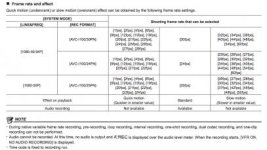
Someone was asking about frame rates 1080 59.94 Rec Format AVC-i 100/30PN = 1fps,2,4,6,9,12,15,18,20,21,22,24,25,26,27,28...30fps...32fps,34,36,40,44,48,54,60 with no audio
 

Attachments

  • 270 Frame rates.jpg
    270 Frame rates.jpg
    20.4 KB · Views: 0
Last edited:
HD Warrior: Sorry to go off-topic, but I just wanted to say how much I enjoy your blog. I visit it every single day, and it's one of my very favorite video-related websites. In fact, your extensive review of the HPX250 a couple years ago was instrumental in helping me decide to purchase one. It's been a fantastic camera for me. I can' thank you enough.

Jim
 
What does the AC90 record in 1080/60p compared to the Long-GOP of the PX270? Just wondering because I can ingest the 1080/60P from that camera and others into FCPX.
 
I know the servo zoom on the handle has variable control as well which is great but I'm curious if you can set it up so that it always works at the slowest speed? I think you can set it to "fixed" speed but I'm wondering what the "fixed" speed is and if there's a way to set that. Random question I know. Also, how do you enable the flash band compensation?
 
I know the servo zoom on the handle has variable control as well which is great but I'm curious if you can set it up so that it always works at the slowest speed?

There are 99 possible speed settings when in fixed mode, so I expect it would be able to go pretty slow.


Also, how do you enable the flash band compensation?

Looks like you need to assign a user button to it. See page 60 of the manual. (it's available on my web site).
 
Strangely enough you only get the ability to speed the zoom up from 5.5 secs to 4 secs. PS Thats in USER SW and you assign a number to FAST ZOOM. Flash band is also a USER SW assignable to 1-8 user buttons.

Zoom speed...The handle has a small rocker switch which can go from OFF/VAR/FIX...put it to FIX and via the main menu (press MENU for about 4s) under SW MODE scroll down to H.ZOOM SPEED you can choose from 1-99 1 being the slowest and 99 being fast...1 is far too slow...20 gives you about 20s zoom.
 
Last edited:
Strangely enough you only get the ability to speed the zoom up from 5.5 secs to 4 secs. PS Thats in USER SW and you assign a number to FAST ZOOM. Flash band is also a USER SW assignable to 1-8 user buttons.

Zoom speed...The handle has a small rocker switch which can go from OFF/VAR/FIX...put it to FIX and via the main menu (press MENU for about 4s) under SW MODE scroll down to H.ZOOM SPEED you can choose from 1-99 1 being the slowest and 99 being fast...1 is far too slow...20 gives you about 20s zoom.


That's awesome! Yeah, it's super slow but I love having the option! For a live switch the super slow is perfectly discreet when reframing. I have a good hand for working the variable speeds, but being able to set the handle zoom for other camera operators so they don't screw up and go too fast is perfect. I'm inspired. Just ordered 2 of them online! When my wife wakes up I'll have to gently tell her I just spent $11,500. If I'm not back on this forum for a few days it's because I'm grounded. ;)
 
What does the AC90 record in 1080/60p compared to the Long-GOP of the PX270? Just wondering because I can ingest the 1080/60P from that camera and others into FCPX.

The AC90 records AVCHD, 8-bit 4:2:0, at a maximum data rate of 28 mbps. The PX270 uses AVC-LongG, and it would have a maximum data rate of 100 mbps at 1080/60p, while recording 10-bit 4:2:2. So it's a very different and much improved codec over what the AC90 has. Although it should be noted, 1080/60p isn't possible from LongG50 yet (which would have a 100mbps data rate) and may or may not ever be enabled. LongG25 can do 1080/60p now, and the data rate expands up to about 50mbps when doing so (it's 25 mbps at 60i, and about 50mbps at 60p).
 
So who here is going to break down why the PX270 is a $5700 varicam? I want a full discussion of film rec and 300% versus 600%...
 
So who here is going to break down why the PX270 is a $5700 varicam? I want a full discussion of film rec and 300% versus 600%...

It can be argued that the PX270 is the $6K Varicam Jr. 5-7 years ago now. In other words, it's ~7 years after the P2 Varicam made it debut. But it's still a "Jr" and no way can replace the real 2/3" body with very fine DSP circuits and 2/3" CCDs. Now you can get the used HPX-2700 for roughly about $10K body only. PX270 is repackaged in a smaller form factor but with older technologies mixed with new AVC Ultra codecs in it. In 2014, the Varicam HS can do at least 240 fps and raw format plus a interchangeable 2/3" lens that can be super wide (4.3mm) all the way to super telephoto (870 mm) w/ real all-optical stabilizer (none of that electronic OIS that really don't do a good job of curtailing wind vibration in the field). That's the new standard if you have the budget.

The Film Rec 100-600% is mostly used for specific lighting contrast. Sadly because there's no DRS in 24/30PN modes with the PX270, operator will have to spend a lot of time tweaking these in the field and with a very good Panasonic monitor that has Film Rec gamma compensation. I'm not sure if the PX270's LCD has a function for Film Rec compensated display in it. I doubt it because the entire cam is $6K. Nobody in the right mind would put it there for free. Back to Film Rec - on a super bright sunny day, I'd use Film Rec @600%. When sunset or sunrise, I'd use Film Rec@100-200%. If I use DRS, it'll act as Film Rec 100% in the dark areas and 500% in the bright highlights - all in realtime and processed in the cam. DRS pretty much remove the need to manually adjust such but only available in 60i, which is pretty much useless for most shooters who're doing progressive.
 
Last edited:
no way can replace the real 2/3" body with very fine DSP circuits and 2/3" CCDs.

In fact the PX270 has the exact same DSP circuits (and all other image processing hardware) as found in the $30,000 PX5000. Its image processing circuitry is far advanced over what the older VariCams had.

The chips and the lens are the only difference. And they make a difference.

PX270 is repackaged in a smaller form factor but with older technologies mixed with new AVC Ultra codecs in it.

Absolutely untrue. The PX270 is not using any "older technologies", it's using the absolute latest stuff.


DRS works in 60p modes. This covers a lot and can be used to get 30p or even 24p (with 1/60th shutter) in your NLE. 24p with 1/48th shutter is really the only mode left out in the cold.
 
I've had my px270 for over a month now and have tried a number of different codecs, framerates, etc but still haven't arrived at a go-to workflow for handling the footage in post. Wondering if anyone else has figured out something that works for them.

At issue is the fact that the camera doesn't shoot 24p, 25p or even 30p framerates at all in 720 and won't do so in 1080 unless you're using AVCI100 which is just too bandwidth hungry for my needs. Many of my jobs are live events that are 1-2 hours long and I have to roll on them continuously. Then I have to archive, ingest, edit, transcode and upload them within several hours. Previously I used an HPX170 and my goto format was DVCProHD 720p24PN which worked very efficiently in post (but doesn't exist on this cam). In any case, for the sake of transcoding time, I'd like to continue editing 720p and preferably 24p but would settle for 30p.

So far, my best result has been shooting AVCI50 720 50P. Interestingly, shutter off gives me a 1/50 shutter speed (I'd have expected it to be a 180deg equivalent:1/100, but anyway...) so I go with shutter off and can fit about 70 minutes on a 32GB SD card.

Anyway, here's the fun part, I edit the whole thing in FCPX at original line/freq (720p50) and export a master file as ProRes 422 (which is double the size it would be if it were 25p). Then I open it in Compressor and output it as 720p25 so it takes a reasonable amount of time and the transcoded file is a size I can work with. This seems really Kafkaesque to me. There's gotta be a better way!

So since nobody I know of edits video at framerates >30fps (except Peter Jackson), what are people doing as a workflow to contend with the reverse pulldown required to ultimately yield edits that play in the 24-30fps range.

I'd love to hear from others about their workflows.

(Of course, this wouldn't be an issue if the LongG codec were supported by Mac-Based NLEs...)
 
So since nobody I know of edits video at framerates >30fps (except Peter Jackson), what are people doing as a workflow to contend with the reverse pulldown required to ultimately yield edits that play in the 24-30fps range.

I'd love to hear from others about their workflows.

(Of course, this wouldn't be an issue if the LongG codec were supported by Mac-Based NLEs...)


We just have been shooting at LongG25 (50Mbps) at 1080p60 and editing natively on a 24p timeline in Premiere CC on an iMac with no issues. The reason I switched from FCP7 (after 7 years) to Premiere Pro CC was because of this "any codec/any frame rate" approach that Premiere has and because it was an easy switch as if Premiere CS6 was FCP8. I'm sure FCPX will release an update that makes things easier and I'm sure the camera will soon get the rest of it's resolution and frame rate options, but for us, we've been shooting 60p and editing at 24p for years with awesome results. Easy and gives us the "slow mo if we want it, 24p if we don't" that we like. Any relatively new computer can handle it. I have a 3 year old iMac and it does it just fine. The 2012/2013 iMacs would be even better with their nVidia GPUs which Premiere loves.

Working with previous Panasonic cameras, shutter off has always meant 1/48 for 24p, and 1/60 for 60p. Guess I'm just used to that.
 
Back
Top