
Navigation
Install the app
How to install the app on iOS
Follow along with the video below to see how to install our site as a web app on your home screen.
Note: This feature may not be available in some browsers.
More options
You are using an out of date browser. It may not display this or other websites correctly.
You should upgrade or use an alternative browser.
You should upgrade or use an alternative browser.
P2 log problems
- Thread starter 4mat
- Start date

cinemakinoeye
Well-known member
Isn't this being discussed here: http://www.dvxuser.com/V6/showthread.php?t=61669 ?
4mat said:I'm getting a scrambled image when I use a 720p 50/25p/pn clip from p2 log in FCP ?
I have removed the apple codec and this cleared the problem in P2 log but now I still get the problem in FCP ??
Help lol
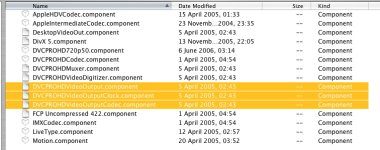
In my Quicktime folder there where 2 dvcprohdoutputcomponent files. Are you sure you trew away both files? (Or put away in another folder?)

mark.burton
Well-known member
Hi Matt,
I only removed the one component. So far the only time I saw a garbled imagine with the Imagine 720p50 codec was when I used a stripped down FXScript filter - but I'm fairly sure this was because the filter was missing some key code.
When are you seeing this - with the footage in the viewer or when you apply a filter etc? Lets get to the bottom of all this so we can have solid support for 720p50, I don't think Apple are going to step up until September at the earliest, so this is our best hope for some time.
Best
Mark
I only removed the one component. So far the only time I saw a garbled imagine with the Imagine 720p50 codec was when I used a stripped down FXScript filter - but I'm fairly sure this was because the filter was missing some key code.
When are you seeing this - with the footage in the viewer or when you apply a filter etc? Lets get to the bottom of all this so we can have solid support for 720p50, I don't think Apple are going to step up until September at the earliest, so this is our best hope for some time.
Best
Mark
Last edited:
mark.burton
Well-known member
There is some kind of incompatibility with the way FCP previews some effects and composite modes and the passthrough codec.
What effects have you seen it with? I've not found it with any individual effects or layered groups of what I have tried (mostly CC, Flop, De-saturate) apart from the striped down FXScript I created. It does happen with all composite modes though.
I found that rendering the effect makes the problem go away.
What effects have you seen it with? I've not found it with any individual effects or layered groups of what I have tried (mostly CC, Flop, De-saturate) apart from the striped down FXScript I created. It does happen with all composite modes though.
I found that rendering the effect makes the problem go away.

projectsplat
Member
this is interesting. I have not removed any components from the QuickTime folder. I do see a scrambled image when I am importing using P2 log, but once I get it into FCP, it is all ok.
mark.burton
Well-known member
I think there are two separate issues here:
1 - The DVCPROHD component that gets removed is to avoid the display issue in P2 Log, as projectsplat is seeing.
2 - The display issue inside FCP seems to be a preview issue with the FCP renderer and perhaps the passthrough codec.
Hopefully Gary or Dan will chime in at some point. It may be that this is beyond their abilities as they can't get to enough of the FCP interface, but I'm guessing again which is always dangerous!
1 - The DVCPROHD component that gets removed is to avoid the display issue in P2 Log, as projectsplat is seeing.
2 - The display issue inside FCP seems to be a preview issue with the FCP renderer and perhaps the passthrough codec.
Hopefully Gary or Dan will chime in at some point. It may be that this is beyond their abilities as they can't get to enough of the FCP interface, but I'm guessing again which is always dangerous!