P2 Footage Corruption

Jeff C

Member
Got my HVX on Tuesday and finally had a chance to shoot on Saturday. Filming was great and I couldn't have been more pleased with the HVX's performance in the field. Except when my 4GB card ran out, but other than that, things went swimmingly. Got some great shots and was really lookikng forward to seeing them on a big screen at home. Today I finally got to work on developing my post production work flow, and, well, it's not a good start so far. I get home to offload the P2 and import into FCP. (5.1.1 on a dual 2.7 G5 running 10.4.6. Anything in Parenthesis is there for troubleshooting clarification) I set the HVX up into PC Mode. The P2 card mounted and I started copying everything over to the computer (Folder over on My G-raid) About 36 mb into the transfer everything froze. The transfer just stopped and wouldn't progress for about 10 minutes. I tried ejecting the card from the finder, but no go. I tried relaunching and the Finder became semi frozen (Dock would work fine and I could launch programs, but all icons on the desktop itself were gone and there was no way to explore files and folders a.k.a. apple N didn't do s#!t.) After trying several tricks to get the Finder to fully relaunch, nothing was happening. I had to restart the HVX. As soon as the HVX was powered off, the finder sprung back to life with the nerve racking "Device Improperly Ejected", or whatever it is when you unplug a device (P2 card in this case). I fired the hvx back up and decided to go the laptop route. So I pop the P2 into my Power Book. The card showed up fine and I pulled everything off and started importing into FCP. The attatched picture is what everyclip looked like. Just in case it was a transfer issue, I tried every other way possible to get files off the card. (Pulling files off the card from FCP while the HVX was in PC Mode on both systems. Pulling files off the card and copying them to a folder on the computer on both systems, and using the PC slot to copy via the Finder or Ingest through FCP)
Everything showed up the same.
Just in case, I reformatted and shot some random footage. Same thing.
The original footage was a mix of 720 and 1080. Both 24p. I had the same problem on both, so I know it wasn't just FCPs lack of 1080p support.

I'm hoping this is an FCP problem and not something born out of having to restart the HVX while the card was still mounted on my frozen system.

Thanks for any help, advice.
This forum rocks and I've spent way to much time here even before I bought my HVX. Thanks to you guys I've been able to out geek several of the guys at work.
If this has already been covered just hook me up with a link as I couldn't find anything on it.


Thanks all.
 

Attachments

  • wtf.jpg
    wtf.jpg
    60.8 KB · Views: 0
Last edited:
If the clip looks like this played back in the HVX, I would be very surprised. But you should check that out first. Actually it will probably shown with a Red X if it were to have this sort of corruption and then you could repair the clip.


However, I think this is coming from your system somehow. You need to offload the card to a Hard Drive and then import to FCP from that Drive. I know it sounds like you are but something is not right here. Please itemize your system for us.

Thanks,

Jan

Best,

Jan
 
System Layout

System Layout

Footage looked perfect in the P2 viewer. No red Xs.

I've got 2 systems networked together. G5 Dual 2.7 and a P.B. G4 1 Ghz 17"
Both running FCP 5.0.4. (mistakenly thought I had 5.1.1)
G-Raid hooked up to the G5.

Methods I tried.
G5:
1. Firewire mount of P2 from the HVX. Attempted to copy from P2 to G-Raid
System Froze
2. Ingest from FCP of P2 from HVX. All but 3 clips registered as corrupt
G4
1. Same methods as above
2. Copy files from P2 card in PC Slot to desktop folder. Import into FCP
3. Import directly from P2 Card from within FCP
4. Copied files off of P2 Card and sent them over the network to the G-raid
(hardwired, not wireless) and tried importing into FCP on the G5. No dice.

All of these attempts brought up glitchy footage on the first try, then more and more clips registered as corrupt until FCP would import none of the clips.
Everything played perfect in the P2 viewer.

Also, I've been looking at getting Avid Express Pro. We're all Avid at work, so I figure it's a good idea to get knowledgeable with it. Has the p2 workflow been more reliable with Avid systems?

Thanks,

Jeff
 
Thanks for the link ggdelarge, but I also transferred directly from my powerbook's PC slot. and still got the same issues during import. Also, the glitches are in a very consistent, near perfect grid. No randomness to them when they show up. Timing is a bit random though, but placement is very consistent. Wonder if anyone knows what that clue means.

Thanks again,

J
 
not sure what that means. i still dont think its part of the footage. id try hooking the camera up to your comp. did you try both copying the footage then importing or importing directly into FCP? also, some people suggest creating a disc image of the file. i think it has something to do with copying over when the connection is slow.
 
Are you running the same FCPs software on both the networked computers? i.e. did you pay for two seperate software licenses or just load the same program on both computers?
Try disconnecting the laptop from the network, put the card into the PCMCIA slot, copy the Contents folder and Last clip.txt files to an external FW drive. Then import into FCP from that.
 
Also are these glitches appearing on the computer screen or an external monitor?
Explaining your set up in detail will make it a lot easier for everyone to troubleshoot.
 
ggdelarge said:
i still dont think its part of the footage.
These glitches are most definitely not part of the footage. He's already verified that by playing it in the P2 Viewer. This is a Mac importing issue, pure and simple.

I don't know how to tell you to solve it, but if you're going to solve it you need to keep your focus on what the problem is. It's not the HVX, it's not the P2 card, it's not the footage. The footage on the card is good.

It's getting from the card to the Mac hard drive that's the problem. It's strictly a computer issue. There's something going on that is causing some sort of interruption or data corruption when you're transferring the footage over.

It's either the PCMCIA driver in the Mac, or the Panasonic P2 driver. Or it's the way Macs deal with FAT32. I can't think of too many other things it could be.

Here's something I would find interesting -- can you offload the footage to a FAT32 drive using a Windows PC, and then try importing it from that FAT32 drive onto your Mac? If it gives the same glitches then you'll narrow down the issue to one of drive reliability/FAT32 support, because the card totally gets removed from the equation. If an error happens from importing footage off a FAT32 hard disk then the culprit is obvious: Macs and FAT32 don't work well.

If it imports reliably and repeatably from an external drive glitch-free, and the glitches only ever happen when importing directly from the card, then that leaves us to wonder whether it's Apple's PCMCIA driver at fault, or Panasonic's P2 driver. Only way I can think of to test that would be to get a PCMCIA hard disk. Try copying a card's worth of content from a P2 card to a FAT32 PCMCIA hard disk on the PC, and verify that the footage is good (by using the P2 Viewer on the PC) and then try importing that onto the Mac. If it succeeds repeatably and reliably, that points a finger at Panasonic's P2 driver. If it fails to import footage properly then, that exonerates Panasonic's driver and points the finger squarely and firmly at Apple's PCMCIA driver.

Oh, and obviously -- you should kill any terminate & stay resident programs on the computer you're using! That's obvious to many, but maybe not to all. Any virus checkers or partition managers or any type of optional applications or utilities should all be turned off/disabled/exited. You want the cleanest possible platform; that kind of stuff shouldn't even be installed on an editing system in the first place but I don't know if Mac users are normally as diligent about that (or as understanding of how it causes problems) as PC users are.
 
Last edited:
Barry_Green said:
These glitches are most definitely not part of the footage. He's already verified that by playing it in the P2 Viewer. This is a Mac importing issue, pure and simple.

Now does that mean that the copies of data I've got on my drives are permanently screwed up from the import or is it that they're not being read correctly.
I've also tried the .dmg trick and got the exact same results. Is this an issue common to FCP 5.0.4 that would be alleviated with an upgrade 5.1.1, or is it more of a system wide issue that I need to address.

Thanks Barry.
 
Cancel that last reply. I wrote it as you were writing the last one you wrote. Thanks for the tips. I'll be experimenting with the formatting and getting rid of any TSRs. Unfortunately It'll be a few days till I have time to work on this. Thanks for the help. I'll get back when I have any new information or results.

Jeff
 
also one quick note. make sure you try copying the footage to your internal HD instead of an external one. that made a difference for me as well.
 
Success!!! The Blessed Re-install doeth work her magic again!!!.
Thanks Barry on the TSR tips. I wouldn't doubt that's what it was. I started waiding around in my system trying to eliminate everything I could. After about 30 minutes, I knew it was time for that disc with the big X on it.
Re-install. Update.
Install FCP. Update.
Instal P2 driver.
Load footage.
Gravy.

Nothing else is going on the laptop and I've turned off every service possible.

Once again thanks to DVXUser!

Now I've got nice clean footage.
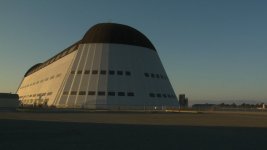
Here's a shot from Labor Day. I was at a barbecue at a NASA test facility. Intersting day, especially when a black helicoptor flew by. I think I got that on DV tape.
 

Attachments

  • Hangar.jpg
    Hangar.jpg
    140.9 KB · Views: 0
Last edited:
Back
Top