

RandyRosenthal
Active member
We just got back from an intense four day shoot in NY using two 8GB P2 cards, a P2 Store and a Firestore FS-100. Everything worked very well until yesterday afternoon when a P2 card seemed to fail. Here is what happened:
Two P2 cards were formatted in the P2 store and inserted into the HVX-200 for shooting (720 30N) Both cards were recognized by the HVX and the total recording time was displayed at 33min.
When the viewfinder indicator showed one P2 card full and 16 min remaining, we pulled the full P2 to dump to the P2 store. Recording continued on the 2nd card.
When we put the full P2 card into the P2 store and pressed Start, all of the green lights indicating percentage copied flashed continually. We waited about 15 minutes and hit cancel and tried again with the same result.
We the took the P2 card in question and inserted it into the camera and it did not show any recorded media.
The second card did have media.
WHAT HAPPENED??????
Some other notes:
These same P2 cards worked flawlessly until yesterday.
While most of the time data was transferred from the P2 Cardss to the P2 store, right before this failure we transferred the card contents from our Powerbook. The transfer went fine. However, the P2 cards took a long time to mount and during that wait, the computer was frozen.
The p2 cards were formatted in the p2 store prior to shooting.
The day before, the P2 store had previously displayed full capacity remaining even when 3/4 full of media.
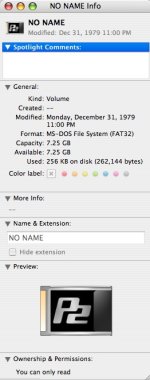
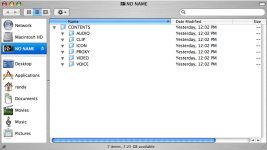
Attached are jpgs of what is on the P2 card that failed.
Just now when I went to look at the P2 card in question, we got a kernal pasnoc when we unmounted the P2.
Jan , anybody... have you seen this before?
We still have the 2nd P2 with data that we are afraid of using either the P2 store or the Laptop.
Two P2 cards were formatted in the P2 store and inserted into the HVX-200 for shooting (720 30N) Both cards were recognized by the HVX and the total recording time was displayed at 33min.
When the viewfinder indicator showed one P2 card full and 16 min remaining, we pulled the full P2 to dump to the P2 store. Recording continued on the 2nd card.
When we put the full P2 card into the P2 store and pressed Start, all of the green lights indicating percentage copied flashed continually. We waited about 15 minutes and hit cancel and tried again with the same result.
We the took the P2 card in question and inserted it into the camera and it did not show any recorded media.
The second card did have media.
WHAT HAPPENED??????
Some other notes:
These same P2 cards worked flawlessly until yesterday.
While most of the time data was transferred from the P2 Cardss to the P2 store, right before this failure we transferred the card contents from our Powerbook. The transfer went fine. However, the P2 cards took a long time to mount and during that wait, the computer was frozen.
The p2 cards were formatted in the p2 store prior to shooting.
The day before, the P2 store had previously displayed full capacity remaining even when 3/4 full of media.
Attached are jpgs of what is on the P2 card that failed.
Just now when I went to look at the P2 card in question, we got a kernal pasnoc when we unmounted the P2.
Jan , anybody... have you seen this before?
We still have the 2nd P2 with data that we are afraid of using either the P2 store or the Laptop.
Attachments
Last edited:

