Over-Lighting and Color Correction

Tim Joy

Veteran
So for my Twilightfest entry, shot on the dvx with 35mm adapter, I chose to "overlight" everything, enabling me to shoot at a decent f-stop and shutter speed, and having the intention of bringing everything down in post for that dark shadowy/creepy feeling I thought this would give me a nice clean image in the end. I'm having a little trouble now with the CC.
Firstly, I don't have a proper monitor, and when it looks very dark on my computer lcd, it still looks pretty bright on my TV. Does CC need to be tailored to the monitor it will be viewed on? (Computer screens for the fest, and TV's for my DVD version later on.)

Can someone explain basically how to read these video scopes, and their purpose?

Do you think it is a mistake to overlight the set with the intention of bringing it down later?

Thanks!
 
So for my Twilightfest entry, shot on the dvx with 35mm adapter, I chose to "overlight" everything, enabling me to shoot at a decent f-stop and shutter speed, and having the intention of bringing everything down in post for that dark shadowy/creepy feeling I thought this would give me a nice clean image in the end. I'm having a little trouble now with the CC.

Well be "overlight" I hope you mean bringing the overall levels up to obtain a workable exposure. If you overexposed then you are in trouble.

Firstly, I don't have a proper monitor, and when it looks very dark on my computer lcd, it still looks pretty bright on my TV. Does CC need to be tailored to the monitor it will be viewed on? (Computer screens for the fest, and TV's for my DVD version later on.)

I properly calibrated monitor is paramount when doing color correction and grading. Without one you have no idea what your output really is.

Can someone explain basically how to read these video scopes, and their purpose?

This is a study all into itself. Very Basically a waveform will tell you your levels of exposure and how many piels are in that area. An RGB Parade will tell you were the red, green and blue levels are in the exposure range. A vectorscope will show you the relative intensity of each color in the color wheel.

Do you think it is a mistake to overlight the set with the intention of bringing it down later?

Thanks!

I would not call it a mistake if you took into account your end result. For example if you light your scene for a harsh contast ratio and where able to maintain that ratio with bigger lights, great. If however you wanted the same ratio and just thru in a big fill light to raise the levels you probably destroyed your intent.

I would really like to take a look at your locked edit before correction with some notes on the look you were going for. It might help both of us develop our skills further.

Jim
 
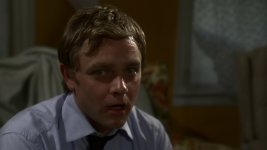
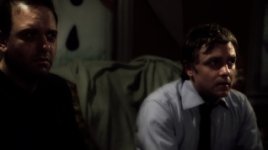
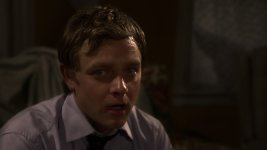
Thanks Jim. I didn't overexpose anything, and was always checking the lighting during the shoot by closing up to get a feel for what my final look would be like. There's a couple screen grabs on the films thread for now (link in my sig), and maybe I can send you a copy later.
 
So for my Twilightfest entry, shot on the dvx with 35mm adapter, I chose to "overlight" everything, enabling me to shoot at a decent f-stop and shutter speed, and having the intention of bringing everything down in post for that dark shadowy/creepy feeling I thought this would give me a nice clean image in the end. I'm having a little trouble now with the CC.
Firstly, I don't have a proper monitor, and when it looks very dark on my computer lcd, it still looks pretty bright on my TV. Does CC need to be tailored to the monitor it will be viewed on? (Computer screens for the fest, and TV's for my DVD version later on.)

Can someone explain basically how to read these video scopes, and their purpose?

Do you think it is a mistake to overlight the set with the intention of bringing it down later?

Thanks!
It would be better if we had an example of you clip that shows your lighting...

In the olden days, and in the current era as well, there are a lot of shoots done with a mind for 'day for night'. That is, with filters and processing give the impression of a 'night' shoot, but done more inexpensively during the day.

The problem with 'real' sunlight is that the contrast ratio, and the 'sharpness' of shadow edges, are so high, that even with knocking the shot down several 'stops' worth of intensity, does not give the impression of real 'night', just blue filtered, contrasty, day light.

Real 'moon' light, while may be represented as a 'blueish' cast on everything... produces softer shadows than the corresponding sun light.

When you say 'color correction', is that to remove something like 'yellow/red cast', or is it to 'grade' the image to your desired effect.

Again, examples would help on 'where you want to go, and from whence your are comming'...

I've seen some people use Photoshop and still frames taken from the shot, then manipulated using PS filters and adjustments, to the 'desired', then gone back to the editing software, FCP, AfterEffects, (Doesn't Avid just simply have a 'Do what I want', option, so there's no real work needed there...), and used the whatever editing capabilities to get the effect. With Photoshop extended, you could seriously think about using PS itself to process the clips, once having arrived at the look you desire.

In any case, it seems you need to show what you are using, and want to do, before some one can really say, 'well is there time to reshoot'... of course not... never is...

Some ideas on 'filters' and adjustments would be to:

Desaturate
keep 'high values' up, but flatten mid and low values, in contrast.
Soften 'mid and low' valued 'edges'.

Go black and white... (total desat... with a bit of contrast boost in the high to mid range, despite above idea...)

Add film grain to get a more grunge look.
 
I took the liberty of doing some of my own correction on one of your grabs. I personally think your fine with your original. It's dark, but not too dark...I like it.

Here is try at some CC.


EDIT: It would appear on comparing the 2 grabs, your original and my CC'ed that my tastes are far darker then yours haha.
for my taste I think you could up the contrast a bit still, but thats just me.
 

Attachments

  • grab-ot-andy.jpg
    grab-ot-andy.jpg
    156.2 KB · Views: 0
Thanks Zerg. I had already adjusted that grab a bit. Here is one that is untouched.

antidepresence-grab-couch.jpg


J1Clarck- Yes, this is more of a Grading thing, as I was very careful to white balance often, especially when changing lenses, and the only "correction" needed is due to the slight color differences when using different lenses. I can handle that part. The grading is where I have issues.


I want it to still be visible, as to not hide the actors' performances, but be dark and creepy.

The main problem I have is whether to adjust for my TV or my computer monitor. The TV looks bright when the monitor looks dark.
 
Put SPMTE bars up on your monitor and TV and adjust accordingly as best as you can. For all you know, your TV could have too high black levels and your monitor could be crushing them too far. Eyeballing color bars for at least brightness is fairly simple. On the bottom right there are three small black vertical bars. To the left is blacker than black. In the middle is true black. On the right is lighter than black. Adjust your brightness setting (in whatever ambient lighting and viewing angle you use) on either display so that Blacker than Black and True Black blend together but without losing the ability to differntiate between True Black and Lighter than Black.

This should set the brightness level of your monitor fairly close as far as blacks are concerned. Without a blue-gun mode or better measuring equipment I don't know if there's much more to do, but then again I'm no video engineer.
 
Thanks Zerg. I had already adjusted that grab a bit. Here is one that is untouched.

... moved below for comparison...


J1Clarck- Yes, this is more of a Grading thing, as I was very careful to white balance often, especially when changing lenses, and the only "correction" needed is due to the slight color differences when using different lenses. I can handle that part. The grading is where I have issues.


I want it to still be visible, as to not hide the actors' performances, but be dark and creepy.

The main problem I have is whether to adjust for my TV or my computer monitor. The TV looks bright when the monitor looks dark.

Since I don't know where you want to go with getting that 'dark and creepy' look, I sort of made some adjustments in Photoshop. Basically a desaturation, a bit of contrast enhancements using 'levels', then added a 'dark green fill' layer, adjusted the opacity to give everything sort of a twinge of 'green', and then another contrast adjustment to bring things up just a bit.

If you are using FC or AfterEffects, and this is the 'direction' you are interested in, I'll see what the adjustments may be in those apps.

Here's the original:

antidepresence-grab-couch.jpg


Here's a stab at 'dark and creepy':

antidepresence-grab-couch_Altered.jpg
 
Sorry I didn't see this in time. I was working like a mad man to get the film finished in time. (made it by 5 minutes of the deadline)

I like what I'm seeing here.

Clark- I definitely like the green. I did go with a little green in the final grading.

Jim- I also like what you did with the shadows, but I can still see their faces well. For some reason when I would go really dark I would lose their eyes and it seemed too dim and muddy, so as it sits right now, the film is probably too bright, because I didn't want the acting to get lost in the mud.

I would love it if either of you had the capabilities, time, and desire to do a CC on the whole movie, or just part of it, even as practice or exercise. I feel so weak in this area. I think the raw footage is pretty good to work with. :) I work in final cut 5. PM me if interested.

Thanks for the help.
 
I'll have to wait till the viewing is open for twilightfest to show more screenshots, because it's too hard to correct a couple random grabs without seeing the BIG picture specifically the wide shots done with a slower lens.

Papa- If I went that dark on the whole movie, I think much of the acting would get lost, and when you see it, (if you see it :)) you'll know what I mean.

Thanks!
 
Very interesting discussion. Here is a question along similar lines.

Suppose you light up the whole stage with varying intensity of light, that is, the areas of interest (talents, for example) have more light then the areas of no interest (background, for example). In other words, You can see everything clearly on the set (as opposed to having some dark areas).

Now you shoot your scene without overexposing the bright areas with Iris wide open. Given that everything is well-lit and iris is open, your (video - EX1) camera will capture all the details - including the not-so-interesting ones. This will be a good capture from engineering POV, but very boring artistically.

Then in the post, you play with tools to crush the so called black, increase the contrast, and so on.

How will this strategy work out? Is this what the OP has done?
 
My work flow, in After Effects, is as follows,

Import clip(s) split into separate layers one for each clip.

Apply the threshold effect to an adjustment layer

Dial down the effect until the last bit of black shows, Mark this position, disable the adjustment layer and set this position to be black. Repeat this process, dialing up the effect and marking/correcting your white level.

Your clips should now have a black that represents 0 IRE and a white that represents 100 IRE.

The DV Rebels Guide by Stu Maschwitz has detailed color correction and timing techniques. It even includes plug ins to assist. It is a worth while read.
 
Very interesting discussion. Here is a question along similar lines.

Suppose you light up the whole stage with varying intensity of light, that is, the areas of interest (talents, for example) have more light then the areas of no interest (background, for example). In other words, You can see everything clearly on the set (as opposed to having some dark areas).

Now you shoot your scene without overexposing the bright areas with Iris wide open. Given that everything is well-lit and iris is open, your (video - EX1) camera will capture all the details - including the not-so-interesting ones. This will be a good capture from engineering POV, but very boring artistically.

Then in the post, you play with tools to crush the so called black, increase the contrast, and so on.

How will this strategy work out? Is this what the OP has done?


For me, the lighting needs to be in reasonable ratios, and reasonable intensities. So, sure, make sure that the shot is lit well for the camera to capture the information, and then adjust in post for the desired tone. This is sort of what has been done for the last 100 years of film...

When filming moved out of the studios, into 'real world' situations... aka Location, the problems arose that the film stock was not up to recording the range in many cases. So, the army of support ligth, screens, etc. was, and still is required to get a 'correctly' lit shot.

If you watch the various DVD special features that show sets, you will notice that even for shots in 'daylight' there are lights to make sure the various important areas of the shot are lit, screens to cover the actors, bounce cards, down to small ones that someone will run around as the talent move, keeping the talent's face 'lit'.

All of this is to avoid harsh lighting. Then, now that there is the digital intermediary process, there are a number of things that one can do with a reasonably lit shot, such as play with color balance, cast, add 'shadow', boost shadow... or occasionally recover from a bad lighting situation that couldn't be delt with otherwise.

I think the thread title is a bit wrong... a well (or reasonably) exposed shot is not 'over lit'...

Some of the other threads do have badly exposed shots... and the name of the game there is tring to pull a rabbit out of the shi*...

The only criticism on the shots from this thread would be the lack of using powder to take off the shine on the actors' faces. That's not a lighting question... that's in makeup... sure it can be mitigated with a softer light... but then that has it's problems when one is looking for that starker contrast.
 
The only criticism on the shots from this thread would be the lack of using powder to take off the shine on the actors' faces. That's not a lighting question... that's in makeup... sure it can be mitigated with a softer light... but then that has it's problems when one is looking for that starker contrast.

I actually used that shine purposely, to give it a "plastic" look. If you see the movie (Viewing open now!) you'll understand why, but I'm not sure if it was the best idea. I should've done more tests, but time didn't permit.

You are right that the thread title is misleading, but my theory was that these ccd's want a lot of light in order to achieve a noise-free image, and I wanted to end up with the cleanest "dark" image in the end, so I'm basically doing a day-for-night thing, except on the warmer side. I think I had about 5k watts of tungsten light blasting in that little room. It was very bright to say the least. I even covered all the windows with CTO gel, so I wouldn't have to gel the lights and diminish their output. It was HOT in there.

Check out the film and see what you think. Then we can take some wide grabs and balance them with the CU's already on here.
 
Have you guys seen the movie? I'm interested to know if you think my technique worked or not. I'm starting to get used to the brightness the more I watch it.
 
Back
Top