outputting footage to DVD

I have some problems with the delivery of a project. If I finish of as a quicktime movie using prores 422(HQ) the footage is fine but anything else like H.264 looks like a cheap 200 euro consumer camera (even at small picture size of 400*300 pixels). When i look at examples of other people at you tube and Vimeo the footage looks razor sharp. So there must be something I am doing wrong. I am using FCS and recorded in 720/50p. Any tips are welcome.

p.s. the files in proress 422 (HQ) are way to big, 5 minutes video is more than 4 GB and the quicktime needs even 3 files (xxxx.mov, xxxx-AV.mov1, xxxx-AV.mov1 which all are needed to play the video) that is why wanted to compress them but not at the expense of to much quality.

So what is the best way to deliver the footage preserving the HD look but without getting huges files ????
 
Last edited:
I master all my 301 material to full pro res HQ movies at 1920x1080i 25np.

I then let i-dvd re-scale them to fit the DVD. If I am uploading to you tube etc I re-scale using quick time to 1280x720 at 5mbs, i.e apple tv.

It always seems to work fine for my material and once you tube re-scales to around 1.5mbs it is still good quality.
 
Yes in prores hq or uncommpressed the quality is of course good but the file size is huge namely respectivy more than 4 and more than 40 Gb respectively for 5 minutes video. So you can not use it for delivery to a customer `9withou giving him a free HDD :-)) ).

I master all my 301 material to full pro res HQ movies at 1920x1080i 25np.

I then let i-dvd re-scale them to fit the DVD. If I am uploading to you tube etc I re-scale using quick time to 1280x720 at 5mbs, i.e apple tv.

It always seems to work fine for my material and once you tube re-scales to around 1.5mbs it is still good quality.
 
Hi Cees if I need to give a client a file I always give them an apple TV file that is 1280x720p at 5mbs.

That is also what I archive and play back on my 37" TV via a memory stick and a western digital media player box.

Not the best resolution but good enough for most jobs and it looks good from the pro res HQ files.

As said DVD's are made using the pro res masters and once it goes down to mpeg 2 it also looks as good as you can get.
 
"So what is the best way to deliver the footage preserving the HD look but without getting huges files ????"

I'd just go with H264 at about 5000kbs a sec...

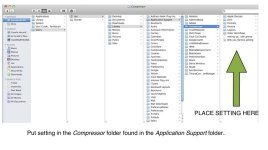
Send me an email and I'll send you a compressor setting...

It's all pretty easy stuff... and should look very similar to the original.. all though I do notice a bit of a contrast change in the H264 as compared to the original... but it's only a slight difference...

If you want to deliver on Optical disc.. then you need to create a DVD or Blue Laser Disc... the latter is still an issue on the mac's right now...

I've had allot of people coming to me lately saying their HD movies they have shot look crap on DVD and HD Plasma screens...

Most of the issues seem to relate to the white levels on the footage... Plasmas/LCD screens really don't like hot whites so you have to be pretty zealous about controlling the levels as you colour correct your footage...

Cheers

www.les.herstik.com
 
Last edited:
If the white levels are too hot try running a broadcast safe filter on the FCP footage to take it down to a max of 100%.

As said a 5mbs file should be good quality for most things in 720 or 1080, I personally prefer 720 as not every one here in the Uk has 1080 yet.
 
Broadcast safe filter is what I always do, it is standard procedure at my place :-)

If the white levels are too hot try running a broadcast safe filter on the FCP footage to take it down to a max of 100%.

As said a 5mbs file should be good quality for most things in 720 or 1080, I personally prefer 720 as not every one here in the Uk has 1080 yet.
 
Hi Lez,

My email address is info@artivideo.nl (for some reasons I can not send personal messages on this site, I am blocked somehow). Looking forward to receive the settings. Thanks in advance.

Cees


"So what is the best way to deliver the footage preserving the HD look but without getting huges files ????"

I'd just go with H264 at about 5000kbs a sec...

Send me an email and I'll send you a compressor setting...

It's all pretty easy stuff... and should look very similar to the original.. all though I do notice a bit of a contrast change in the H264 as compared to the original... but it's only a slight difference...

If you want to deliver on Optical disc.. then you need to create a DVD or Blue Laser Disc... the latter is still an issue on the mac's right now...

I've had allot of people coming to me lately saying their HD movies they have shot look crap on DVD and HD Plasma screens...

Most of the issues seem to relate to the white levels on the footage... Plasmas/LCD screens really don't like hot whites so you have to be pretty zealous about controlling the levels as you colour correct your footage...

Cheers

www.les.herstik.com
 
Will send the file through to you...

Drop inside the compressor folder in application support...

Cheers
 

Attachments

Back
Top