Out of Sync and back into sync on export

Goldmond

Active member
I'm completely baffled by this. I filmed a theater project (1.5 hours) on a DVX-100A 24PA, Imported and edited the project. Everything comes out fine until I export it and then the audio is not synced with the video. I tried to use the time stretch tool to match it up but that didn't work either. So I exported everything to a new audio and video file imported them and put them together. They were out of sync of coarse so I tried again to use the time stretch tool on the audio with a linear stretch from start to end and the audio now begins perfectly in sync, then slowly goes way out of sync through the coarse of the movie, then slowly comes back into sync. What makes it difficult is that this only happens when I export. Everything is perfectly in sync in my timeline. One camera unfortunately was set to record in Drop Frame and the other in Non-Drop Frame, but I was able to make it work in the editing. I know there is an "Audio Sync Tool" but I believe that only applies to the DVX-100, not the 100A or 100B. The fact that it changes when I export gets me and the usual work around of exporting it and importing the exported file isn't working. Any ideas at all?
 
Also I used the (2:3:3:2) pull-down removal and I really think that that's part of the problem, unfortunately recapturing doesn't fix anything, and taking off the pulldown removal doesn't fix it either.
 
So if I'm reading this right, everything is in sync even when you play through your time line in FCP. It's only the exported video that's out of sync? That tends to show that it's not the capturing, pull-down removal, or editing that's causing the issue. It's the export.

So walk us through your export steps:

- How, exactly, are you exporting your video?
- What format/settings are you using?
- Where are you viewing the video after export?

Also, just for chuckles, and because it sort of really matters, what Mac are you using, and which OS and which version of FCP?
 
I'm using a MacBook Pro with a 2.4Mhz core 2 duo running leopard 10.5.8 with FCP 7.0.2 You've got it right, and you're logic is right too. I used compressor to make m2v and ac3 files and found the problem when I viewed them in DVD creator and thought compressor might be the problem, but the same thing happens when I use Quicktime to export and then view with quicktime It's happened to me in the past, but I was able to work around by burning it (exporting and importing the file) and/or time stretching the audio. Going out of sync and coming back in after the stretch sounds like it's doing a curved stretch. But I have have linear checked for start and finnish. I've trashed the prefs too just in case. It's weird and I'm not sure where else to look.
 
I used compressor to make m2v and ac3 files and found the problem when I viewed them in DVD creator and thought compressor might be the problem,

Are you exporting from FCP using Compressor? Just FYI, I've never had good experiences with that.

but the same thing happens when I use Quicktime to export and then view with quicktime

Is that exporting a self-contained FCP movie at current settings?

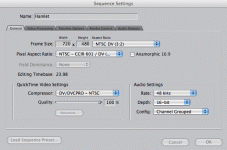
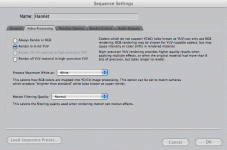
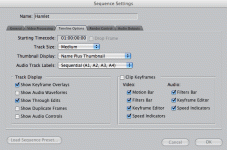
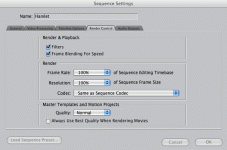
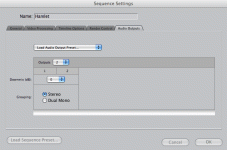
What are your sequence settings?
Is all your audio at 16-bit/48kHz?
Are you exporting your audio to 16/48?

And you mention noticing the problem in "DVD creator." Are you talking about DVD Studio Pro, or some other program? If you're editing in FCP, why not use DVD Studio Pro?
 
Are you exporting from FCP using Compressor? Just FYI, I've never had good experiences with that.

Really? So you export it as a quicktime file and then send it to compressor?

Is that exporting a self-contained FCP movie at current settings?
Yeah, it`s sending the sequence to Compressor


Are you exporting from FCP using Compressor? Just FYI, I've never had good experiences with that.

Really? So you export it as a quicktime file and then send it to compressor? I get the same thing either way.

And you mention noticing the problem in "DVD creator." Are you talking about DVD Studio Pro, or some other program? If you're editing in FCP, why not use DVD Studio Pro?
My bad, I was writing quickly, I noticed it in DVD studio pro when I previewed it before creating a disk image.

What are your sequence settings?
Is all your audio at 16-bit/48kHz?
Are you exporting your audio to 16/48?
All audio is at 16bit/48khz and exporting to current settings
 

Attachments

  • sq1.gif
    sq1.gif
    30.4 KB · Views: 0
  • sq2.gif
    sq2.gif
    31.2 KB · Views: 0
  • sq3.gif
    sq3.gif
    31.2 KB · Views: 0
  • sq4.gif
    sq4.gif
    26.8 KB · Views: 0
  • sq5.gif
    sq5.gif
    18.6 KB · Views: 0
Back
Top