Our Tascam DR-40 Really Hosed Us

puredrifting

Major Contributor
I recently flew about 1,200 miles to shoot a high profile series of interviews for the digital promotion of a feature film. Used a couple of 5D MKIIIs, Tascam DR40 for audio. Begged studio for a sound mixer but they cheaped out and said no. Shot interviews with several subjects, checked playback, was monitoring with headphones as I shot. All of the audio for the interviews turned out great, except for the one main subject. His files are No 15 below. I am completely baffled how the recorder could have started a header for the files, but then just "not saved" the files? They show a different icon then the rest of the intact files that show the standard Apple iTunes icon. What makes it weirder is that all of the interviews before and after this subject recorded great, sound great. I have been shooting with the DR40 and sometimes the Zoom H4N for a couple of years, I have never seen this happen.
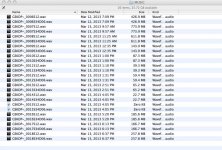
Missing Audio.jpg

High quality Sandisk SDHC media was formatted in the recorder. The executive producer is understandably not happy about it, it makes me look bad and all we have now is the camera audio from the 5D MKIII, which is low quality to begin with. The camera was about six to seven feet from subject, room was fairly quiet with the exception of some HVAC that couldn't be heard on the Tascam mics (Countryman B6 lav and a an Audio Technica AT875R) but the camera mic, of course, picked it up nicely. The noise can be removed, but the reverb and room characteristics can't. Studio will either have to pony up bucks for me to go back or live with the crappy camera audio. Have any of you ever seen this happen where the recorder writes a header, captures the audio (I was monitoring with headphones) and I pushed record, adjusted levels a bit as we shot and hit stop, no different than any of the other clips. I am baffled, it makes me want to throw the DR40 into the trash, how can I trust it again for other shoots? Do you think it could have been a bad sector on the SD card or the recorder or?

I am going to take this up with Tascam. The damage is done. I know, cheap recprder, you get what you pay for, buy a Sound Devices, always use two recorders, etc. but any ideas on how or why this could have happened? It strikes me as incredibly unlikely since all of the files on the card are intact , recorded and played perfectly yet one set of files just "didn't record" yet left perfect header information? Murphys Law that the only file it did this to was the MAIN SUBJECT! I told the producers, "Get me a Sound Mixer for this shoot" and they wanted to but the studio was too cheap and now we are paying the price. Although to be fair, this could have happened with a sound mixer as well.

Advice or comments?
 
Last edited:
First, good to see you back here, Dan!

I had this happen years ago with a Zoom H4 (original), but have never encountered it with either my DR-40 or my FR2-LE. All I could suggest is to check the firmware and make sure you're up-to-date, then see what TASCAM has to say.

I rarely use my DR-40 for primary dialog, though... it's my go-to for grabbing wild FX wherever I happen to be. Shouldn't make a difference, though. Data errors are data errors no matter what source is being recorded. All I can imagine is that it's a small computer, as is just about everything these days, and computers corrupt data every once in a while. Though, how old are the SD cards and how many times have they been cycled? They should have decently-long lives and be able to survive many cycles, but as cheap as they are these days there's not much reason not to start fresh with each project and then archive them like we did with tape.
 
Well there is that is a reason most folks with a budget stream to a backup. But I'm not often in that situation so not shaking my finger.

Has it happened before, well yes. Probably on every recording device know to man. MiniDisk was notorious for loosing the whole disk if it had a glitch. The HHB DAT (kind of the SD of DAT) had a quirk in that IF you fast forwarded past the end of recorded tape (it was possible with out a lot of effort) and went in to record, tape would move, numbers would advance and the meters worked and monitoring was find, BUT you were not recording anything. I got bit by that after getting a bunch of editors to pause and do a little loop group for us o a big film. The only thing that saved me from getting my butt kicked was that while I was trying to save my job while explaining that we got nothing and would have to get everyone back and do it again, was that the Sound designer piped up that he knew why because it had happened to him.

Someone was on this list a few weeks ago and had had the "out of battery" shut down that killed the file being recorded. The DR40 BTW does not have that problem.

Could be operator error. Not that I think you did anything but I always start with the assumption that it was my mistake until I know it wasn't. And in some fashion it usually is operator error, though that error is possibly doing something that should NOT be a problem but is on some particular device.
I had a Nagra V shut down because of excessive low frequencies. My flash recorder was fine, so $$$ is no lock against problems.

You could also have some bad blocks of memory on the card and those two files happened to hit them. I have had new cards with problems. I had a brand new harddrive fail after one week of use. Stuff happens that you can't do anything about. Since those were close together I would look long and hard at exactly what was going on during those takes.

The odds are that it was either a problematic card, bad battery connection (if you interrupted power you will loose the file but the header would still be there) so if there was gunk or maybe some big bumps and the battery momentarily got interrupted you might get this issue, or something you did that the DR40 doesn't like. Or maybe excessive heat/ humidity/ cold?

These devices can be a pain but they rarely are randomly quirky.

I would also do a Google search. If you don't find a lot of folks who have had the same problem it again was probably something that happened during that recording, if you do find a bunch you will also probably find the reason and maybe a fix.
 
Good to see you again Alex. I just hit up Tascam Service, we'll see what they say. Thanks for the advice guys. Ughh, shot five interviews that day and the one that chokes HAS to be the main subject. It was a tough, emotionally wracked interview too, even if I could go back, which I doubt the studio will okay, would be difficult to get that interview again. That's what I was figuring Scott, bad sector on the card. It was a new card, Sandisk, not low quality no name and I did format it with the DR40. Fresh batteries, I doubt it was a power issue although I guess that could be possible.

Moving forward, I always bring a spare recorder on shoots, I will probably start by just placing it out of picture but close to subject as a backup. If I would have done that here, I would have ended up with at least usable audio. Makes me paranoid to trust the DR40 again, but that's the kicker, it could have been the media as well or "bad harmonic convergence"?
 
did you try re naming the files? or try a different computer, or open the files with different software, sometimes its the computer that's whacky, did you get a scratch track from the 5d3?
 
Considering that the recordings before and after the defective recording are ok, I would strongly suspect a faulty SanDisk memory card.

I haven't had a flaky SDHC card over the past 4 years of shooting using mainly SanDisk and Patriot premium cards, but had lots of problems with SD cards before this.

If you can afford it, you might want to find a way to add another audio recording device to your mix, even if it's just a good audio feed to your main camera.

On the more important shoots I use a Sound Devices MixPre-D mixer that feeds a Sony M10 recorder that is tucked into the front of the mixer bag ( fed via the SD Tape-Out ), then run the SD LINE outs to my main camera. The camera audio is definitely good enough for final production, but the Sony M10 audio is quieter with somewhat better sound than the camera. ( if I'm in a hurry I just use the camera audio )
 
I am going to take this up with Tascam. The damage is done. I know, cheap recprder, you get what you pay for, buy a Sound Devices, always use two recorders, etc. but any ideas on how or why this could have happened? It strikes me as incredibly unlikely since all of the files on the card are intact , recorded and played perfectly yet one set of files just "didn't record" yet left perfect header information? Murphys Law that the only file it did this to was the MAIN SUBJECT! I told the producers, "Get me a Sound Mixer for this shoot" and they wanted to but the studio was too cheap and now we are paying the price. Although to be fair, this could have happened with a sound mixer as well.

Advice or comments?

While I obviously don't know what happened... I have seen this sort of thing if a recording device (or camera) is powered off in a strange way, or the card pulled without shutting down the recording device. Batteries dying can also produce such a failure.

There is as mentioned the potential for a corrupt area of the disk.

One idea would be to see if a 'disk recovery' utility could see the data on the device, even though the file structure is corrupted. If the interview was 'long' relative to the recording devices buffering, perhaps some data is on the device but not available via the usual file system structure.

It could also be that if the file system was corrupted, the next 'valid' recording in your list could have clobbered the data area, as the data area 'busy' bits in the file system structures were not properly updated.

The usual file system structure is the MSDOS/FAT, which is pretty 'stupid' and if the device was clean, then perhaps all the data files were recorded sequentially on the device, and that even though the disk blocks were not allocated, file system wise, the recording device just continued on with 'next block' to record...

In any case, SD devices have a 'write' protect switch on the side, almost unnoticeable... so 'write' protect the device before futzing with it any more.
 
I've had that happen on one of my Canon 7Ds using a SanDisk UDMA card that had worked perfectly on several jobs prior.

I replaced the card with another SanDisk card and haven't seen the problem since (nearly two years ago).

I had no luck retrieving the lost files.

Bottom line: The card went bad.
 
Granted, the whole audio path in a DSLR is rather less than mediocre. But AT LEAST feed the proper lav/shotgun audio INTO the DSLR and never use the 87-cent electret capsule in the camera body. That would have at least given you a running start at salvaging good-enough audio out of the DSLR audio track.


I would be surprised if you even get a response from Tascam. As a big corporation, they have undoubtedly insulated themselves very well from the slightest hint of liability.

As you say, this is rather low-end gear, and I have rather come to expect occasional problems like this.

Does examining the detailed file metadata reveal anything further. At least why the OS thinks the files are different enough to use a different icon for the same file-type?
 
I would second the have a look with card recovery software. I wouldn't spend much money on trying to recover though since you wrote to the card after the problematic files IF the files did record and just have a directory entry issue you probably already wrote over them but?

Often in my experience a file that has zero bytes is an entry to a file not properly closed. So IF you don't write to the disk after that file it is sometimes recoverable. I have had ones where all the header info got lost so it's really handy to know sample rate, bit depth, and format since you may have to manually tell the file what it is if you can find it.
 
I've spent a lot of time doing customer support for this very issue. 80% of the time it's user error...not saying that's the case this time. I mean, if you had hit record and accidentally hit stop early there would be at least some sort of file there.

I've seen this happen on everything from little cheap machines all the way up to $10,000 recorders. As much as I'd love to chastise the production for not properly budgeting sound..this can happen to anyone at any time on any budget. You were working with what you were given.

Usually, if the machine was in record, and you know for sure it was in record, this means that the file wasn't closed properly by the machine. Soundhack has a free program that might help you. Check it out at http://www.soundhack.com/freeware/. You have to know what you are doing as you could easily screw something up, but I saved countless peoples' butts with that app...and it is FREE. Did I mention it's free? When you go to that page scroll down a little and it'll be on the right side. It's called "Soundhack" and it was the first program they ever made and it still works. You can download the correct version for your OS. I just installed it on my machine and it opened up fine.

I'll bet the data is on there, but corrupted somehow. It might be recoverable. If you are having problems I can see if I can deal with it for you. Just email me at dave@ktekbooms.com and I'll see what I can do if you strike out. I can't make any promises as sometimes I've come to a dead end with no solution, but I can try if you want.

Good luck to you. I've been in your shoes. It isn't a comfortable place to be, but if the producers are breathing down your neck just kindly remind them that this sort of thing can happen to anyone at any time on any medium, be it camera or audio recorder. I've seen it on ALL kinds of stuff. You aren't alone.
 
As I stated over of the DVi Audio forum, when I encounter problem files with corrupt header / TOC info, I change the extension to <.raw> and attempt opening in Sound Forge Pro, which usually works. This applies to files after a recovery process as well.
 
Sorry this happened to you especially since you were asking for a proper sound mixer and the people above said no. It's as much their fault as any, but you can't really blame them which is the suck part of it. That being said, I'd give what Dave Fisk is saying a try! Who knows, the data could be sitting right there on the card!

I find myself in this situation more and more, asked to run DSLR camera and sound for an interview. I always use a separate audio recorder and send a line out to the camera. They serve as backups for each other. It's saved my butt twice in the last month! Once, I forgot to press record on the audio recorder, but the camera feed recorded it all. The other time, there was a grounding loop (Tascam DR60) on the camera track and the audio recorder tracks saved the day. It's easy to run another 1/8" cable from recorder to the camera. If you don't have 2 outputs like the DR40 then you'll need a splitter so you can monitor the audio and send the feed to the camera. Or if you have the good luck of working with a DSLR with a headphone jack, you can monitor from there.

It's really a junk situation for video/film professionals these days as producers/studios don't want to hire the right amount of people for the job nor pay them what they are worth. I think even basic interviews need at least a camera and sound person along with the producer. Things just work better that way and yield better results!

BTW, you might try the Izotope dialogue plugin on the camera track to remove the background noise. It's a really expensive program but you can get a 7 day trial I think. It's a pretty, ridiculously amazing software for removing background noise and then you can try and pull the voice out with EQ and make it sound halfway passable.

Hope everything works out!
Andy
 
I've only ever done one gig that was sit down interview, and they made sure to pay me well and made sure my gear was top notch. It was for the AMC network, so they had some budget, but still..the client was happy. The thing to politely remind companies that don't have "budget" for proper audio is that they will get what they pay for and this will be a hard lesson for them to learn, unfortunately.
 
What i can say about this issue is that i have a similar issue with my files.
In my case it manifests in two ways, one the card from the recorder, says file cannot play att all, but when i change to another computer it can play but cannot be copied, in the third computer it can play and copy in one external drive and thats it, it cannot be transffered anywhere else to other drives.

The second scenerio is that i copied the files into two different external hard drives, one as a back up and the other in the project hard drive now when i look at the one in the project hard drive, it shows exactly what i'm seeing above "zero size WAV", what i find strange is that although i have a working file in the backup hard drive, i cannot copy it anywhere in the project hard drive regardless of directory or size of space available, but other files can be copied without any problem at all. I have checked the hard drive read/write access privilages they are ok, file system format is same in all my drives.
First i thought that it was some virus, because in all the four cameras plus the H4N i used, all the copied files from different cards had at least one file showing the strange "zero WAV" problem except for one PRIVATE file which had all the files ok.
At the moment i have connected my backup to use the "ok" file/files, but since i cannot find the root of this problem i am running scared.
I don't know in detail how files are written in hard drives, at least that would explain why a particular file cannot be copied at all in that hard drive, while other files can be copied without any problem at all.
I cannot even trace down whether it is an SDHC card problem or a hard drive problem, because if i had only one computer, then i would say that the card is the culprit but at least another computer can read the card and copy its contents, here again i would say it is the hard drive, but it copies in one and thats it, the file cannot be transffered to any other drive. i'am confused.
 
This would be a computer/ file issue. The file probably needs repair, and maybe your drives. Repairing permissions is a start (I'm assuming your on a Mac because I don't think Windows does a "repair permissions" but?) you need to run disk repair on the computers and drives. When things won't copy it's generally because either the linkage in the file is damaged or the permissions are screwed up. Generally you will get an "authorization" dialog if it's permissions so it's probably a screwed up directory.

Not being able to play a file on some computers may just be a codec issue. There is this big myth in the Mac user world that Quick Time is a format and if A file has a QT icon it should play. QT is a wrapper and what it can play depends on what codecs you have installed. The icon however is based on what program the file is identified with. Most media file will identify as QT unless some other app has claimed them. Foe WAV files this should not be the problem but with video formats it's not unusual at all to have a "Quick Time" file that a lot of QT players can't play.

But first thing is to rune DiskRepair on your systems and see what that catches. Don't run it on the backup drive (since that one is your only working copy) but the others should be checked. If you are really paranoid you can run the "verify disk" instead and it won't fix anything just tell you what it finds. Since you will have to "repair" it to fix the problem I almost always go straight to repair. You should do this on your boot drive periodically also. To do that you have to boot of another drive though.
 
Back
Top