One Mic, 2 Channels

NorBro

Major Contributor
I've been asking random questions here a lot lately (I appreciate all the help!), but I'm really getting into audio.

For some of my specific run-and-gun shoots where I have a shotgun XLR mic plugged straight into the camera, I usually have it in Input 2 and it records to both channels - Channel 1 and Channel 2. I have the audio level slightly lower on Channel 1 to provide some room for peaking and I adjust Channel 2 accordingly.

If the audio turns out okay, I use both channels in my edit.

It never accord to me before to delete one because both channels always made the audio sound louder or "fuller".

I was just wondering what the negatives or positives are when using both channels in the edit as opposed to 1 channel. To me, both channels sound the same when I listen to them separately, but when I'm only using one channel in the timeline, the audio sounds lower. When I have both channels, the audio is louder.
 
As a rule, I never use "duplicate" channels. Much of the time (perhaps most of the time) they will be truly identical, and there is no consequence. But if there is any difference between then (and there are dozens of potential causes of that) then you have reduced the quality of the mix. And worse, slight phase and other interference problems in the mix that could be passable on their own, get exaggerated and made worse by distribution (data) compression. And most distribution of video these days involves data compression of video and usually audio as well. You might be able to get away with it, but it is a bad habit, IMHO. Now, perhaps this is just a unwarranted hold-over from the analog era, but it is inherently safer.

And for similar reasons, I typically mix dialog down to monaural unless there is some compelling reason for stereo. Especially "talking head" or other documentary type production.
 
If you record the same signal to both tracks, with one lowered as a safety track, pick one in post and use it, and delete the other from your timeline.

First, the audio is likely coming in as a linked stereo pair unless you are intentionally changing that capture setting in your NLE. That means that your dialog won't be centered considering the safety track. With one channel playing back slightly lower, the signal will be stronger in one than in the other. Dialog should be centered. If, on the other hand, you're adjusting the stereo image to center it, you'll still have the increased amplitude (explained below).

Second, the reason you think it sounds "fuller" (really, it's just louder) is because of doubling. When you have both recorded tracks in use, you have twice the audio which means an increase of +3dB. However, with the safety track a few dB lower, it isn't exactly doubled. It still results in an additive effect. When you delete one track, then pan the other to center, you can bring it back to that "fuller" sound by increasing the volume.
 
Last edited:
What do you mean by centering the dialogue?

If you're recording one audio track with a lower volume than the other, then using both tracks will cause the dialog to sound like it's shifted to one side. If the Left track is quieter, the dialog will sound like it's shifted slightly to the right.

You only need one of the tracks. Typically, pick the louder one, and only use the other as a spot replacement if an unexpected loud spot clips the track.

This method of recording is illustrated in the preview reel of Sound for Film and Television (starting at about 1:25), so maybe that'll help you understand and visualize what we're talking about.
 
Oh, got it...but when I import the video clips into my editing software, each channel has audio on both sides - left and right. I think that's what Alex was talking about...a linked stereo pair. So although one channel may be slighter lower than the other, the audio sounds even on both - the left and right sides - from both channels...if that makes any sense.

If the audio was recorded only on the left side in Channel 1 and only on the right side on Channel 2, I would understand this much better.

I think I need to get your book/video, haha.

But regardless, I will start using just one track and delete the duplicate.
 
Well, a channel is just that -- one channel. A left channel, a right channel. Two channels make a stereo track.
 
So I just recorded a test on one channel in my camera and the audio bounces on the left and right side in my NLE. Is the software automatically sending audio to both sides?
 
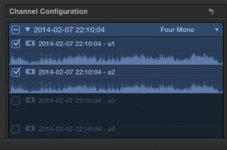
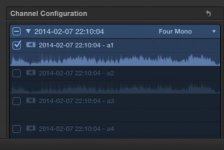
1.jpg 2.jpg 3.png

From left to right: first pic shows the 2 channels, in the second pic I disabled one of them, and then the third pic shows both audio meters bouncing left and right when playing back the one channel.
 
The project is stereo, so the NLE is just playing the track in the center, which means playing it at the same volume on both sides. That's what you want.
 
Back
Top