One-Eye Monsters in Music Video. Motion Tracking/Animation advice.

finklefilms

Active member
Hi all,

I'm about to direct a music video that will include two one-eyed monsters (see pic) escorting the two band members around their city in shopping carts. In post I want to add the "eye" on each monster. I know this may involve some tricky motion tracking. The eye of the mask is where the actor will be looking through. The question I have is:

1. Can we cover the hole with a translucent source so the actor can see out but we don't fully see the actors face and what color is best to use if we are planning on motion tracking and animating on eye on it in post?

Thanks so much. Any insights would be most helpful.
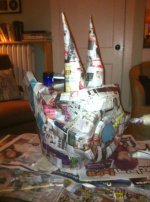
photo.jpg
 
If you'll be covering the eye in post then why not just leave it an empty space for the 'pilot' to look out?

To me, the only reason to have e.g. a solid green eye would be if you're planning on greenscreening to show the eye through the hole. But I suspect that would only be useful if the monsters will always be lit to keep the eye a nice bright green. Even then, you'd still need to do all the motion tracking, so you'd get little advantage.

I'm assuming you're manually motion tracking? If using some sort of automated tool, then the eye just needs to be the type of pointer your particular software can track easily.
 
clang, thanks for your comment. The monsters will be shot 80% of the time in natural light, so I guess having a bright green "eye" wouldn't be worth it. I'm using after effects so I'm wondering if there should be a high contrast color in there so we can try and have the computer track it and minimize the amount of manual tracking.
 
I've never used AE tracking, but no doubt it finds certain things easier to track than others. I suggest doing some tests, shooting people wearing simple paper masks with various eye markers (e.g. a black cross on a white background), then in post try to track an eye over the marker, to see which works best. Be particularly careful with any shots where the face will be partially turned to one side - the potential change in shape and lighting is the most likely to confuse any automated tracking.

You need to preplan all your shots for the big shoot - if you just shoot randomly, you're almost certain to end up with some that are horrible difficult to add the eye to. Of course, you should also make life easier by planning some shots where the monsters are posed so that their eyes aren't visible at all :)
 
I'm guessing AE tracking needs something with a high contrast in order to lock on.

Maybe consider putting two bright white pieces of wood or plastic across the hole in a cross pattern -- maybe painted popsicle sticks. The wearer could still see through the hole. The bright white 'cross' over the darker hole might give AE a good target to lock onto.
 
I'd consider doing something like a large rubber ball cut in half with a hole for the talent to see through, and just like it with black sharpie "X"s. When something pivots or rotates, you need two tracking points. Give yourself plenty of points to choose from.

Other things to consider:
Avoid motion blur (shoot faster shutter and force-blur in post).
AE likes a nice, tight point - I find X's or crosses work well - I often make a cross with 1/2" tape, and them put sharpie crosses in the white corner spaces of the cross. If the thin crosses won't cut it, you have the thick ones to use.

Consider spending an evening learning Mocha for this - most advanced AE users call it up first and skip the AE tracker, or so I'm told. I'm not an expert with it but I imagine I will have to be before long, and it is said to be pretty easy once you get 2nd nature with it.

Mark Christensen's after effects book has great info on the tracker (and a killer keylight section). It should be the first AE book you buy, as it's packed with stuff and fun to read - and covers a LOT of ground on really "Seeing" things, using reference, being an artist vs. a technician.

And finally, test the HELL out of this - storyboard it and test plenty of shots that are indicative of the video, test any difficult angles or shots where trackers may leave the frame via rotation, etc. Don't shoot the project and then find half your shots won't track.
 
Back
Top