Ol' Uncle Sheldy can't SMPTE his Sony Camera to his computer sound recorder

SIPdesk

Member
Most of my video production is in the field. I shoot attractions, restaurants, bars , shops, beaches and anywhere else a visitor would find interesting, to produce a MetroFYI Travel Video.

Our Design Team uses two old Sony DCR-TRV520 NTSC handy cams, lighting, Alesis MultiMix8 audio mixer connected via a firewire to a Dell laptop running XP.

Although both cameras have a LANC port, I can't find any information on how to sync the cameras to the computer via MIDI or a master wordclock. (SMPTE code)

The cameras don't have a SMPTE in plug but I think they can be jam locked to an external SMPTE source.

Since I've retired from the commercial production business, now focusing on "Fun Stuff" I like to do, my shooting budget and crew has downsized considerable.

I'm forced to use the clapperboard and calculator method to sync everything when I edit the sound and footage from both cameras. Each time I edit this way, I feel like good ol' Uncle Sheldy!

If I can't find anyway to SMPTE this equipment together, I might use a software program called DualEyes from Red Giant.

Are you familiar with this program or any SMPTE correcting software? If you only had a few bucks to spend and had my equipment to work with, what would you do?

Meanwhile, I'll just sit hear and try to figure out what time 16:34:214 - 9:41:018 is.....
 
LANC is only going to give you control protocol. You aren't going to get time code or master clock in or out of a LANC connection. At least, not that I have ever seen, heard of, or experienced.

Do a quick search of the forum and you'll see that PluralEyes and DualEyes are often used. Personally, I don't fool with them. A dumb slate/clapper is enough for me in a non-sync system between camera and recorder, or two cameras and recorder. As long as you slate properly (visually and aurally) and keep a log sheet and sound report, you shouldn't have a problem.
 
The LANC port is the I/O of the camer's firmware

The LANC port is the I/O of the camer's firmware

It's possible to connect a custom-made interface cable to your computer's printer
port and the camcorder's LanC connector and communicate with the camera's registers
using some 3rd party software. Once the cable is connected you'll be able to alter
the camcorder's registers.

If you alter your camera's registers you will void your warranty, so proceed at your own risk.

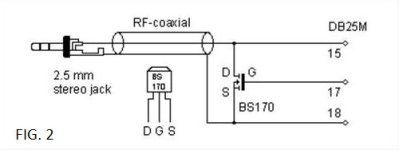
Fig 2. shows the schematic for the cable, only standard components are used. Upon looking
at the schematic all the components can be easily identified, the plug
on the left is the 2.5-mm stereo jack that is used for the LanC
connection on the camcorder, whereas the DB25M connector on the right is
a male LPT 25-pin connector and connects to your PC.

FIG2.jpg

The cable is approx. 3-feet in length and shielded. The
common N-channel mosfet transistor, BS-170, is rated at 60-volts,

Please be aware that this cable is designed to work with EPP or ECP printer ports only,
so be sure to check whether your BIOS settings reflect this, if not change them, as
the cable will not work with SPP or Normal settings.

Once you've got the cable properly put together there are two programs
you'll need to download, one for making a dump of your camcorder's
firmware, for backup, and one to change the registers to enable
recording. The programs you'll need are RM95, which we'll use to make
the firmware dump, and DVin Lite, that we'll use to modify the
camcorder's registers. Both RM95 and DVin Lite need Windows 95, 98 or Me
to run and will not work with true 32-bit operating systems such as
Windows NT or Windows 2000. We've had best results when booting any of
these operating systems in safe mode, as that will prevent any
applications from polling the printer port when we're changing the
registers or dumping the firmware.

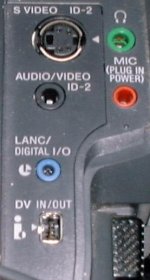
FIG3.JPG
Fig 3. shows the LanC and DV-in/out connectors on my Sony DCR-TRV520 NTSC Camera.

How it works. Connect the cable to the camcorder's LanC connector and the other end of the
cable to our printer port and put the camcorder in 'Player' mode. Once
we've done that you can execute DVin Lite and you should see this window appear.

If there's a dialog box displayed that asks you to check your cable and/or power on the
camcorder there's something wrong. If everything is properly connected and the camcorder is
turned on in 'Player' mode and provided you've made a working interface
cable, the DVin Lite window should appear without any dialog boxes.

We can now check our cable by pressing 'Play' and 'Stop' to see if we can
control our camera from remote. If that works we're good to go.

I don't know if getting DEEP into the camera's software is apropreate for the users on this board,
so I'll stop right here.

I just wanted you to know LANC is a direct connection to the camera's firmware and the sync pulse rate
IS the SMPTE clock.

If any camera hackers would like to help me work on forcing this camera to accept an external SMPTE clock, let me know.

I'm Game...
 
It's possible to connect a custom-made interface cable to your computer's printer port and the camcorder's LanC connector and communicate with the camera's registers using some 3rd party software. Once the cable is connected you'll be able to alter the camcorder's registers.
...............
We can now check our cable by pressing 'Play' and 'Stop' to see if we can control our camera from remote. If that works we're good to go.

I don't know if getting DEEP into the camera's software is appropriate for the users on this board, so I'll stop right here.

I just wanted you to know LANC is a direct connection to the camera's firmware and the sync pulse rate IS the SMPTE clock.

If any camera hackers would like to help me work on forcing this camera to accept an external SMPTE clock, let me know.

I'm Game...

That's all fine and well, but the camera will only transmit and receive the information and commands that it was programmed for. Manufacturers have a financial interest in protecting their product base by reserving "advanced" features for the higher-end (and more expensive) camera models. It seems highly unlikely that one would find that kind of feature in such a low-end camcorder.

There are end-user "hacks" for some DSLR cameras (such as Magic Lantern) which add features not provided by the original manufacturer, but I have never seen any similar projects for any video cameras.

As you say, the one thing that LANC provides is a sort of "frame clock". This could be very useful to do things like PLL an external audio recorder sample clock. But (AFAIK) there are no cameras which provide anything like timecode via LANC. First, there is only 8 bits of data available per frame and it would take several frames of LANC to fully identify just a single frame of video. They could use a multiplexing scheme like WWVB uses to transmit a lot of data at very low rates, but Sony (or whomever) would have to write the firmware to send that information. But then, if the LANC stream were fully occupied by timecode, it would render it useless for any kind of control or monitoring functions.

I have several Sony HXRNX5U camcorders which I use in a multi-camera, live-switch ultra-mobile production unit. In addition to many other very nice features (at a good price) they have rather extensive control implementation via LANC and are controllable with a pretty comprehensive remote control (Sony RM-1000BP) Certainly not the equivalent of a proper broadcast-level camera control unit, but good value for the price-point of the camera (IMHO). I am working on a 3rd party substitute for that (rather over-priced IMHO) remote. So I will be mapping all the LANC commands for the RM-1000BP. But I suspect that only the HXRNX5U camera will respond to most of them.
 
Sounds interesting Richard. I never found a broadcast engineer that wasn't a hack. Remember it's only hacking until it becomes SOP. I was hoping to push a clock number into a register without Sony knowing about it. BTW: Size matters, especially when you pack gear into your carry-on. Those BIG camera cost more to fly than me ;-)
 
We packed up four of those cameras, stands, tripods, remote pan/tilt heads (which were twice as heavy as the cameras) a big pile of cables, recorder, switcher, etc. into four cases that qualified as "checked baggage" (72 inches/100 lb) and took them with us from PDX to SNA a few months ago. It only cost us $190 which wasn't that much more than the ticket for a seat inside the cabin.
 
Back
Top