Oktava MK012 weird sample plot?

KINOKS

Well-known member
I'm editing some material that was shot with Roland R26 together with the MK012 hyper. The sound plot shown in MC6 is kinda strange. It's all wave like:)
Is this normal? Every cut makes a crack when played, this I also find strange.

Here is a picture comparing the MK012 to Sony ECM-673 (MK012 at the bottom) :
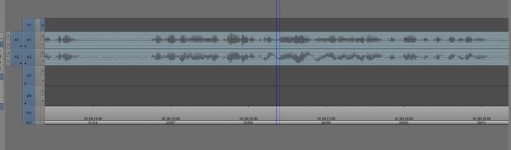
waveform.jpg

This is probably a stupid question, right?

Thx

Br
S

Ps.: also tried other capsules on the MK012, same thing...
Pps.: otervise there is nothing wrong with the sound atleast as far as I can say.
 
You have a strange DC offset, the only time I've seen this was with a faulty capacitor in the phantom power circuit, that was pulling up - but your plot is slowly swinging from + to - as it progresses. The modest signal peaks are then over digital 0 at the peaks and this is where the nasty noises come from. Some software offers a DC offset fix, which might repair it - but what is causing it needs looking at urgently.
 
Digital offsets are rarely caused by a mic itself. So that may not be the issue.
BTW, what is a "crack"?
 
How sure are we that it's not a counterfeit Octava? That's one of those mics that was known for having a lot of fakes, at least a while back.
 
A crack is a European term for a loud pop, unlike the Irish word that sounds the same - Craic, which means fun or good time!
 
Have you tried cleaning the contacts on the capsule and the mic body?

Not througly, no. Should I open the mic or what?

A crack is a European term for a loud pop, unlike the Irish word that sounds the same - Craic, which means fun or good time!

:) Jep, that's what I meant. It's poping on all the cuts I make.

How sure are we that it's not a counterfeit Octava? That's one of those mics that was known for having a lot of fakes, at least a while back.

Well I ordered it directly from Oktava... If that means anything...

Digital offsets are rarely caused by a mic itself. So that may not be the issue.
BTW, what is a "crack"?

I'll try recording directly to the camera and see if I get the same thing.
 
As I understand it this mic has interchangeable mic capsules similar to the AKG C451 that screw onto the main body, there is no need to open up the main mic body but the capsule should screw onto the main body and have a gold plated pin in the centre, the power for the capacitor charge is passed through these connectors and it is essential that they are kept clean and make good contact as that can cause problems with the phantom power getting to the diaphragm!
 
Are you using an Zero cross function? Here is the description from Adobe Audition 3 help menu.....

Auto Zero‑Cross Edits Automatically adjusts the beginning and end points of all Cut, Copy, and
Paste operations to the nearest place where the waveform crosses the centerline
(zero amplitude point). If the amplitudes aren't lined up on both sides of the
selection, the endpoints are at different amplitudes. This often results in an
audible pop or click at that point.
 
Are you using an Zero cross function? Here is the description from Adobe Audition 3 help menu.....

Auto Zero‑Cross Edits Automatically adjusts the beginning and end points of all Cut, Copy, and
Paste operations to the nearest place where the waveform crosses the centerline
(zero amplitude point). If the amplitudes aren't lined up on both sides of the
selection, the endpoints are at different amplitudes. This often results in an
audible pop or click at that point.

No, I'm not using anything like this. At least not that I'm aware of. I have two samples taken from the same recording side bi side (recorded two channels); one is the Sony and the other is the Oktava. I make the same cuts on both audio tracks and only the Oktava pops when cut.
 
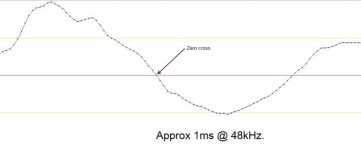
Yes, if the edits occur above or below the 'zero cross' if not, "cracks" could be audible, regardless or DC offset or not.zero cross.jpg
 
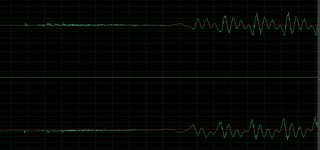
Here is another picture. What's evident is that the Oktavas waveform is reversed (what's up on the Sony is down on the Oktava - Oktava is at the bottom):

waveform2.jpg
 
Well the polarity is reversed in the image - but keep in mind that only by looking at the individual samples can you tell if the polarity of the recording is reversed. You're looking at a large number of samples, so the waveform is being displayed upside down compared to the other. Do you have access to another piece of software that can look at the same clip? Another thing to try would be combining the two into a mono file, and seeing if they cancel out and remain cancelled. If the Oktava waveform is drifting up and down, this should wreck the cancellation and produce a distinct pumping up and down as it cancels to different degrees. I'm wondering if the problem is in the production of the waveform, rather than the waveform itself? A different piece of software might show something different.

Other than that - how about making ten-twenty seconds available on-line, and we could all download it and inspect it and see if we see the same error? I'm happy to try.
 
Well the polarity is reversed in the image - but keep in mind that only by looking at the individual samples can you tell if the polarity of the recording is reversed. You're looking at a large number of samples, so the waveform is being displayed upside down compared to the other. Do you have access to another piece of software that can look at the same clip? Another thing to try would be combining the two into a mono file, and seeing if they cancel out and remain cancelled. If the Oktava waveform is drifting up and down, this should wreck the cancellation and produce a distinct pumping up and down as it cancels to different degrees. I'm wondering if the problem is in the production of the waveform, rather than the waveform itself? A different piece of software might show something different.

Other than that - how about making ten-twenty seconds available on-line, and we could all download it and inspect it and see if we see the same error? I'm happy to try.

Oookey, this is out of my league:) However I can upload a sample. Gladly, and I would be really grateful if you could take a look at it!:)

I have tried it in MC6 and in Audition. Same thing. Also tried recording directly to the camera, same thing.
 
A bunch of things.

That big wave that is on your second track is some very low feq signal imposed on what you want. It's not a DC offset or it would be all on one side. I would put a low pass filter on it at maybe 80 and it should go away. BTW They probably should have done this when recording. I have seen something like this in music where there are some very low synth stuff that is basically subsonic. One reason it's generally a good idea to pass everything through a 20Hz highpass if in doubt (that will eliminate any very low freq passengers).

The popping is because you are not editing at the before mentioned "zero crossing". I don't even know if that is an option with a NLE since you are cutting on the frame line. It's also pretty near impossible with that low freq. rider, so get rid of that first.

As to phase, it's possible that the cable was mis wired, but it's also possible that it's the difference in location between the two microphones. They are never going to be exactly in phase because they are not at the same location and sound takes some time to travel between the two. Basically you won't really know unless you do some tests in a controlled environment. It's also possible that it's the other mic that is "wrong". You can check the cables to see if they are wired correctly, it's very unlikely that the mics are wired incorrectly.

But I suspect that both are fine and you are seeing the effects of displacement.

BTW the standard "fix" for pops at edits is a short fade. The top editing (sound) applications used in film didn't have a zero crossing feature so assistants got the fun job of going through the whole session and adding 1/4 frame scrapes (film term for fade) to the heads and tails of everything. Unless zero crossing is built in to your software it's very time consuming to do. Also with that sub harmonic wave the zero may be too far from your edit point.
 
Well actually, the thing is that the mic was shooting normally about 6 months ago. The waveforms looked normally. They looked like the ones from Sony in my above example.

As for the poping, yes I know, a 2 frame fade resolves the problem. But, it's weird because it's poping all the time (man this sounds funny when writing:)) almost no matter where I cut and this is not normal. I'm just looking at an older interview taken with this mic and all is normal, the waveform looks normal, I can cut it and there is no poping:) lol
 
I think I'm with scott - I doubt the mic is wired the wrong way, but as most mixers provide a button for just this problem, it's eaily solved if you get cancellation effects - and I can't find any on this one. Converting to mono would produce cancellation if the mics were co-located and one was inverse wired. In this example, they don't cancel, and I suspect Scott is right in assuming that the extra distance is what's preventing it - but making it look a bit strange. There is an awful lot of LF energy, and the HF dies off gently over 10K.
 
Back
Top