
Navigation
Install the app
How to install the app on iOS
Follow along with the video below to see how to install our site as a web app on your home screen.
Note: This feature may not be available in some browsers.
More options
You are using an out of date browser. It may not display this or other websites correctly.
You should upgrade or use an alternative browser.
You should upgrade or use an alternative browser.
Okay AF100 users, I need your expertise and opinions.
- Thread starter dreoftheblue
- Start date
 The jib shots look great. Knock 'em dead.
dreoftheblue
Active member
Having an absolute blast. The next teaser is going to be a gut-buster... We're at the point where equipment/tech isn't limiting us, just our own work and skill and writing. 
Loving it!
Loving it!
dreoftheblue
Active member
*Edit*
I won.
I won.
Last edited:
dreoftheblue
Active member
Quick question:
I'm having issues with my audio levels being either too quiet to monitor or clipping... It's like an imaginary line on the dials keeping the increase from being smooth. It jumps from "I can't hear it" to "oh dear heavens the red bars indicate clipping"
This is simply plugging the mic directly into the AF100, and have the "mic" setting selected.
I know a field mixer might help here, but if the sensitivity is the camera itself, I can only imagine it being useful in duplicating my signals so that one can be cranked down and one cranked up... Not exactly a perfect fix.
I'm having issues with my audio levels being either too quiet to monitor or clipping... It's like an imaginary line on the dials keeping the increase from being smooth. It jumps from "I can't hear it" to "oh dear heavens the red bars indicate clipping"
This is simply plugging the mic directly into the AF100, and have the "mic" setting selected.
I know a field mixer might help here, but if the sensitivity is the camera itself, I can only imagine it being useful in duplicating my signals so that one can be cranked down and one cranked up... Not exactly a perfect fix.

EndCredits
Well-known member
That doesn't sound right. Experiment with the Line & mic switch. Some one else would have more info on the Audio side of things.
Whats the mic setup your using?
Whats the mic setup your using?

Jon Hout
Active member
Quick question:
I'm having issues with my audio levels being either too quiet to monitor or clipping... It's like an imaginary line on the dials keeping the increase from being smooth. It jumps from "I can't hear it" to "oh dear heavens the red bars indicate clipping"
This is simply plugging the mic directly into the AF100, and have the "mic" setting selected.
I know a field mixer might help here, but if the sensitivity is the camera itself, I can only imagine it being useful in duplicating my signals so that one can be cranked down and one cranked up... Not exactly a perfect fix.
It sounds like you're amplifying the signal before it reaches the camera. Check the following:
1. Do you have an in-line pre-amp?
If your signal is being amplified before it reaches the camera, then you'll want to the input to "Line" level instead of "Mic" level. Mic level is reserved for input sources that are going in unamplified, so if the signal is already too hot it's going to overload the channel extremely quickly and give you very little room to make fine adjustments.
2. Do you have a battery in the mic?
If this is the case, take the battery out of the mic and just use the phantom power (the +48v switch) on that input channel. Since you've got a camera that supplies phantom power, there's no real reason to use a battery IMO, and if you use both, you can even introduce a buzz in the line in some cases.
If those suggestions don't work, give as many specifics as you can think of and we can probably get it sorted.
- Jon
dreoftheblue
Active member
After uploading the footage, my levels are fine and the audio is fantastic (very low noise and I haven't touched it), so I guess my concern is just being able to monitor properly. Is there such a thing as monitor volume (making the signal to phones louder without adjusting the actual level)?
I was using the aforementioned oktava at the time, and as I said I had the selector to "mic," and phantom power to "on."
I was using the aforementioned oktava at the time, and as I said I had the selector to "mic," and phantom power to "on."
Jon Hout
Active member
After uploading the footage, my levels are fine and the audio is fantastic (very low noise and I haven't touched it), so I guess my concern is just being able to monitor properly. Is there such a thing as monitor volume (making the signal to phones louder without adjusting the actual level)?
I was using the aforementioned oktava at the time, and as I said I had the selector to "mic," and phantom power to "on."
Yep. You can adjust the monitor level with the "+" and "-" keys underneath the playback controls by the viewfinder.
- Jon
dreoftheblue
Active member
Yep. You can adjust the monitor level with the "+" and "-" keys underneath the playback controls by the viewfinder.
- Jon
Well sonofagun...

Thanks for the help, I guess this is the best news I could have hoped for on the issue!
dreoftheblue
Active member
So, turns out I suck at filmmaking!
Lots of reshoots, but we're learning fast and it's been tons of fun! Here's a screen cap of my last shoot.
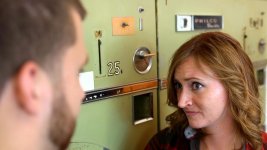
(Tons of my shots from that day were blown out/worthless, but this sequence seems fine)
Lots of reshoots, but we're learning fast and it's been tons of fun! Here's a screen cap of my last shoot.
(Tons of my shots from that day were blown out/worthless, but this sequence seems fine)

hscully
Veteran
Do you mean overexposed? Make sure you consult the waveform monitor on each setup before you roll. I also set up zebras for 70% so that you never see them on skin tones. That shot looks fine. See where the highlight is on her cheek... as long as that's below between %50 and %70 you're doing fine.
dreoftheblue
Active member

So here's a problem I ran into. I had a HUGE silk, but even setting that up (it was to the guys left, just off-screen) you can see what we got. We event tried blotting an entire window (there are no blinds as it is a storefront), but it still looks like this. I thought of adding a light to the actors and then dropping another ND, but this was a busy part of the day at the business and I didn't want to trip someone with a cord/have a tota set up where it could hurt somebody.
I'll be reshooting once on this location, but in case of similar lighting circumstances, what could I do to expose correctly?
hscully
Veteran
If you're shooting out those windows then I would ND the windows. That's the best way to do it It depends how many other angles your getting. If it's just the light coming in they just knock it down with scrims or floppies or Duvetyne or whatever you have.
The other thing to do is what you already suggested, light the actors higher and ND the camera. You know it's blown because you see it in the waveform. It's OK if that's the best you can do but you then have to live with that compromise.
That will happen with any camera with any DR at some point but it happens a little sooner with the AF100.
Know what? I'd live with it. It's not that bad
The other thing to do is what you already suggested, light the actors higher and ND the camera. You know it's blown because you see it in the waveform. It's OK if that's the best you can do but you then have to live with that compromise.
That will happen with any camera with any DR at some point but it happens a little sooner with the AF100.
Know what? I'd live with it. It's not that bad
dreoftheblue
Active member
If you're shooting out those windows then I would ND the windows. That's the best way to do it It depends how many other angles your getting. If it's just the light coming in they just knock it down with scrims or floppies or Duvetyne or whatever you have.
The other thing to do is what you already suggested, light the actors higher and ND the camera. You know it's blown because you see it in the waveform. It's OK if that's the best you can do but you then have to live with that compromise.
That will happen with any camera with any DR at some point but it happens a little sooner with the AF100.
Know what? I'd live with it. It's not that bad
Thanks for that, makes me feel better. (I was having one of those "oh crap am I wasting everybody's time?!" moments)
On a totally separate note... I've got a music video in http://www.tallgrassfilmfest.com... Just a medium-importance fest, but I'm told James Franco may show up.
His film is an official selection. My video is pretty crappy (just threw it together in hopes of sweeping a contest, winning some $$$ and getting to go to the fest), but I'm stoked to get my first taste of the festival experience! Hopefully next year this time I'll have a feature of my own to submit. Any tips for a first-time festival experience?
You need to block the light coming through the windows. Use ND or color correcting gels on the glass itself if you can afford it, or a large silk in front f the windows or better yet pick a time of day when the sun isn't shinning through the window like that. Evening or night †ime.
Sure, the background is blown... but the actors are our focus and they're very prominent in the frame.
In the future... first, a 25'x4' roll of ND .9 gel is only about $120.
In this case, in a pinch, since the windows aren't visible in the shot, like HScully mentions, partially or completely black out a window or two using flags, duvatyne, packing blankets, coats, whatever, just leave enough light coming through to suggest the windows.
In the future... first, a 25'x4' roll of ND .9 gel is only about $120.
In this case, in a pinch, since the windows aren't visible in the shot, like HScully mentions, partially or completely black out a window or two using flags, duvatyne, packing blankets, coats, whatever, just leave enough light coming through to suggest the windows.
dreoftheblue
Active member

Reshoot=This was my answer. I'm pretty limited in post, and will likely have to do a lot of ADR, but this looks better and I can see the business name, which is a plus. (I didn't even notice that part when we were shooting!)
I tried silks, as I said, but the place is HUGE with about 120 feet of windows, so we still couldn't cut the light well. Shooting on a cloudy day would be our only hope if we go out again, but I think we can just use this shot.
dreoftheblue
Active member
First film festival=Success! Boy did I learn a lot watching films by people who've "been there, done that."
And I realize just how important it is to see stuff in a theater with an audience... It's totally different. It was *SO* helpful to see what people reacted to in the films...
Comedy, as it turns out, is gold. These people were laughing easy. Any sort of joke or reference got more laughter than I'd normally hear in a hollywood comedy.
And I realize just how important it is to see stuff in a theater with an audience... It's totally different. It was *SO* helpful to see what people reacted to in the films...
Comedy, as it turns out, is gold. These people were laughing easy. Any sort of joke or reference got more laughter than I'd normally hear in a hollywood comedy.
dreoftheblue
Active member
dreoftheblue
Active member
I know this is a question better posed in a different forum, but I need to use the latest version of Premiere to utilize a plugin for barrel distortion correction, but when I opened my project into it none of my timelines crossed over, it just compiled them into clips for each sequence.
Anybody have experience migrating projects between versions of PP?
It's not worth reworking the whole film for this one feature, and I'm pretty upset that CC updated the software this way. (I was under the impression that CC would update the software itself, not issue entirely new programs that you have to start from scratch with!)
Anybody have experience migrating projects between versions of PP?
It's not worth reworking the whole film for this one feature, and I'm pretty upset that CC updated the software this way. (I was under the impression that CC would update the software itself, not issue entirely new programs that you have to start from scratch with!)