Odyssey7Q bricked due to scrubbing, beware!

Hi all,

I wanted to report this here as others may run into the same scenario:

I was on a shoot yesterday and selected all clips in playback mode to quickly scrub through the footage with the client. Well, i scrubbed and scrubbed, but suddenly the Odyssey hung up. I thought, well just pull the power cord, reboot and be up and running. NOT!

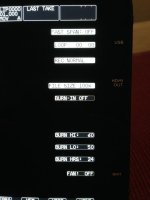
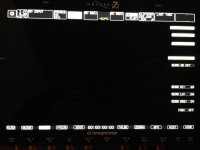
The Odyssey rebooted, but in "MANUFACTURING" mode, showing weird technical data on the right side of the screen, also a MFG menu item showed up, with settings to mess around (which i didn't do of course).

Right, i tried to just keep shooting, wanted to finish first and then call CD support. But shooting wasn't possible anymore unfortunateley. The footage (no matter if captured RAW, 4K2HD or normal 422 ProRes) shows a pink stripe going horizontally through the captured picture.

The folks over at CD didn't pick up the phone unfortunateley, i wrote them an email then.

what i tried already (didn't work):

- factory reset
- menu reset
- different recording modes
- different batteries
- reinstalling the firmware
- it has nothing to do with th SDI cable
- it has nothing to do with the SSD's

I hope there is a combination of keys to press to get out of that mode again. Would be nice if Mitch could forward that post over to CD's engineers, since the contact form on CD's website doesn't allow uploading pictures.

This is a nightmare, and having more shoots coming up, this is stressing the hell out of me.

would love to hear if somebody else ran into that before...

here are some screengrabs:
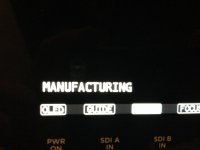
IMG_1765.jpgIMG_1764.jpgIMG_1768.jpgCLIP0000003_0000000.jpg
 
So sorry about that, as that's super stressful.

Isn't the pink line something that comes up in Demo mode? I could be wrong. Whatever it is, not good and I hope a solution is posted soon. I'll try to avoid scrubbing in the meantime.
 
outch, very sorry for you my friend. Cannot help but just confirm that the pink line shows up in demo mode. Keep my fingers crossed for fast fix.
 
I'm wondering since Clermond confirmed it's a Demo mode thing, if you can re-enter the FS700 Activation number (I know there were 2 sets of numbers - one for the codec and one for the 7Q unit). Maybe that will get rid of the pink line. Whatever the case, I'm sorry for your pain.
 
Thanks clermond, still hope cdsupport will do their thing remotely and solve this issue.

Gene, I wondered about that too, but:

1. My account data still hasn't been migrated to the new website :(
2. So i don't have my activation keys anymore.
3. under SET -> ACTIVATION -> UNIT i can only see MFG, nothing like ACTIVE or such.
4. the MFG menu item shows a submenu for activation/deactivation, but im pretty sure i shouldn't press any of these buttons.

thanks for your help guys, much appreciated!
 
I was on a shoot yesterday and selected all clips in playback mode to quickly scrub through the footage with the client. Well, i scrubbed and scrubbed, but suddenly the Odyssey hung up.

I'm sorry to hear that. Were you scrubbing on the main screen or using the time bar to scrub?

Last night I did 44 shots at 240fps and scrubbed all of them back and forth using the time bar with no problems. I was also in a hot environment and the 7Q was at about 57 to 59 degrees C.

It will be good to know how to get out of manufacturing mode - just in case!
 
update on this...

i just got called by Dan Keaton in a conference call with an engineer (i think), who remotely guided me through the process of getting my unit back to normal mode.

just in case anyone may need it:

GEAR WHEEL --> ODYSSEY --> MFG --> then you will have three options, PREP and two additional ones, one of them was MODE i think. Anyway, one of those three buttons have the options to activate, deactivate and test-key. i was asked to press ACTIVATE -> CONFIRM. I then got a prompt to reboot my unit, which i did, the Odyssey was then back in normal DEMO mode.

Dan was then working to reach one of their employees to get my activation keys figured out, which they sucessfully did. I just typed in the activation code, and everything seems to work properly again!

Kudos to CD's customer support! It really is NOT a common thing to get called by two people to figure out an issue, and certainly not on a sunday morning (8:00 AM at Dan's place i think), which is more than remarkable.

hope you guys never have to fuzz around with such things.
 
I'm sorry to hear that. Were you scrubbing on the main screen or using the time bar to scrub?

Last night I did 44 shots at 240fps and scrubbed all of them back and forth using the time bar with no problems. I was also in a hot environment and the 7Q was at about 57 to 59 degrees C.

It will be good to know how to get out of manufacturing mode - just in case!

I was using the time bar too.
 
wow this is super scary if happen in the middle of some project shooting. I might have a chance to shoot for a feature film in nov, hope there is no problem come on my 7Q.
Beside that there is a fan OFF selection appear on the screen? 7Q got fan can be on??
 
Sorry for your troubles. We have not had this particular issue occur before, and first thing tomorrow our engineers are going to work on hunting down how it happened so as to prevent it in the future.

Manufacturing mode is what we use when first assembling and testing the units. Once we've gotten past our initial tests we set the Odyssey7Qs to the standard Demo mode, which is how we ship them out to dealers.

Somehow when Stefan first called our 24-hour support line, when Dan picked up the connection wasn't made and the call hung up. We all know how that goes. From the time I was alerted to Stefan's issue (via a glance at a Twitter post) to the time we had Dan, Tommy and Amber get his Odyssey7Q restored to normal was under one hour.

We of course work to prevent such issues from ever occurring in the first place, but Convergent Design takes customer support very seriously and we aim to keep our clients shooting.
 
Not that more anecdotal evidence is needed, but I had an issue once with my Odyssey when I had a late night shoot around 10:30-11pm (Central time) and I contacted CD's 24-hour line, Dan had no problem talking me through troubleshooting the device at such a late time. Really awesome support from CD.
 
great to hear that it was fixed, great to hear how support works if you need them. Thumbs up!

(I made a copy of the procedure and stored it at goodreader on my iPhone.)
 
update on this...


GEAR WHEEL --> ODYSSEY --> MFG --> then you will have three options, PREP and two additional ones, one of them was MODE i think. Anyway, one of those three buttons have the options to activate, deactivate and test-key. i was asked to press ACTIVATE -> CONFIRM. I then got a prompt to reboot my unit, which i did, the Odyssey was then back in normal DEMO mode.

Dan was then working to reach one of their employees to get my activation keys figured out, which they sucessfully did. I just typed in the activation code, and everything seems to work properly again!

So if this happens, do we ONLY have to enter the FS700 Activation Key? I seem to remember there were 2 sets of numbers we had to enter to get the FS700 working. Obviously, I don't want to reset my FS700 to find out, so I'll just ask :)

I cut and pasted this into an email just incase this happens.
 
I did only have to enter the FS700 key, not the basic activation key. My unit was still activated, though being in manufacturing mode.

Dan, Mitch and Tommy (the Engineer) - they all stated that this is very unlikely to happen under normal operation and that they have no idea why that happened, as they did not have this problem before. I could try to replicate the issue, but i'm a bit hesitant to do so... lol
 
I sincerely doubt you can replicate it easily. This sort of issue occurs at a particular point in a data cycle with a device running at a certain operating temperature and drawing power at a particular current level. Plus probably three or four other companion factors. The stars have to align just right and even then it may only ever be in Stefan's unit.

We are testing here to work to replicate this but after 1000s of units in the field actively working with a vast number recording with the FS700 RAW option, this is the FIRST reported incidence of such an event occurring. We'll put protection in the firmware to try to prevent it in the future, but it is extremely unlikely to occur no matter what. That said, we don't take it lightly and are working to identify what happened and why.
 
Back
Top