Odyssey7 & Odyssey7Q Status Update

I stop using Convergent transfer/combining tool. I found that having PRORES files 4G chunk is great.
I distribute groups of 4G files to a rendering farms - so each machine apply the LUT, cleanup noise, etc to each 4G PRORES file
then compress down to H.264 at highest bitrate - then the next morning, I can pull all those into Adobe and edit.
if some file doesn't come out correct, it is just a matter of re processing that 4G chunk file. This save a lot of time
rather than wait for the combining tool, then edit a hundred gig byte PRORES file then try to render that gigantic PRORES file.
Interesting workflow. Perfectly valid.
 
Having issue importing files into Avid Media Composer since updating Odyssey. Video importing fine - However getting "An unexpected error occurred while importing the Quicktime Audio Tracks. The imported audio tracks may be unusable." The resulting file in media composer has no audio.
Files are 1080p29.97 ProresHQ from SDI output of Sony FS5. (not RAW signal)

Before latest update have not had any issues with this workflow.

The avid is on a windows machine (ver 8.4. ) The files all work fine in FCPX/Adobe on my Mac. The files playback fine in Quicktime Player on the windows machine.
 
Last edited:
Is the audio in your files coming in as 32bit?

Since the last update, all of my audio is 32bit and won't run through a couple of my software programs, like PluralEyes. I had to transcode to 16bit audio to fix it.
 
Hi,

with the newest Firmware (2016.06.1431), the Checkbox "Skip Frames" when playing 50p or 60p is gone! That is very bad, as it´s now impossible to check the recorded files in realtime-speed!
The checkbox was located underneath the playlist... or is it now anywhere else?
 
Is the audio in your files coming in as 32bit?

Since the last update, all of my audio is 32bit and won't run through a couple of my software programs, like PluralEyes. I had to transcode to 16bit audio to fix it.

I'm thinking the 32bit audio is the problem. I've posted a clip in an Avid forum and others were having the same audio import issue using "File/Import" to bring in the file to Media Composer - However, using "AMA LINK / Consolidate" seems to work to get the files into Avid...
 
I have asked the engineers about the audio files. I am unaware of any change, other than we now support 8-channel audio in Apple ProRes recordings from SDI video sources (not from RAW or over HDMI).
 
Hi,

with the newest Firmware (2016.06.1431), the Checkbox "Skip Frames" when playing 50p or 60p is gone! That is very bad, as it´s now impossible to check the recorded files in realtime-speed!
The checkbox was located underneath the playlist... or is it now anywhere else?
In what mode are you shooting that you now find the Skip Frame function is no longer available?
 
I have asked the engineers about the audio files. I am unaware of any change, other than we now support 8-channel audio in Apple ProRes recordings from SDI video sources (not from RAW or over HDMI).

That's great. I emailed Dan on Sunday about this issue. Hope you guys can find a quick solution. None of my prores footage from before 2016.06 has this problem.
 
I now made some tests: the "skip frames" is only working in HD, not in 4K nor in UHD.
I am not sure, was it like this before the update?
From what source are you recording? FS700 RAW? Are you recording in CinemaDNG or in Apple ProRes?
Just trying to track down exactly where you are seeing this issue.
 
From what source are you recording? FS700 RAW? Are you recording in CinemaDNG or in Apple ProRes?
Just trying to track down exactly where you are seeing this issue.

I am recording FS700 RAW or FS7 RAW to Apple ProRes. Skip Frames is only available at HD-resolution, not at 4K or UHD.
 
Hi Mitch,
I just ordered the 7Q+ for my FS5. I read that you can also Apply a LUT to the ProRes files? Is this function still in the planning and do you know when it will be apx. released?
Would be really nice to be able to apply a LUT to the RAW stream and then record it to ProRes so I can give the client a nice looking, ready to use file with be best possible quality in ProRes.

Also it would be awesome to have lossless compressed 3:1 RAW like on some blackmagic cameras. Can you say if this is at all possible with the current processor inside the 7Q+?
 
Baking in LUTs is on what is a very long list. I don't know when we will get to it. You're not the first to ask and I do pass the desires of the client body on, but I can't give any sort of schedule for implementation.

In theory it is possible to incorporate RAW compression, but there are problems with this approach. The RAW data format out of the Sony FS-series cameras is already compressed. We have to decompress it in order to read and restructure it into something that can be used, namely CinemaDNG. If we were to recompress this data, then the issue of concatenation can creep in. This is essentially mismatches between the two compressions that throws away real data and creates new false data. The result can be image artifacts. We really don't like that.
 
Thanks Mitch, looking forward for baking in LUTs. Not something I will need often, but certainly good to have the option.

RAW compression would be nice but if this will produce artifacts, then maybe not. As soon as I have a RAW shoot I will try out slimraw. Then at least I will save some hard drive space. They claim that with the app it is possible to losslessly compress FS5 RAW footage at average of 1:2.6 :)
 
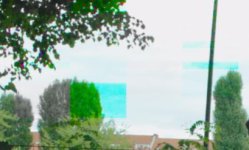
Screen Shot 2016-08-16 at 19.06.49.jpg
I just did a few testshots outside with the FS5 and 7q+ both with RAW activated and tried different framerates and resolutions.
The screenshot is from a 200 FPS recording 2K RAW -> Prores.
Has anyone experienced these kind of artifacts that you see in the tree? Looks really ugly. I can't check if it is also on the internal XAVC-L recording because in HFR RAW mode the internal recording is deactivated.
This also looks bad: Screen Shot 2016-08-16 at 19.27.40.jpg
I have not seen this before on internal recording, so I think this is an issue with the odyssey?
 
Last edited:
We issued a bulletin about such artifacting last week. If you roll back your firmware to 2106.01 it should alleviate the problem for now. On that firmware build you can use the FS700 S-Log2 setting for your FS5.
 
We issued a bulletin about such artifacting last week. If you roll back your firmware to 2106.01 it should alleviate the problem for now. On that firmware build you can use the FS700 S-Log2 setting for your FS5.
OK, just tested with 2016.01 and seams that the big square artifacts are gone in 2K HFR mode. Still have the smaller ones in highlights. But I think this could be produced by the Sony FS5, because I have seen these before in the internal footage. :(
I already asked sony about this and hope that they will fix it in feature firmware so we get a clean 2K@240FPS image.

Can someone with FS700 say if these artifacts (the smaller ones not big ones produced by odyssey 2016.6) also appear in their HFR footage? FS5 and FS700 seam to have a lot in common, especially in HFR mode.
Screen Shot 2016-08-17 at 15.33.18.jpg
 
I have never seen coloured artifacts like that with my fs700 in the highlights. I shoot with the 7Q - 4kraw to 4k prores in slog2 almost exclusively.
The old issue that plagued fs700 users (pre-Odyssey)was the highlight and aliasing artifacts that was largely fixed with the 7Q.

Your other Achilles heel in this situation is that you are shooting with the 2k stream in high frame rates. Even on the fs700, the 2k is not as nice as the 4k due to the way the camera throws away information when down sampling the image from the large sensor. You seem to have a double whammy in quality reduction going on there.

In the mean time, using the rolled back firmware, be sure to at least protect those highlights and use the waveform on the 7Q to make sure you are not clipping the image. This is your best solution right now and with the dynamic range of slog, you should be able to reduce these issues significantly (if not all together) if you just be more careful with your exposure and consequent grade.

I am of course speaking as an fs700 user and am drawing these conclusions accordingly. I apologize if these thoughts don't apply to the fs5 as I have never used one.
 
Thanks Kyron, so if these artifacts are not there on the FS700, what did SONY do with the FS5? :( I'm really angry at SONY right now.
I did another test, this time in 100p RAW DNG with the Odyssey and can still see the artifacts. I couldn't test 200 FPS RAW because I don't have two SSDs at the moment.
Screen Shot 2016-08-18 at 18.54.11.jpg

The only way I found to get a clean result with this camera was by only using 4K and then use 4K->2K Supersampling of the Odyssey. But then the max. framerate will be 100P for 4 sek buffer. Still better than nothing.

I guess I can't use the FS5 in 200P or 240P if I need a clean, error free image. I still hope sony will fix this problem but their support already said that it is a hardware problem and can't be fixed by a firmware update. :(

Before I bought the Odyssey I also did some test with FS5 in HFR mode and tried all kind of picture styles. I found out that Slog is making it much more visible, while the Cine Gammas seam to reduce them. But I guess it is not possible to use cine gamma while in RAW mode?

I just watched some intro videos that SONY posted back in December and in the videos I can now also see at many places these artifacts although they are very difficult to see because of the youtube compression.
 
Hi and thank you for posting your feedbacks. I can also see artifacts on my 2K HFR previews...small but here. Also use 4kRAW to 2k via the odyssey without having issues (but with no 200 fps available.)
Daniel FS5, Did Sony really say that they won't be able to fix the issue? we'll never be able to shoot 200p without these artifacts using the direct full sensor RAW output signal and the odyssey ?
 
Last edited:
Back
Top