Odyssey 7Q Slog2 - Inconsistencies...

jpardon

Active member
Hello, all--

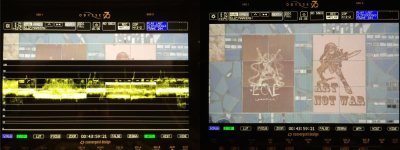
Been working with the new firmware on the 7Q, shooting 4K RAW Slog2 in field. Please refer to the attached images below:

When using the WFM on the 7Q, my clip runs from 45-80 IRE, which I'm guessing is how a "flat" image should appear on a Waveform Monitor.
Odyssey7Q-Slog2.jpg
Odyssey 7Q Slog2, no LUT

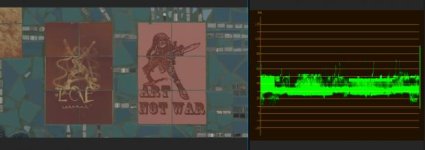
Things get weird when I take the clip out of the 7Q and put it in Premiere. The clip looks darker and more saturated, and runs from 25-50 IRE on Premiere's Waveform Monitor.
Premiere-Slog2.jpg
Premiere Slog2, no LUT


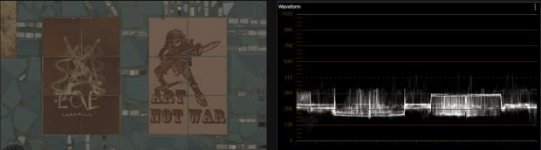
Things are also weird when I put the clip in Resolve. The clips looks darker but still low contrast, and runs low on Resolve's Waveform Monitor.
Resolve-Slog2.jpg
Resolve Slog2, no LUT


What I am doing wrong?
 
Thanks Sean--

Looks like adding 3 stops of exposure compensation in Resolve does the job.

But what about the weird magenta color-cast that I get from Odyssey 7Q cDNGs in Premiere?
 
But 3 Stops make that thing noisy! Facing the same problem right now...

How hould we expose like that?!
 
EXPOSE two stops to the right, don't BOOST 2 stops in post.

Joshua, what version of Premiere are you running?
 
It's not about upping the exposure, you need to change the contrast curve. RAW is linear, a gamma of 1.0. Standard video gamma is 2.2.
 
It's not about upping the exposure, you need to change the contrast curve. RAW is linear, a gamma of 1.0. Standard video gamma is 2.2.

and changing the contrast curve, moving the gamma up, you raise the noise floor.

Here's a fun project kids, dual record your SLOG2 on your FS700 and 7Q. Adjust your 7Q cDNGs to match the output from your FS700s AVCHD. Tricked you, that's impossible! hahaha Not even with Nick's luts (which are great btw, thx Nick!) Get it as close as you can. Now look at the noise in the shadows. I'll admit this isn't totally fair as AVCHD's reduced resolution and heavy compression squashes a lot of noise anyway.

So record the scene twice on the 7Q. Once in RAW and once in 4K Prores. Again, good luck matching the RAW to the Prores, but do your best. Unfortunately, the results are the same albeit less dramatic. Noisy footage. Noisy? Noiser? Is Noiser a word?

I have found a technique that provides me with cleaner output when working specifically with 7Q's DNG files. Moving my exposure up at capture. I'd rather not, but it gives me better output when working with these linear files. I compare it to a film technique of over exposing slow film and printing "down" for a super clean image.

I'll admit I'm finding it less and less useful to use FS700 RAW on the 7Q. Since it's not really RAW, the advantages of recording in this format are much less than with other cameras. Add to that the frustration of trying to adjust these linear files to match what we are all used to working with and see on the 7Q on set, there isn't much point.

Why is that again Mitch? Why linear?
 
I'm not going to tell you how you show expose. CD should detail how to achieve the best results with their equipment.

I'm simply sharing what's provided me with good results.
 
I'm not going to tell you how you show expose. CD should detail how to achieve the best results with their equipment.

I'm simply sharing what's provided me with good results.

They definitly should! As said, Im supprised this hasn't been discussed yet!
 
I have found a technique that provides me with cleaner output when working specifically with 7Q's DNG files. Moving my exposure up at capture. I'd rather not, but it gives me better output when working with these linear files. I compare it to a film technique of over exposing slow film and printing "down" for a super clean image.
That is exactly what the -1 and -2 LUTs are provided for. You can install -1 and -2 versions of the S-Log2 to LC709A LUT (from the CD LUT download page) in your Odyssey, so you can overexpose your RAW by one or two stops, but still see a normal looking image on the Odyssey display. Then in Resolve you use the matching -1 or -2 BMD Film to S-Log2 LUT, followed by the Odyssey preset S-Log2 to LC709A LUT. You should see the same image in Resolve that you saw on the Odyssey when shooting. Then you apply your grading adjustments between the two LUTs.

Unfortunately I do not have an FS700 here, or I would test that, rather than just explaining the theory to you!
 
It has been discussed a lot. It's a trade off to have a superior image on the Oddysey.Unfortunately this means dual record is going to give you a fairly overexposed internal image. I think most people over time have just accepted this because the image is so much better out of the 7Q.

To use the least noisy part of the dynamic range of the camera, you need to shoot between 1 to 2 stops over and bring it back down in post. At least the new LUT system allows you to actually monitor in -1 or -2 now so the image finally looks pretty damn nice while recording.

You either live with the noise in the oddysey output, or you over-expose your internal copy.
To have the best of both worlds, you could spend more time and money on denoising techniques in post like selective shadow denoising using luma masks. A pain but quite effective, especially with raw. Welcome to the land of compromise!
 
It has been discussed a lot. It's a trade off to have a superior image on the Oddysey.Unfortunately this means dual record is going to give you a fairly overexposed internal image. I think most people over time have just accepted this because the image is so much better out of the 7Q.

To use the least noisy part of the dynamic range of the camera, you need to shoot between 1 to 2 stops over and bring it back down in post. At least the new LUT system allows you to actually monitor in -1 or -2 now so the image finally looks pretty damn nice while recording.

You either live with the noise in the oddysey output, or you over-expose your internal copy.
To have the best of both worlds, you could spend more time and money on denoising techniques in post like selective shadow denoising using luma masks. A pain but quite effective, especially with raw. Welcome to the land of compromise!

Well then I have looked up the wrong threads :)

And how do you manage to get this over exposure right and not overdue it? With zebras? Or do you use false color?

Cheers
 
And how do you manage to get this over exposure right and not overdue it? With zebras? Or do you use false color?
I posted a table here showing the IRE values in S-Log2 and S-Log3 for 18% grey and 90% white at normal exposure and one and two stops over. You could use these values to set up over-exposure zebras or false colour, whichever you prefer. And use the appropriate exposure compensated LUT in the Odyssey. To a great extent, if the image looks as you want it to with the -2 LC709A LUT switched on in the Odyssey, then you are two stops overexposed.

But as ever, test thoroughly, running footage through the complete post pipeline, to ensure you are happy you understand what you will get out of the other end.
 
I'm not going to tell you how you show expose. CD should detail how to achieve the best results with their equipment.

I'm simply sharing what's provided me with good results.
And if you look at what's been discussed here on the forum and in Knowledgeable articles on our website you will see that we do give such information. Much more so than other companies.
 
There are many ways to skin the cat. We offer a solution that provides a good, standard result. We also supply solutions for over-exposing and then adjusting that back in post. And we now supply a system whereby you can customize your own process to achieve the look you want, and you can preview it as you shoot.

Honestly, don't just accept our LUTs. I mean it. Nick has done some wonderful work for us here but I'm certain he agrees. These LUTs are simply standard offsets, designed to deliver a "technically correct" form of image. But that doesn't mean you have to use it that way.

Shoot a test using the LUTs. Then manipulate it in post. Get the look the way you want and create a new LUT. Then try another test using that new LUT. Rinse & repeat until you're satisfied.

You are craftspeople. Artists. You manipulate light, optics, exposure and now image processing to achieve the images you desire. We're not here to cut you off at the knees, Cnvergent Design makes tools to allow you to unleash your creativity and skills. Go for it.
 
Back
Top