Odyssey 7Q+ - Skip Frames Function

pythonman

Well-known member
I asked this on the Facebook group, so apologies for repeating this if you've seen it already, but there's meant to be a skip frames option in playback of 50/60p recordings on the Odyssey, so they appear to playback in realtime rather than 50% slower. But I cannot for the life of me find this option anywhere. The latest manual refers to it (see attached image), but doesn't show where this feature/option exists physically. I'm probably looking straight at it without realising, but if anyone can enlighten me I'd appreciate it. Thanks!
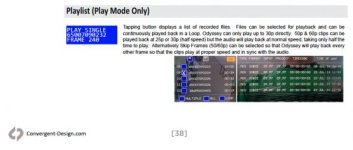
Screen Shot 2016-08-01 at 16.45.36.jpg
 
It is only available in certain modes, not for all forms of 50/60p. For the modes in which is is available, it will appear on the Play List screen at the bottom, next to the LOOP button.
 
Could you clarify which modes it does exist in? I would like to be able to playback both 4K 50p ProRes and HD 50p ProRes in real-time on-set to a client, not 50% slower. Does the skip frames feature exist in these modes? Thank you.
 
I believe that it is currently available in 4K RAW->HD ProRes and 4K Video->4K ProRes, but not in 4K RAW->4K ProRes. I have asked our engineers if it is possible to add it to this mode as well.
 
Back
Top