
Navigation
Install the app
How to install the app on iOS
Follow along with the video below to see how to install our site as a web app on your home screen.
Note: This feature may not be available in some browsers.
More options
You are using an out of date browser. It may not display this or other websites correctly.
You should upgrade or use an alternative browser.
You should upgrade or use an alternative browser.
Odyssey 7Q issue...
- Thread starter thirdyearff
- Start date


Doug Jensen
Carbonite Member
I haven't yet decided whether to get the Odyssey repaired or not.
I did decide to get mine fixed by CD. Almost like brand new now. But I don't need it anymore, so if someone wants a good deal on a 7Q+ that was just serviced, let me know.
https://www.cnet.com/reviews/toshiba...gb-7-7-review/
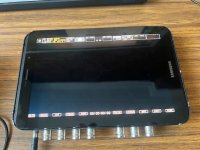
7Q uses the front assembly of the Toshiba Excite 7.7. Ever wonder why that little dot is in the corner? It's the camera hole for the tablet. Also see the SmallHD OLED for the exact same panel. What does this mean? 7Q replacement screens can be found for around $20 if you are willing to take the tablet apart. Photo above is of upgraded AMOLED Plus screen I found from Samsung which also works. Focus is easier to see close up on the plus screen.
7Q uses the front assembly of the Toshiba Excite 7.7. Ever wonder why that little dot is in the corner? It's the camera hole for the tablet. Also see the SmallHD OLED for the exact same panel. What does this mean? 7Q replacement screens can be found for around $20 if you are willing to take the tablet apart. Photo above is of upgraded AMOLED Plus screen I found from Samsung which also works. Focus is easier to see close up on the plus screen.
I have been trying to contact cdsupport@convergent-design.com and the email address bounces. The 1-720-221-3861 number also reports as non-existent when dialed. Has the company recently (very recently) vanished? I have two 7Qs with the RAW bundle and the Titan and DNxHD keys I received for one of them a couple of years ago were rejected and their suggestion to flash new firmware did not resolve the issue. I just gave up at that time. I am now trying again to see if I can get working keys for both monitors. I have three FS700s and wanted two of them to have 7Q monitors available.
My other issue is media. The "unrecognized" message for anything other than a couple of rather old SSD versions is very annoying and not acceptable as the old media availability is going to disappear. Trying to use new media that exceeds all of the old requirements fails as the firmware apparently has a fixed list of acceptable options (like only 5 or so).
If anyone can determine whether CD exists and has possible access to vintage information, maybe even a hack to at least get past the media recognition problem, I would be very grateful. If there is an updated list of acceptable more recent SSD options, that would also be appreciated.
One other note: When replacing the battery you will be prying the main board off of the heat sink (back) separating well cured heat sink compound. There is a silicone pad under the compound that is subject to tearing a bit. Make sure the pad is positioned to maintain electrical insulation and possibly clean off and replace some of the compound on the main chip as old compound tends to lose heat transfer efficiency especially when dislodged.
My other issue is media. The "unrecognized" message for anything other than a couple of rather old SSD versions is very annoying and not acceptable as the old media availability is going to disappear. Trying to use new media that exceeds all of the old requirements fails as the firmware apparently has a fixed list of acceptable options (like only 5 or so).
If anyone can determine whether CD exists and has possible access to vintage information, maybe even a hack to at least get past the media recognition problem, I would be very grateful. If there is an updated list of acceptable more recent SSD options, that would also be appreciated.
One other note: When replacing the battery you will be prying the main board off of the heat sink (back) separating well cured heat sink compound. There is a silicone pad under the compound that is subject to tearing a bit. Make sure the pad is positioned to maintain electrical insulation and possibly clean off and replace some of the compound on the main chip as old compound tends to lose heat transfer efficiency especially when dislodged.
Doug Jensen
Carbonite Member
I had mine serviced last June and it is basically new again. Here's some info from last summer that might help you get in contact with them. I have a phone number too, but I don't want to post it here. Send me a PM if you still hit a brick wall.
I understand that the Odyssey and/or Apollo are integral to your business. So we will do our best to repair and support these products. We can repair most common issues, including power connectors, SDI input, and output failures, and even OLED panel replacements.
Convergent Design
4525 Northpark Dr.
Colorado Springs, CO 80918
USA
Please include your name, address, phone number, email, and a short description of the issue(s) with your unit. Just to let you know, no RMA is required. Turnaround time is usually one week after we receive your unit. You will receive a PayPal invoice for the repair work, which can be paid via a debit or credit card.
Clock Battery Replacement - $50
While we will continue to offer the clock battery replacement at a flat rate of $50, we are developing a short video that details the procedure. We understand many users prefer to avoid the cost, and especially the downtime.
Software Tools, Firmware, Owner's Manual
Software tools, the latest Odyssey and Apollo firmware, LUT tools, CD transfer tool, owner's manual, and mechanical drawings can be found here. We recommend using the 2018.03.1719 firmware.
Evaluating Raw and Apollo Without Purchase
The Raw bundle and the Apollo quad-channel recording can be evaluated without a license purchase. Both capabilities are already present in your Odyssey if you have the 2018 firmware. The only caveat is that the video will be watermarked with a horizontal bar. Otherwise, you can test the entire workflow. You will need the CD transfer tool (found in the software tools folder) to separate the multi-track file as recorded on the Odyssey into four files.
If you wish to purchase with the Raw bundle or Apollo option, please email mike@convergent-design.com. Please include your Odyssey serial number. The Raw bundle can only be added to an Odyssey, not an Apollo.
Unable to Load New LUTS
There may be a simple fix if you cannot load new LUTS. Go to the RESET to FACTORY DEFAULTS menu option and RESET (DELETE) LUTS. This clears out the LUT memory and hopefully resolves the issue.
I Forgot To Eject the SSD
Reinsert the SSD back into the Odyssey/Apollo. Under the SSD menu, select REBUILD SSD1 or SSD2, as appropriate. This will rebuild the file system without changing any of your recorded files. After the rebuild operation, do a standard SSD eject.
Overtightening the ¼-20 Mount
Please be careful not to overtighten the ¼-20 mount on the backside of the Odyssey. The best approach is to snug the screw and tighten the knurled nut. Do not tighten this screw by twisting the Odyssey. It’s easy to overtighten the screw, breaking thru the metal barrier and ultimately destroying the circuit board. This is non-repairable; your Odyssey is gone for good!
Burn-Out of OLED Panels
OLED is a fantastic monitor technology. The color rendition and the black levels are far superior to LCD. However, OLEDs can exhibit both burn-in and color shift with excessive use. We do have replacement OLED panels available, but they are expensive. The best practice to avoid these issues is to minimize both the on-time and static image display. Please turn off the Odyssey/Apollo when it’s not used to maximize life.
========
Contact Person for Tech/Sales Questions
Contact Mike Schell: at mike@convergent-design.com with all your tech support and sales questions. Mike can be reached by cellphone/text at 1-719-661-3388. Text and/or email are preferred over voicemail.I understand that the Odyssey and/or Apollo are integral to your business. So we will do our best to repair and support these products. We can repair most common issues, including power connectors, SDI input, and output failures, and even OLED panel replacements.
Returning an Odyssey/Apollo for Repair
Please ship your unit via UPS/FedEx/DHL or USPS to:Convergent Design
4525 Northpark Dr.
Colorado Springs, CO 80918
USA
Please include your name, address, phone number, email, and a short description of the issue(s) with your unit. Just to let you know, no RMA is required. Turnaround time is usually one week after we receive your unit. You will receive a PayPal invoice for the repair work, which can be paid via a debit or credit card.
Shipping RMA Units from Outside the US
Creating the proper customs paperwork is critical when shipping units outside the US. Please set a low customs value of $75 for the unit to avoid a customs duty charge. In reality, no customs duty should be required, as we are not re-selling your Odyssey, only repairing and returning it. If the custom form requests a country of manufacturer, always enter the USA, where the Odyssey was manufactured. If you mistakenly enter China, a 25% duty will be added to the customs bill. Ouch!Clock Battery Replacement - $50
While we will continue to offer the clock battery replacement at a flat rate of $50, we are developing a short video that details the procedure. We understand many users prefer to avoid the cost, and especially the downtime.
Software Tools, Firmware, Owner's Manual
Software tools, the latest Odyssey and Apollo firmware, LUT tools, CD transfer tool, owner's manual, and mechanical drawings can be found here. We recommend using the 2018.03.1719 firmware.
Evaluating Raw and Apollo Without Purchase
The Raw bundle and the Apollo quad-channel recording can be evaluated without a license purchase. Both capabilities are already present in your Odyssey if you have the 2018 firmware. The only caveat is that the video will be watermarked with a horizontal bar. Otherwise, you can test the entire workflow. You will need the CD transfer tool (found in the software tools folder) to separate the multi-track file as recorded on the Odyssey into four files.
If you wish to purchase with the Raw bundle or Apollo option, please email mike@convergent-design.com. Please include your Odyssey serial number. The Raw bundle can only be added to an Odyssey, not an Apollo.
Unable to Load New LUTS
There may be a simple fix if you cannot load new LUTS. Go to the RESET to FACTORY DEFAULTS menu option and RESET (DELETE) LUTS. This clears out the LUT memory and hopefully resolves the issue.
Quad-Channel Monitoring w/o Apollo
If you were unaware, quad-channel (four video streams) can be monitored without purchasing the Apollo option. (The Apollo option enables the recording capability). Under the gear menu, go to setup -> master camera -> multi-stream -> Quad HD monitoring. The system will reload the firmware, which takes a few minutes, but you can now view 4 streams simultaneously.Low Battery Warning While Recording
While recording, the Odyssey and Apollo require considerable power, upwards of 18W, which strains the power supply. If you have a low-battery warning, try switching to an AC power source. If this cures the problem, you must recharge your battery or consider switching to a higher-grade battery, such as a Sony-branded battery. This is not to be confused with a low clock battery warning requiring an internal battery replacement.I Forgot To Eject the SSD
Reinsert the SSD back into the Odyssey/Apollo. Under the SSD menu, select REBUILD SSD1 or SSD2, as appropriate. This will rebuild the file system without changing any of your recorded files. After the rebuild operation, do a standard SSD eject.
Overtightening the ¼-20 Mount
Please be careful not to overtighten the ¼-20 mount on the backside of the Odyssey. The best approach is to snug the screw and tighten the knurled nut. Do not tighten this screw by twisting the Odyssey. It’s easy to overtighten the screw, breaking thru the metal barrier and ultimately destroying the circuit board. This is non-repairable; your Odyssey is gone for good!
Burn-Out of OLED Panels
OLED is a fantastic monitor technology. The color rendition and the black levels are far superior to LCD. However, OLEDs can exhibit both burn-in and color shift with excessive use. We do have replacement OLED panels available, but they are expensive. The best practice to avoid these issues is to minimize both the on-time and static image display. Please turn off the Odyssey/Apollo when it’s not used to maximize life.

bill totolo
Veteran
Shipped mine in Nov last year ('24) and now 9 months later I'm already receiving the "battery low" warning.
Swapped it out myself this time around, and the same message immediately popped up. Guessing there's a short somewhere.
Besides time and date, am I losing any other functionality that I should be aware of?
Swapped it out myself this time around, and the same message immediately popped up. Guessing there's a short somewhere.
Besides time and date, am I losing any other functionality that I should be aware of?