Odyssey 7Q drive transfer times - other people's experience.

Colinelves

Well-known member
I got the O7Q on Tuesday and have finally gotten round to testing it out with my FS700 today.

Suffice to say, I shot a little high-speed stuff. Not a huge amount - or so I thought. Although it looks like I ended up using both my 256gb drives.

So I'm now siting down backing up the material to take a look at it and.... well, my computer says it's going to take an hour per drive and I wanted to check if this was consistent with other people's experience.

Now, bare in mind that I've a seriously old macbook pro so I'm transferring via USB 3.0 through an express card adaptor. i.e. it's not USB 3.0 natively included with my computer. It's not Thunderbolt - so I'm not exactly shocked that it's taking a while (although 2 hours to download 10 mins of footage is a bit of a surprise!)

While it's just me, that's not too much of an issue - but if I'm doing a paid job with a lot of slow mo - I need to prepare my client for extended long back up times!

So, I'm asking those of you out there who have more experience of this, how your transfer time compare when using USB 3.0 and thunderbolt on newer computers. Should I be looking to purchase a thunderbolt card reader and/or a newer computer!

Thanks!
 
USB 3.0 is about 15 minutes per drive in my experience, that increases slightly if I'm doing two at once. I have both a Thunderbolt adapter and a USB 3.0 adapter. If your computer is old enough to have the ExpressCard slot, I'd maybe look into an eSATA card, which you can get 3Gb/s or 6Gb/s depending on the ExpressCard speed. That's a good route to go if you are OK with keeping your current laptop longer. Otherwise, getting a new MacBook Pro would solve your problem and probably give you a big boost in other areas (Retina, HDMI, Thunderbolt 2, USB 3.0, quad-core processor)

Regarding your statement "2 hours to download 10 mins of footage": It's ten minutes at 240fps. So that's 100 minutes of footage on the drives. You have an hour and forty minutes of footage transferring, not ten.
 
USB 3.0 is about 15 minutes per drive in my experience, that increases slightly if I'm doing two at once. I have both a Thunderbolt adapter and a USB 3.0 adapter. If your computer is old enough to have the ExpressCard slot, I'd maybe look into an eSATA card, which you can get 3Gb/s or 6Gb/s depending on the ExpressCard speed. That's a good route to go if you are OK with keeping your current laptop longer. Otherwise, getting a new MacBook Pro would solve your problem and probably give you a big boost in other areas (Retina, HDMI, Thunderbolt 2, USB 3.0, quad-core processor)

Regarding your statement "2 hours to download 10 mins of footage": It's ten minutes at 240fps. So that's 100 minutes of footage on the drives. You have an hour and forty minutes of footage transferring, not ten.

Thanks. I've actually got an eSATA card as well - and an eSATA enabled reader (it's USB 3.0/eSATA) so I'll give that a try and see if I notice a difference. Ultimately, however, I expect that it might just be that the Expresscard bus is really slow, as the USB 3.0 card is supposed to give 5Gbps and the eSATA one 3Gbps.

15min, however, is much more acceptable! I may have a word with the wife about buying a new computer then!
 
It's ten minutes at 240fps. So that's 100 minutes of footage on the drives. You have an hour and forty minutes of footage transferring, not ten.

Yes. Thank you mr pedant ;-) I am aware of that. The issue is more that it only took 10 mins to shoot so clients won't be happy to sit round for an hour while it downloads!

Still. I may just tell them they need to provide a decent laptop and fast drives for back up!
 
No pedantry just clarifying.

I think if you are doing 240p raw shooting you are going to need, well, a significant digital workflow solution as you are not just going to have to DL it but also back it up offer 1st lights/proxies et al

I could imagine having a minimum of six drives for the O7q for starters.

and of course a price structure to match


S
 
Yes. Thank you mr pedant ;-) I am aware of that. The issue is more that it only took 10 mins to shoot so clients won't be happy to sit round for an hour while it downloads!

Still. I may just tell them they need to provide a decent laptop and fast drives for back up!

I'm with Sam on having multiple drives. I currently only have three (so at least I can shoot standard speed while high FPS drives offload) but I'll probably pick up a fourth soon. Another thing to keep in mind is that although the 7Q's continuous 240fps mode is very liberating (compared to the 8 sec buffer), there is no substitute for planning the shots and shooting conservatively in 240fps. Don't let the camera pre/post-roll for too long on takes if you don't absolutely have to. Hopefully then you won't actually burn through the drives in 10 minutes, leaving the client waiting around while they transfer!
 
I'm with Sam on having multiple drives. I currently only have three (so at least I can shoot standard speed while high FPS drives offload) but I'll probably pick up a fourth soon. Another thing to keep in mind is that although the 7Q's continuous 240fps mode is very liberating (compared to the 8 sec buffer), there is no substitute for planning the shots and shooting conservatively in 240fps. Don't let the camera pre/post-roll for too long on takes if you don't absolutely have to. Hopefully then you won't actually burn through the drives in 10 minutes, leaving the client waiting around while they transfer!

Well, I've done some bench marking and it looks like I'm getting 80-90MBs from both the USB 3.0 express card and the eSATA express card, so I'm guessing the bottleneck is in the Expresscard bus. Shame, it's only slightly above firewire 800 speeds. Oh well, time to upgrade the machine. Mind you it is five and a half years old now! Thankfully the wife seems open to the idea of me upgrading the old girl.

I'm with you on the drives. I bought 3 as that's all I could get from CVP, my intention as to have 4 so I could run two and back up two. I'll get another as soon as one is available in the UK.

And I agree with planning out the shots. If nothing else, those 10 mins of high speed footage equals 1/2 TB. Most clients won't be happy with you burning through that much data! Let alone dealing with the, literally, hours and hours of footage this will involve.

To be honest, it's another reason why people shouldn't be so excited about getting 4K Raw on the O7Q. I've shot some with the Sony recorder and you're looking at 1Tb per hour of footage. Again, that's too much for most productions to handle - and that's before the headache in post.

One thing worth noting though: It turns out I didn't shoot 10mins of slow mo (I knew it felt off) I only shot 10Gb worth. Rather, it looks like the O7Q drives are permanently full (I'm guessing this has something to do with keeping up their performance) so if you click and copy the drive (rather than the folder inside containing the clips) you'll end up copying the whole drive each time, rather than just your footage. Just something to watch out for, in case people didn't realise.
 
another test from my side: I recorded continuously on a fresh formatted 256GB Disk.
2K RAW, 25p. about 48min. Disk Full.

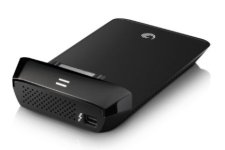
Copy to a 2012 iMac via Seagate Thunderbolt adapter. First try via Finder.
10min preparing, 1,9GB copy. Freeze. Bummer.

Next try via Synchronize! Plus which I use for incremental
back up or copy from hard drives or flash drives.
10 minutes preparing to list all files.
log: 73,520 files / 231,95 GB, 36:30 to copy.
Done.

SSD is warm but not too hot
 
I've used Thunderbolt, USB 3 and Firewire 800 (all Seagate Adapaters) and although I have not done any official side by side tests, I can say that Thunderbolt does seem to be quite a bit faster than USB 3.0 and Firewire 800. I'm actually pretty amazed how fast it copies RAW files.

NOTE: I wrote this to Sunnyjayfilms in another post:

seagate1.jpg

Hey Sunnyjimfilms, I saw that you got the Seagate Thunderbolt adapter. I have the same model and I have to warn you a bit. I would NOT leave the adapter plugged in or have your SSD card sitting in it for a long period. Basically, I just copy my files then disconnect the Seagate adapter, which it does well and very fast.

Why? Because I noticed it gets really hot, as in potential electrical fire hot. In fact, if I put un-plug the Thunderbolt cable after it's been sitting in the adapter, I cannot keep my finger on the metal tip for more than a few seconds before it starts to burn my finger. It runs very, very hot.

So yeah, be careful with that thing. Works great, I just wouldn't want my house to burn down over it.

------------- Other issues I've noticed with copying files

1) Seagate USB 3.0 GoFlex Seagate does NOT play well with my G-Technology 4TB Thunderbolt drive. I very often get a file copy error and the files stop copying. This does not seem to happen when copying to other USB 3.0 connected drives, only my Thunderbolt drive. I am on a 2013 iMac, so all my drives are now external via adapters.

2) Firewire 800 GoFlex Seagate, like the Seagate Thunderbolt GoFlex, also gets very hot. Other Amazon reviews have noticed this as well. Not as hot as the Thunderbolt which gets crazy hot, but hot enough for concern.

3) USB 3.0 GoFlex does not have the heat issue, but it does have the disconnect Thunderbolt issue.


LMAO, I guess I just can't win!
 
My average transfer speed copying from SSD to PC is 105 MB/S.
That's using a Nexstar USB 3 external Dock, copying directly onto an internal 1TB Samsung EVO SSD.

Equates to around 40mins per 256gb SSD for me (but no 10min "preparing file lists" pre-time like Clermond. It just transfers immediately.)
 
If you are using a five year old MBP then it is going to take awhile to download those files. And I can't imagine trying to ever work with these files over Firewire 800 -- you'll want to shoot yourself.

Thunderbolt is fantastic for this, with a proper USB3 just behind it. But be careful, as you can mount the GoFlex (or other) USB3 adapter and all will seem well, until the file transfer takes forever and you discover you only have USB2 on your computer.

There's really no way to get around needing one of the modern interfaces if you want to move heavy data loads. Lots of Gigs is lots of Gigs.
 
IMHO Thunderbolt on a modern mac will suck the data off as fast as the SSD can give it. Your limit will be either that, or the speed at which it will be written which is more often the bottleneck. But it does get hot, that's true.

Time to break out that credit card Colin...

cheers
Paul
 
Time to break out that credit card Colin...

cheers
Paul

I don't actually have a credit card. The wife made me cut it up after I bought the FS700. However, she has agreed to let me get a new one so I can buy a new computer on interest free credit!

I'm probably going to get a top of the line MacBook Pro - If it's still taking 15mins for a Thunderbolt connection, it sounds like Thunderbolt 2 will be what's needed in the long run, so a new MPB is future proofing and I'm hoping the extra graphics processor will mean I can grade the 4K and 2K Raw in realtime in Davinci (my current laptop barely loads the DNGs!) Hopefully if I max the specs again this next one will last another 5 years. Although this time I might actually charge clients to use it (assuming they don't want to hire a DIT).

I'll probably get the extra drive as well - most people still view the FS700 as a one trick pony so it has to be high speed ready.
 
I bought a 27imac (a year or two ago) my thought was the two thunderbird ports (unlike the 23in at the time) would enable me to write from the capture disk straight to an external drive, also the second one allows using an external monitor while thunderbirding to a disc.

Anyway two years in that has not happened as you cant wander in to PC world and get Thunderbird external drives so Ive stuck with my normal drives (im on 25 pairs now!) being whatever is cheapest at PC world.

I cant help too much but id observe

.. Thunderbird seems to be dead not much faster than USB3 and just not available

..I would consider a system where you are writing direct from your shoot media to the archive media, keeping the computer, clean

I had a surprise a bit a go when I did a full (HD) project (including edit and grade) off a normal USB disk Usb2 I guess.

My SSD from my HShuttle will play the prores perfect which is great for on location checks

I personally dont buy the 'NAS" concept as they would get filled in a month, duplicate external HD seem and OK solution although T+C should cover data loss.

I did revisit LTO (after having one in 1998) and the write speed seem OK and the cost per TB more managable but there are upfront costs of about another £2g

One of my reasons not to buy the F5(and raw) was I realised my backend would need a total rejig to handle the data.

S
 
..as I dont really trust any external recorders Id look to be shooting to SDcard and/or an FMU too, this also might generate proxies on the fly.. super handy maybe

I dont know if it is possible to match file names, but with reasonable discipline and PhotoMechanic you should be able to easily match file names which may or may not allow connection of the locked edit to the raw images just before the grade..

S
 
Last edited:
Can anyone tell me how many MB/sec to expect when using a thunderbolt drive and copying to a a fast internal or fast raid setup? Is 100MB/sec the most we can get? That seems pretty slow. I imagine speeds much higher are possible. Any feedback? Thanks so much!
 
For daily edits I use thunderbolt external connected ssd to new mbp with the new super fast pcie ssd. 1tb each. I get 600+MB/s. It benches at 900+ using black magic disk test.

Everything else goes on a 10Gbe 12tb R10 nas which I get 300MB/s plus to/from. I've had that nas up to the limit of the internal ssd of the mbp when test configured with some ssds. I connect to it using a sonnet express tb case that is about to get a free upgrade to tb2. After that it goes off to a slower r5 nas and duped each night to offsite rotating 5 bay cheap das's.

I'm waiting for my oddessy ssds that are stuck in extreme weather in NJ. I can post some real world with it once I get them.
assuming they are like my pre latest gen samsung ssds, I'd expect 450-500MB/s out of them. Once you are thunderbolt and 10gbe the limits are only how many spinning disks you can r10 for how many streams, and the speeds of your ssds.
 
I personally dont buy the 'NAS" concept as they would get filled in a month, duplicate external HD seem and OK solution although T+C should cover data loss.

I did revisit LTO (after having one in 1998) and the write speed seem OK and the cost per TB more managable but there are upfront costs of about another £2g

I have two Synology NASs and one is on 10gbe, i find them real workhorses and am experimenting with putting RAIDd SSDs to see if i can get the latency down as well as increase the speed. To a 8 x 3TB volume i get about 4/500MB/sec real world. The bottle neck most often is the speed i can read at. However latency is the killer over 10gbe (in other words individual seeks).

But the issue that most of us face is archiving and backing up. Whilst the NASes are all 2 disc redundant, it's still not as safe as a copy in a separate location. I scrape through with LTO4 at the moment but what a pain and slow. You need SAS cards (there are no USB3 or TB LTOs that i'm aware of) and patience, you'd be looking at real world 100MB/s which is faster than some spinning drives but even so. And they are bloody noisy.

I've not really considered LTO5 or 6 because of price, but don't know if they're substantially better. I've looked at BDXD (the 128gb discs but too little, too expensive) and even XD cards (128GB?) but again too expensive and also no data on long term stability. Spinning drives seem the only choice but their longevity is also in question - how long can you shelf them as an archive before they mush up?

The broader point is throughput on all these systems always involves many components. Like the optical quality of a lens test depends on what you're testing with. So going overboard on one small part of it, doesn't really always help. It's also quite difficult to pinpoint resource issues in a big pipeline too.

cheers
Paul
 
Back
Top