Odyssey 7Q Cinema DNG w/ Resolve Troubleshooting

NextWaveG

Well-known member
I've had my 7Q for several months now and I've mainly used it in ProRes 4K2HD. I wanted to start testing out RAW and shot some test footage in a high contrast spot. I brought the clip into Resolve but when I adjusted the exposure, it felt more like the 10 bit ProRes that I've been used to. No highlight or shadow recovery. I tried several project settings but nothing seemed to help.
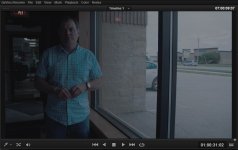
7Q Resolve Test.JPG

So I brought one of the Cinema DNG stills into Lightroom and adjusted the exposure and it worked just like it should. More detail in the sky instead of washed out milky whites.
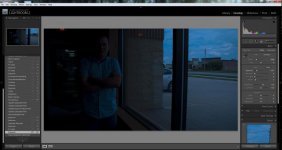
7Q Lightroom Test.jpg

I'm sure I'm doing something wrong in Resolve. Is there a setting I need to have checked when grading RAW?
 
How were you processing the DNGs in Resolve? ACES or yRGB? Did you try the highlight adjustments in the Camera Raw panel?
 
Resolve doesn't work in the same way as lightroom does, at least as far as the term "highlight recovery" goes. What do you want to achieve? bump up the shadows and pull down the highlights?

I'd give the curves panel a go.
 
BMD film settings with "highlight recovery" set seem to work decently in Resolve. If you look at the waveform you can see it gain a stop or 2. Best luck I had so far was with ACR and lightroom.
 
Resolve doesn't work in the same way as lightroom does, at least as far as the term "highlight recovery" goes. What do you want to achieve? bump up the shadows and pull down the highlights?

I'd give the curves panel a go.

The only experience with RAW editing I've had is with Lightroom. I haven't shot much CinemaDNG before or Red for that matter. This is my first attempt at testing the footage in Resolve and it seems to be performing just like 10bit ProRes. I'm not seeing the highlight recovery or shadow information that shows up with I take the same CinemaDNG image into Lightroom. If Resolve can't handle the RAW color space, what's the point?
 
both shots look horrible, but here we go...

edited in Photoshop, highlights -100, shadows +100, PS seems to sharpen the shots automatically...
RAW photoshop.jpg

CameraRAW Panel: bmd film, exp +2.5, no sharpening
Color Match Panel: Highlights -100.00, Color Boost: 0.00, Shadows: 5.00, Midtone Detail: 100.00
Color Wheels: switched to LOG mode, pulled up the highlights to 0.64
added a bit of saturation too.
RAW resolve_1.2.2.jpg

cheers
 
DNG performs way better than ProRes 10bit. As Stefan said, get the curves going in resolve. Plenty if information there.

Or or failing that, the AE workflow might suit you better. It's more like light room IMO
 
I opened it up in Capture One, selected linear, and the core histo shows nothing above about 85-90 so one could describe the file as mildly under exposed, this is then 4 exposure versions manually melded in Photoshop.

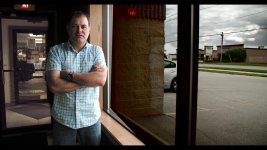
One would never have time to do this in a video edit but what I gained is that apart from being mildly under the core file is fully flexible, the 'problem' is Resolve..

CLIP0000295_hdr.jpg

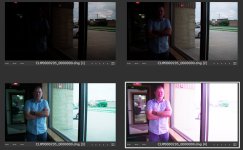
This was made be blending this lot of 'varients' (different settings on the exposure/wb sliders) being sky, paving, man, int room in the BG.
variants.jpg

This is where I got to with 4 nodes in Resolve which is not bad apart from that red wall which could be corrected..
4nodes_1.36.1.jpg
 
Last edited:
I brought the clip into Resolve but when I adjusted the exposure, it felt more like the 10 bit ProRes that I've been used to. No highlight or shadow recovery. I tried several project settings but nothing seemed to help.

Re reading this you mention project settings, have you tried CLIP settings - use the dropdown in the camera tab select clip - at that point your exposure, WB et al sliders come to life?

=====

Overall Im finding from initial tests that DResolve is not a great raw converter - it seems to give about 70% of the flex of C1 (or I guess LRoom) - mix that with actual flexibility of manipulating log in Dresolve and, well the differences dont seem too huge.. if you got your initial exposure in the ball park. Say you set the camera to 55 and shot under 32 lighting Im sure your raw file would shine compared to a 422 file?

S
 
Back
Top