paulcurtis
Veteran
Taken me far too long to get down to it but i've finally managed to grab some time to start looking at the O7Q properly, i thought i'd write a little now because it includes some questions that perhaps Mitch or someone else might be able to answer.
I've been specifically looking at whether the 4K Downsampled output is recordable and how the 2K RAW looks at normal frame rates.
I start by saying giving CD a pat on the back for making such a solid piece of kit and i'm very much looking forward to seeing it mature, albeit a bit slower than i would like to see
To record the display i have the 700 set to 4K output, which the O7Q correctly notes is an unsupported format for recording but it does display the 4K signal and output a 422 version to the SDIs, i have that running into a Shuttle which is being recorded in 422 10bit ProRes.
Firstly the 4K Downsample is noticeably sharper than all other modes however it does suffer from magenta and green aliasing on sharp contrast areas, i think this is to be expected. In fact it looks like a C300 now
Secondly i'm not quite sure what area of the sensor is being downsampled because the frame is different to the 1080 frame. It appears that it is offset to the left *and* scaled slightly. I'd originally thought that perhaps the 4096 was being squeezed into 1920 making it slight anamorphic but it's not. If i take the AVCHD version and overlay the 4K downsample i can see that it's shifted left but oddly scaled. An observation might be that the O7Q display is not showing the full 4096 across as comes across in the 2K and 4K signal perhaps?
Thirdly there's a tearing error with movement, a chunk of pixels at the top appears to be delayed a little, this is also recorded through the output.
So my question to Mitch is whether the 2K and 4K monitor display is full raster or whether i've messed something up somewhere?
The surprise for me was the 2K, it was quite a bit better than i'd seen on other past demos. It could be a number of reasons. First i was using Resolve 9, this limits to 1920 and therefore unless you're very careful the 2K is being scaled and that by itself introduces a lot of artefacts. So i wonder whether some of the videos i'd previously seen had gone through this. I just downloaded Resolve 10 and was very pleased to see how much better the files are debayered. I can still detect the stair stepping on diagonal images but it's much better than it was because the magenta/green noise is gone. You can compare the 4K downsample with 2K and see the difference but it's more than usable.
One area that i've not been able to wrap my head around is the apparent brightness shifts in all the various recorded versions! The 4K Downsample levels are different to the DPX levels are different to the AVCHD levels and could be different to the RAW levels (but more difficult to say). I need to do more testing on this front but if anyone knows what the 'rules' are that would be great. I suspect it's something to do with compounding legalised video levels.
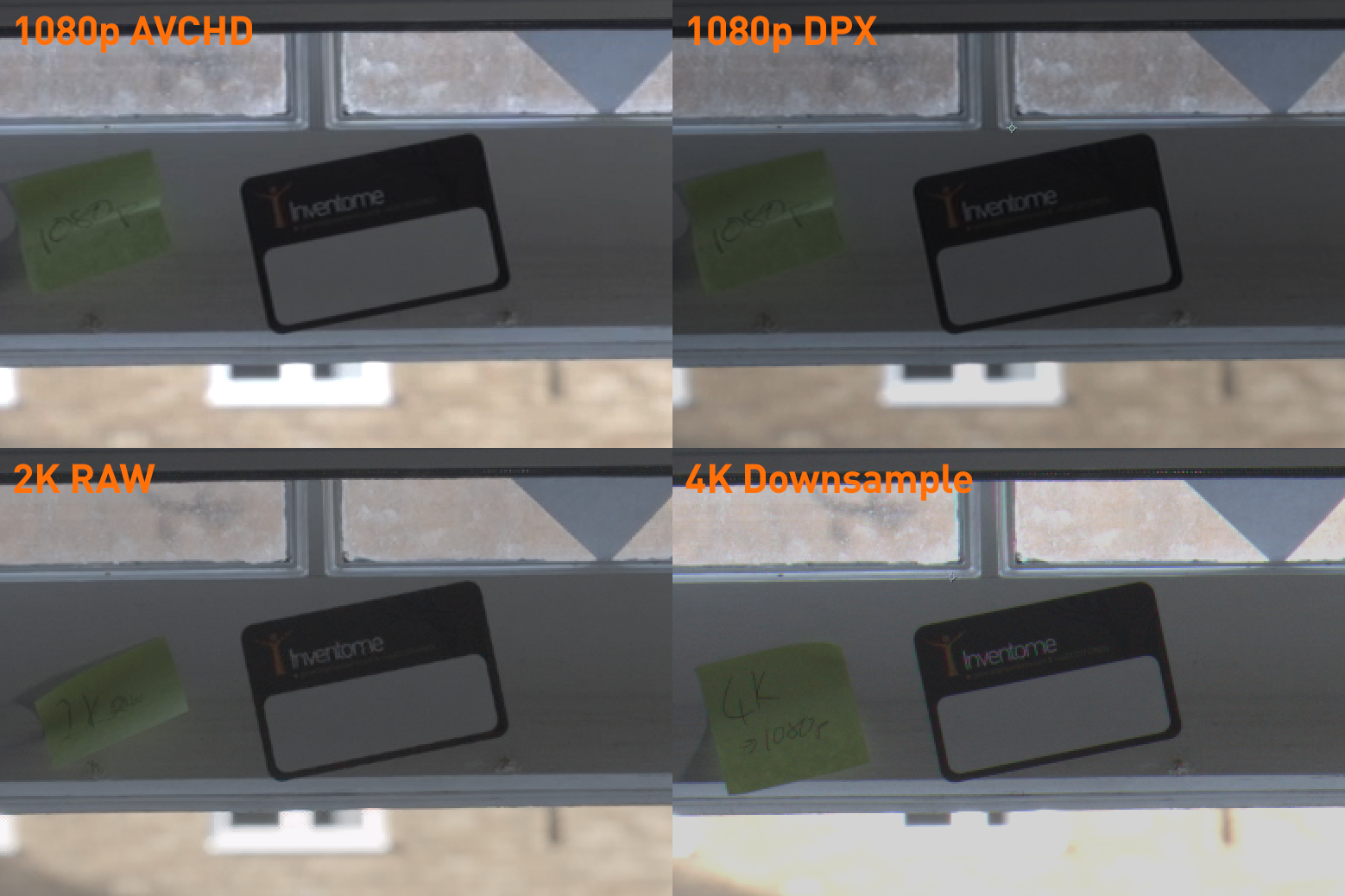
I've included some crops so you can see the resolution and sharpness differences. I think the page is cropping the image a little, if you can click and view image in a separate window you'll see the full comparison. (in fact please make sure you look in a separate window as i think the forum is scaling the image so it's important to view at full res). There's an AVCHD version, DPX, 2K RAW and down sampled 4K. I've linked these as PNGs hosted by my servers so they're not resampled to JPEGS making the comparison kinda pointless. My conclusion from this is that, aside from the fact i need to clean my windows, the 4K promise shows how much detail there is in this camera, a 2K downsample in post would be sublime. Also that the 2K RAW is a step up from standard 1080 - big props to the CD engineers for making the best of that 2K RAW signal.
I want 4K
cheers
Paul
I've been specifically looking at whether the 4K Downsampled output is recordable and how the 2K RAW looks at normal frame rates.
I start by saying giving CD a pat on the back for making such a solid piece of kit and i'm very much looking forward to seeing it mature, albeit a bit slower than i would like to see
To record the display i have the 700 set to 4K output, which the O7Q correctly notes is an unsupported format for recording but it does display the 4K signal and output a 422 version to the SDIs, i have that running into a Shuttle which is being recorded in 422 10bit ProRes.
Firstly the 4K Downsample is noticeably sharper than all other modes however it does suffer from magenta and green aliasing on sharp contrast areas, i think this is to be expected. In fact it looks like a C300 now
Secondly i'm not quite sure what area of the sensor is being downsampled because the frame is different to the 1080 frame. It appears that it is offset to the left *and* scaled slightly. I'd originally thought that perhaps the 4096 was being squeezed into 1920 making it slight anamorphic but it's not. If i take the AVCHD version and overlay the 4K downsample i can see that it's shifted left but oddly scaled. An observation might be that the O7Q display is not showing the full 4096 across as comes across in the 2K and 4K signal perhaps?
Thirdly there's a tearing error with movement, a chunk of pixels at the top appears to be delayed a little, this is also recorded through the output.
So my question to Mitch is whether the 2K and 4K monitor display is full raster or whether i've messed something up somewhere?
The surprise for me was the 2K, it was quite a bit better than i'd seen on other past demos. It could be a number of reasons. First i was using Resolve 9, this limits to 1920 and therefore unless you're very careful the 2K is being scaled and that by itself introduces a lot of artefacts. So i wonder whether some of the videos i'd previously seen had gone through this. I just downloaded Resolve 10 and was very pleased to see how much better the files are debayered. I can still detect the stair stepping on diagonal images but it's much better than it was because the magenta/green noise is gone. You can compare the 4K downsample with 2K and see the difference but it's more than usable.
One area that i've not been able to wrap my head around is the apparent brightness shifts in all the various recorded versions! The 4K Downsample levels are different to the DPX levels are different to the AVCHD levels and could be different to the RAW levels (but more difficult to say). I need to do more testing on this front but if anyone knows what the 'rules' are that would be great. I suspect it's something to do with compounding legalised video levels.
I've included some crops so you can see the resolution and sharpness differences. I think the page is cropping the image a little, if you can click and view image in a separate window you'll see the full comparison. (in fact please make sure you look in a separate window as i think the forum is scaling the image so it's important to view at full res). There's an AVCHD version, DPX, 2K RAW and down sampled 4K. I've linked these as PNGs hosted by my servers so they're not resampled to JPEGS making the comparison kinda pointless. My conclusion from this is that, aside from the fact i need to clean my windows, the 4K promise shows how much detail there is in this camera, a 2K downsample in post would be sublime. Also that the 2K RAW is a step up from standard 1080 - big props to the CD engineers for making the best of that 2K RAW signal.
I want 4K
cheers
Paul