Nvme Enclosures

Peter C.

Veteran
I’ve been recently been researching adding an external ssd nvme connected via usb c to my new mac mini. I found it actually more complex than I was anticipating. There three or more versions of usb 3.1 (gen 1, gen 2, thunderbolt 3). Many of the faster thunderbolt devices aren’t backward compatible. The nvme enclosures vary widely in performance, quality, price and dependability. After reading the reviews you can be left disconcerted with issues such random disconnecting, bad performance, even over heating and claims of damaging the drive. The advantage of using an enclosure you can get exceptional speed and pick the nvme you want. The other option is to purchase a prebuilt drive and not have to concern yourself with any of these issues and in some instances it can cost the same.

Thunderbolt (40gbps)
$68 OWC https://eshop.macsales.com/shop/envoy-express/thunderbolt-3
$90 Sabrent https://www.amazon.com/dp/B08FT59SB6/ref=cm_sw_r_cp_api_fabc_4IOXFbW5VHWAV?th=1
$110 Avolusion https://www.amazon.com/Avolusion-SSDTB900-PRO-Thunderbolt-Portable-Enclosure/dp/B085T57STT
$139 Fledging Shell (with fan) https://www.amazon.com/dp/B07QY9V2KM/ref=cm_sw_r_cp_api_fabc_bXOXFbW0P8FTG?_encoding=UTF8&psc=1
$170 Orico https://www.amazon.com/dp/B082KFB5TL/ref=cm_sw_r_cp_api_fabc_nSOXFbF9B3VKR

USB 3.1 (10gbps)
$20 Orico https://www.amazon.com/dp/B08G14NBCS/ref=cm_sw_r_cp_api_fabc_KTOXFbZGFGEPE?_encoding=UTF8&psc=1
$46 Sabrent https://www.amazon.com/dp/B07K4TZQ7D/ref=cm_sw_r_cp_api_fabc_4IOXFbW5VHWAV


$279 - SAMSUNG T7 2TB - https://www.amazon.com/dp/B0874Y5XFG/ref=cm_sw_r_cp_api_fabc_dlC_N0OXFbD1FX8JX?psc=1
 
Last edited:
What's the point if you're not going to obtain the native R/W speeds of the NVMe?
 
These are much cheaper than I remember them being (especially now with 'holiday savings')...so they are cost effective if the enclosure is TB3/4 and works well.
 
For pure Thunderbolt 3 external drives, I've had a mixed bag. The G-Technology 1TB G-DRIVE Mobile Pro SSD Thunderbolt 3s is very fast, and while pricey, isn't as expensive as other Thunderbolt 3 drives that utilize NVMe.

Fast, but unfortunately it repeatedly dropped connection. I returned it. I replaced it with a Glyph Atom Pro 500GB External NVMe SSD Thunderbolt 3 drive. No dropped connections, no thermal throttling to reduce drive speed with long transfers. And no speed hits as the drive filled up.

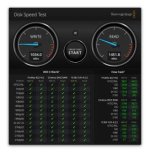
AJA Test shows 2217 MB write and 2387 read. Black Magic shows 1100 MB write and 2450 read. But it's pricier at $249.00 for 500GB drive and enclosure
 
Last edited:
For pure Thunderbolt 3 external drives, I've had a mixed bag. The G-Technology 1TB G-DRIVE Mobile Pro SSD Thunderbolt 3s is very fast, and while pricey, isn't as expensive as other Thunderbolt 3 drives that utilize NVMe.

Fast, but unfortunately it repeatedly dropped connection. I returned it. I replaced it with a Glyph Atom Pro 500GB External NVMe SSD Thunderbolt 3 drive. No dropped connections, no thermal throttling to reduce drive speed with long transfers. And no speed hits as the drive filled up.

AJA Test shows 2217 MB write and 2387 read. Black Magic shows 1100 MB write and 2450 read. But it's pricier at $249.00 for 256GB drive and enclosure

I have no idea if it matches the stability of the 500GB, but the Glyph atom pro 2TB is on sale for $550 now - https://www.bhphotovideo.com/c/prod...technologies_a2000pro_glyph_atom_pro_2tb.html
 
very interesting... considering the compatibility/reliability issues, I'm feeling like I might go with an all-in-one enclosure/drive product since the goal is to optimize performance

...man those speeds are bats*%t crazy. i just ran BM disk speed test on my MBP and I'm getting about 2000MB/s write 2200 MB/s read. to get faster than that with an external drive is fantastic.
 
Yeah the T7 2tb is $249 and 900mbs which is probably good enough for 4k.

To get better performance the enclosures get expensive. 2Tb nvme are around $250 + the enclosure. So there’s no cost savings
 
I have two of these: https://www.bhphotovideo.com/c/prod...e81_2t00_g25_2tb_extremepro_portable_ssd.html

And two of the non-Pro version: https://www.bhphotovideo.com/c/prod...sk_sdssde60_2t00_g25_extreme_600_2tb_ssd.html

They're fine. I use them to take projects on the go to edit on the road. They work fine for that. The Pros give real-world around 1500MB/s and the non-Pro is around 400MB/s real-world.

My main edit drive is an OWC Express 4M2 with four HP 2TB NVMe drives. While it's limited by Thunderbolt's PCIe bandwidth, it still easily cracks 2000MB/s and is very very very fast in use. That setup cost me about $1100.

I run it in RAID 0, but it gets backed up four times a day to a local 12TB disk. If I had to, I could edit off of the 12TB until a replacement SSD stick came in. The SSD RAID is also covered by Time Machine on my NAS, so I'm pretty confident with striping to get the extra capacity and performance.

Anything on the edit RAID that hasn't been accessed in three months gets auto-copied to an archive drive on my NAS (10GbE) and flagged with an orange tab in Finder. I'll take a look, verify it copied correctly and then usually dump it... so I don't generally get very full on the SSD RAID.
 
My general impression is that the performance and reliability is based on the controller in the enclosure and the computer. This would account for the disparity in reviews. Like I said it’s not straight forward with clear cut choices. I trust Samsung but I haven’t looked deeply into the T7
 
Is anyone noticing performance gains between the 500mbps and 1000+ mbps read/write speeds on these drives?

One might assume the only time it matters is when transfer from one SSD to another, but how often does that happen? Most of the time it is coming from a camera card below 500mbps, or going to a spinny drive for back up and long term.
 
Well, my camera cards are pushing 1400MB/s. I don't notice a huge difference between the Pro and non-Pro Extreme SSDs. I do notice the speed on the RAID.

Screen Shot 2020-10-16 at 7.49.23 PM.jpg
 
I found these reviews to be helpful. But with all things Youtube you can't simply swallow what someone is saying without doing your homework.
https://youtu.be/Dkaf42sxqGY
https://youtu.be/qzqs5w8WnzA

Keep in mind that the vast majority of ssd use 3 layer nand, which is less expensive but slower than the 2 layer nand found in high end pro ssd. To compensate they have a fast cache but once that cache is filled the performance drops dramatically. So if you copy 10g file, the first 5g might be fast then the speed will drop in half or more. The other thing the more expensive drives do better is random read writes and this is what most real world work is like.

One other thing the faster ssd when they run at the max speed get really hot and will throttle down just like laptop cpu. The videos I posted touch on this idea that the big numbers ssd rarely live up to the big numbers they advertise. It did show me that you are actually getting something with the high end enclosures. Although every thing in the chain should match, ie it's waste to buy an expensive ssd and put it in a cheap enclosure and vice versa.

I'd like to get that Shell Thunder SSD Enclosure although I don't like that fan. I wonder if you could disable it and throw in a copper heat sink instead. I'm also skeptical the Sabrent Rocket ssd would be faster, might being paid by Saberent to push that drive.
 
Last edited:
Just a regular SSD will probably beat the pants off of a RAID of spinning disks. Not only is the read speed a few times more than even a RAID, but the seek times are 10-100 times faster. So you might try just a well-reviewed NVMe SSD paired with a well-reviewed USB enclosure.
 
I'm seeing cavalier use of B and b.

In spec sheets, B stands bytes, and b stands for bits

For example:

  • a camera codec rated at 400 Mbps could also be written 50 MB/sec.
  • a drive rated at 900 MB/sec. could also be written 7,200 Mbps or 7.2 Gbps

(For some reason, usually bits are paired with p for "per" while bytes use a slash: 400 Mbps, 50 MB/sec)
 
Does anyone have experience daisy-chaining nvme drives in thunderbolt 3 enclosures? One drive per enclosure, up to 4 drives in the daisy chain?

Good idea? Bad idea?

It seems like some of these multiple bay nvme enclosures only use 1 lane per drive, so the 4 drives together operate at the same speed as a solo drive?
 
Anyone have any experience with the OWC Express 4M2? I have other OWC RAIDs and have been pretty happy with them but want to build a screaming fast M2.0 NVME RAID for editing 4K multicam clips,
my spinning drive RAIDs are a joke they are so slow compared to what's needed.

https://eshop.macsales.com/shop/express-4m2

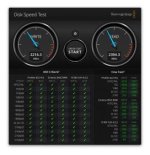
I have one loaded with HP 2TB NVMe sticks. It works really well. About 2200MB/s write, 2400MB/s read over Thunderbolt 3. I'm running it RAID 0 for one 8TB volume. RAID 0 is obviously risky, but I have good and regular backups.

It's small enough to be easily portable if you care about that... but I generally use bus-powered SSDs for portable stuff.

Screen Shot 2020-12-01 at 7.24.27 PM.jpg
 
Back
Top