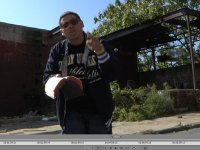
Note: this is just a "print screen shot" from premiere pro CS4 into Photoshop cs4 then saved as a jpeg.
I was doing test shots with the hpx with a friend for a video we're going to shoot (1st one with hpx ) and when I put it in premiere I am seeing a ton of noise in the dark sections of clothes (as you can see in the blue jacket) now, I'm just learning the nuances of the cam, tried to get proper exposure, white balanced manually , etc..etc.. and I'm new at this so bare with me but I have read the boards and saw there was a large thread about the noise level in the hpx vs the hvx and I forget the guys name on dvxuser , but he sent his cam in and then jan talked about the reset button bringing it back to the noise levels of the hvx. I did not reset ..yet. But that below pic shows NOISE..
Now, is that just me not lighting correctly, the sun, premiere pro cs4, my monitor or is that what the hpx looks like? I cant think its the HPX, I'm thinking its got to be me, so tell me how I get rid of it so when these aren't test shots anymore, I dont want to kill myself for shooting unusable footage! Lol
I didn't have gain on, I didnt have the ND filter on ( i dont think, cant be sure) forget how open the iris was, it was 24 720p (instead of PN, I didnt realize that til alot later) my draft quality on my premiere pro is Best, I don't have a HD monitor (yet) taht I'm previewing this on so if you dont see noise then maybe its my monitor..I dont know.
if you need any more info let me know & help a brother out!!
I was doing test shots with the hpx with a friend for a video we're going to shoot (1st one with hpx ) and when I put it in premiere I am seeing a ton of noise in the dark sections of clothes (as you can see in the blue jacket) now, I'm just learning the nuances of the cam, tried to get proper exposure, white balanced manually , etc..etc.. and I'm new at this so bare with me but I have read the boards and saw there was a large thread about the noise level in the hpx vs the hvx and I forget the guys name on dvxuser , but he sent his cam in and then jan talked about the reset button bringing it back to the noise levels of the hvx. I did not reset ..yet. But that below pic shows NOISE..
Now, is that just me not lighting correctly, the sun, premiere pro cs4, my monitor or is that what the hpx looks like? I cant think its the HPX, I'm thinking its got to be me, so tell me how I get rid of it so when these aren't test shots anymore, I dont want to kill myself for shooting unusable footage! Lol
I didn't have gain on, I didnt have the ND filter on ( i dont think, cant be sure) forget how open the iris was, it was 24 720p (instead of PN, I didnt realize that til alot later) my draft quality on my premiere pro is Best, I don't have a HD monitor (yet) taht I'm previewing this on so if you dont see noise then maybe its my monitor..I dont know.
if you need any more info let me know & help a brother out!!