

dresslerphoto
Member
Please forgive this nub, but I will give all the settings. I think in the neutral grays the noise is totally unacceptable. We did a test in our studio and I didn't really notice it until I looked at the footage sent out of FCP.
Scene setup:
Scene Select: F1
Op Type: Film Camera
Rec Format: ph1080/24p
VFR: Off
Detail: -2
V Detail: -2
Detail Cor: +2
Chroma Lvl: -3
Chroma Phase: -2
Gamma: B.Press
Knee: Low
Matrix: Norm1
SkintoneDTL: Off
Panny: f7.6 @1/60 iso 640 wb= auto from gray card
I brought the footage in via Log & Transfer.
Here are the samples:
1st raw video transfered
2nd raw video in FCP
3rd output video
4th final video settings



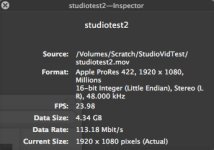
The only filters used in FCS were Levels and Color Correct 3 way, neither were very severe adjustments.
Here are the export settings:
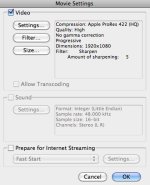
Thanks for the help!
Scene setup:
Scene Select: F1
Op Type: Film Camera
Rec Format: ph1080/24p
VFR: Off
Detail: -2
V Detail: -2
Detail Cor: +2
Chroma Lvl: -3
Chroma Phase: -2
Gamma: B.Press
Knee: Low
Matrix: Norm1
SkintoneDTL: Off
Panny: f7.6 @1/60 iso 640 wb= auto from gray card
I brought the footage in via Log & Transfer.
Here are the samples:
1st raw video transfered
2nd raw video in FCP
3rd output video
4th final video settings
The only filters used in FCS were Levels and Color Correct 3 way, neither were very severe adjustments.
Here are the export settings:
Thanks for the help!


