FS7: Noise reduction artifacts in Cine EI

broughtonfilm

Well-known member
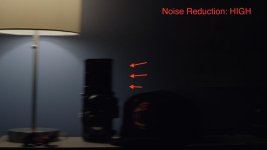
Below are frame grabs from Resolve. This was shot in Cine EI mode, XAVC-I, 1920 x 1080, 23.98p, SGamut Cine Slog 3, shutter was set to 180 degree angle. Lit with a single "traditional" tungsten lightbulb. LC709A was applied in Resolve. I noticed that when Noise Reduction is set to High or Mid, objects in underexposed areas leave a trail / ghost when making a pan or tilt. It is barely noticeable when NR is set to LOW, noticeable when set to MID and quite pronounced on HIGH setting. It is noticeable when watching clips, motion appears more jittery because of the trailing ghost, this is how I noticed something was funky. I purposely underexposed the frames because that's when the artifact is most noticeable. If I remember correctly some potential issues with NR in CINE EI have been mention with FW 3.0's release but this is my first time noticing it. Does anyone else see it? Dropbox folder with original MXF files and ProRes versions is here: https://www.dropbox.com/sh/9jjesbu8xf0aeap/AAA8Ns9Apl8kipunP2Hus7H-a?dl=0
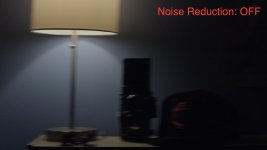
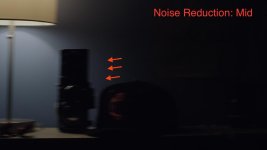
nroff.jpgnrmid.jpgnrhigh.jpg

Also couple of other screen grabs. Unlike the screen grabs above, these JPG's have been brightened after capturing to show the artifacts better.
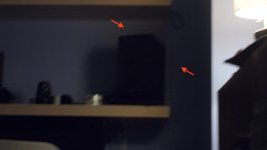
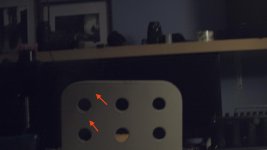
example2.jpgexample1.jpg
 
Last edited:
I have noticed it and have always shot with NR at low in custom as a result. Only went to High when I absolutely needed it because ISO was very high.
 
To be honest this sort of thing is the reason why NR is best added in post no matter what camera.

That is precisely what I would expect to see in areas of dark or shadow with NR. That's why plugins like Neat Video allow you to apply NR to specific areas of the image.
 
To be honest this sort of thing is the reason why NR is best added in post no matter what camera.

That is precisely what I would expect to see in areas of dark or shadow with NR. That's why plugins like Neat Video allow you to apply NR to specific areas of the image.

Personally, I wouldn't use NR in camera to begin with. Having said that, the artifacts are visible in non underexposed areas too. There seemed to be a lot of enthusiasm about NR in Cine EI in FW 3.0 and people stating here that it is "exceptional". Again, I definitely would not use it.
 
Last edited:
There seemed to be a lot of enthusiasm about NR in Cine EI in FW 3.0 and people stating here that it is "exceptional". Again, I definitely would not use it.

Yup. So thank you for showing facts over belief.

I for one will definetly think twice before i enable it now.
 
Personally, I wouldn't use NR in camera to begin with. Having said that, the artefacts are visible in non underexposed areas too. There seemed to be a lot of enthusiasm about NR in Cine EI in FW 3.0 and people stating here that it is "exceptional". Again, I definitely would not use it.


I couldn't see it in the well exposed areas, only the dark areas ( and where you had raised levels) but it is utter madness to think a camera could do in real-time what it takes a far more powerful dedicated workstation takes time to render properly.

NR by its nature sacrifices detail. Which is why you'd want it as adaptive and controllable as possible. Personally I have zero intention of using it in camera. As for the penultimate sentence, there's clearly a lot of people on this forum that do not have a clue what they are talking about, from the ones that state that every bug they haven't replicated is clearly user error to the ones who expect/demand Red Weapon/Alexa XT/Master Prime results from an FS5 with kit lens... and I make it a mission to consider the source before I take info as gospel when posted here :)
 
Last edited:
I have only shot custom so far. And it's there with NR at high. Not as pronounced at mid and nothing at low.
 
I have always shot Custom at mid and never noticed anything but then again I never went looking. Do you guys think it would be more apparent in CINE EI ?
How much good does Low NR have in reducing noise at 2000EI CINE EI?
 
Back
Top