
toddeastman
Active member
Hi everyone!
Wanted the groups input on how to setup an NLE project with log footage such as V-log. This post has me using Final Cut Pro 10.4.3 but the info could easily apply to any NLE.
I was under the assumption that the EVA1 wrote files to the internal card, regardless of codec or gamma (V-log, Scene File, HLG) that conform to Rec.709. So setting up a project to conform to Rec.709 should be an easy call. Well, I brought the same file into both a Standard (Rec.709) Library and a Wide Gamut HDR (Rec.2020) Library. The only thing applied to the clip in each instance is the Panasonic V-Log Camera LUT via the Inspector panel. Here are screen grabs of each with Standard first and Wide Gamut HDR second.
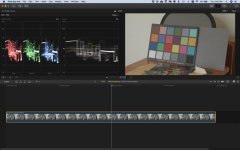
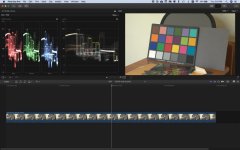
Big difference! Only adding the Camera LUT to the Wide Gamut HDR made the clip look like what my eye was seeing. Why did this work so well? Should I always be using a Wide Gamut HDR type workflow with ANY log footage (Sony, Arri, Red, Canon)? To add more confusion to the mix, The library in FCP was set to High Gamut HDR but the project itself in that library was set to Rec.709!! Changing the project to Rec.2020 showed no difference. The project color space setting is supposed to dictate the files that are rendered or exported.
So, in summary, when grading/editing Log footage what should we all be using for settings to be able to best mold the footage in post? It looks like a High Gamut HDR type setting gives the most options. I never considered using an HDR setting because I was under the impression that the Log encoding packed all that range into a Rec.709 package. What I just saw, as insignificant as some may see it, blew my mind.
Finishing/Exporting might be different story. What are you all working in and then exporting to for regular ole non-HDR and non-Rec.2020 or HLG?
PS. Any Atomos Shogun Inferno users monitoring V-Log with Log to Video or AtomHDR? I've noticed the Log to Video with the Panasonic V-log selected in monitor looks AWFUL! I have a proper exposure for Vlog. Using AtomHDR at 400% seems so show what my eye sees. I figured simply using the Log to Video with the V-log LUT would give client a good idea...but no. The in camera V-709 correction looks far better than the Inferno's correction.
Thanks for reading.
Wanted the groups input on how to setup an NLE project with log footage such as V-log. This post has me using Final Cut Pro 10.4.3 but the info could easily apply to any NLE.
I was under the assumption that the EVA1 wrote files to the internal card, regardless of codec or gamma (V-log, Scene File, HLG) that conform to Rec.709. So setting up a project to conform to Rec.709 should be an easy call. Well, I brought the same file into both a Standard (Rec.709) Library and a Wide Gamut HDR (Rec.2020) Library. The only thing applied to the clip in each instance is the Panasonic V-Log Camera LUT via the Inspector panel. Here are screen grabs of each with Standard first and Wide Gamut HDR second.
Big difference! Only adding the Camera LUT to the Wide Gamut HDR made the clip look like what my eye was seeing. Why did this work so well? Should I always be using a Wide Gamut HDR type workflow with ANY log footage (Sony, Arri, Red, Canon)? To add more confusion to the mix, The library in FCP was set to High Gamut HDR but the project itself in that library was set to Rec.709!! Changing the project to Rec.2020 showed no difference. The project color space setting is supposed to dictate the files that are rendered or exported.
So, in summary, when grading/editing Log footage what should we all be using for settings to be able to best mold the footage in post? It looks like a High Gamut HDR type setting gives the most options. I never considered using an HDR setting because I was under the impression that the Log encoding packed all that range into a Rec.709 package. What I just saw, as insignificant as some may see it, blew my mind.
Finishing/Exporting might be different story. What are you all working in and then exporting to for regular ole non-HDR and non-Rec.2020 or HLG?
PS. Any Atomos Shogun Inferno users monitoring V-Log with Log to Video or AtomHDR? I've noticed the Log to Video with the Panasonic V-log selected in monitor looks AWFUL! I have a proper exposure for Vlog. Using AtomHDR at 400% seems so show what my eye sees. I figured simply using the Log to Video with the V-log LUT would give client a good idea...but no. The in camera V-709 correction looks far better than the Inferno's correction.
Thanks for reading.


