
Navigation
Install the app
How to install the app on iOS
Follow along with the video below to see how to install our site as a web app on your home screen.
Note: This feature may not be available in some browsers.
More options
You are using an out of date browser. It may not display this or other websites correctly.
You should upgrade or use an alternative browser.
You should upgrade or use an alternative browser.
Nikon Z9 update to get Internal 12 bit N-Raw, 8.3K 60 FPS
- Thread starter Tom Roper
- Start date
The bit rate, resolution, the processing power and the media have been heading into the opposite directions since day one. A more compressed codec allows the same quality from a lower bit rate but the new media can record at higher speeds. And everyone strives for the balance. Except the high end production that has big budgets visavis all the gear.
And so, on the lower - let's call it "practical" - end, 4K H265 can look good enough at 100 Mbps. And then you go up to 8K Raw 12 bit.
Or something.
And so, on the lower - let's call it "practical" - end, 4K H265 can look good enough at 100 Mbps. And then you go up to 8K Raw 12 bit.
Or something.

NorBro
Major Contributor
I wonder if at some point life will change enough that any uncompressed scenario above would be more normal for the next few generations.
Every old-timer, every decade, has some new concern or doubt about technology.
Most/all of us here have transitioned through a few different resolutions and from some type of tape to some type of card, and at one point back then thinking about recording 8K RAW internally on an affordable card didn't even exist because the thought was so insane.
In 2040, 2050+, if plentiful petabyte, exabyte and zettabyte hard drives exist, there is no concern for data in the same manner like our concern for hundreds of gigabytes vanished when we were introduced to terabytes.
Once we stopped dialing-up to AOL and had this new infranscture in our lives, some more concerns went away. What's after 5G and 6G?
With all of that said, the only uncompressed footage I can picture is from phones, that's it.
Apple marketing a new way their phone pixels see the world straight from the sensors sounds about right.
Every old-timer, every decade, has some new concern or doubt about technology.
Most/all of us here have transitioned through a few different resolutions and from some type of tape to some type of card, and at one point back then thinking about recording 8K RAW internally on an affordable card didn't even exist because the thought was so insane.
In 2040, 2050+, if plentiful petabyte, exabyte and zettabyte hard drives exist, there is no concern for data in the same manner like our concern for hundreds of gigabytes vanished when we were introduced to terabytes.
Once we stopped dialing-up to AOL and had this new infranscture in our lives, some more concerns went away. What's after 5G and 6G?
With all of that said, the only uncompressed footage I can picture is from phones, that's it.
Apple marketing a new way their phone pixels see the world straight from the sensors sounds about right.
Tape? Abe Zapruder says hello.... Most/all of us here have transitioned through a few different resolutions and from some type of tape to some type of card,.

jmone
Well-known member
Had a bit of a play in Resolve with rending "Uncompressed" footage. Some of the files were 60GB for a 1min render. 1 min. ... and that was for UHD HDR 4:2:2. I've a 100TB server setup, but it would only hold a dozen movie length videos at this sort of bitrate. Also, my i9-11K was pegged trying to play them back (maybe 1 frame per second if I was lucky).
NorBro
Major Contributor
You wouldn't actually deliver it, haha...especially online, just not sustainable for most.
But curious what you rendered in Resolve? I don't know much about Windows, but set up an 8K uncompressed timeline with text in FCP and it didn't make a difference on a M1. Old Apple Intels would probably start smoking, but this [now] inferior M1 [compared to the new ones] handled it well. Wish I had some footage to test though.
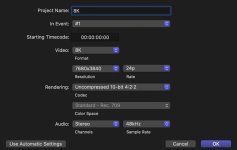
But curious what you rendered in Resolve? I don't know much about Windows, but set up an 8K uncompressed timeline with text in FCP and it didn't make a difference on a M1. Old Apple Intels would probably start smoking, but this [now] inferior M1 [compared to the new ones] handled it well. Wish I had some footage to test though.
jmone
Well-known member
NorBro - I just opened a previous project and rendered the 1st Minute (it was a combo of FX6 SLOG 3 and DJI D-Gamut) to the various "lossless" formats that Resolves offers (there is a few). Interestingly, the output file size varied a fair bit between options from (memory) something like 20 to 60 GB per minute. I then tried playing them back in a media player (JRiver) thinking that something that was RGB should play just fine without GPU HW Acceleration thinking that there is no "decoding" to do, but that turned out not to be true.
jmone
Well-known member
Go to 9:44 for commentary from Gerald on NVENC.
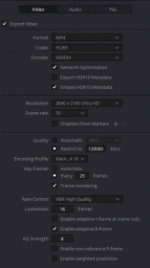
Yup I use NVENC Encoding for all my renders.... but it only works for a specific set of parameters. Even the NVENC Decoding (which has a wider set of profiles then the encoder), for example no 4:2:2 support. There is NVENC decoding/encoding support for Lossless AVC 8-Bit /HEVC 10-Bit 4:4:4 but these profiles are not exposed in Resolve. You can get 10-Bit 4:4:4 HEVC which looks great, and plays well.... just dial up the encoding bit rate (to say 120mbs for UHD), and it also supports HDR which is important for me. The resultant file is under 1GB per minute. I think I'll trial this profile over "normal" 4:2:0 renders as the chroma scaling will be 4:2:2 (from the FX6) to 4:4:4 in post, rather than 4:2:2 --> 4:2:0 in post then --> 4:4:4 in playback.
Attachments
Last edited:
jmone
Well-known member
I seem to get all the HDR specs on my renders (3090 Resolve 17):
FYI - I'm sticking to rendering out as 4:2:0 UHD HDR for compatibility (same profile as what is used by UHD-BD) as not all player apps will HW Accelerate 4:4:4 decoding.
Code:
Color primaries : BT.2020
Transfer characteristics : PQ
Matrix coefficients : BT.2020 non-constant
Mastering display color primaries : Display P3
Mastering display luminance : min: 0.0001 cd/m2, max: 1000 cd/m2
Maximum Content Light Level : 1000 cd/m2
MaxCLL_Original : 65535 cd/m2
Maximum Frame-Average Light Level : 400 cd/m2
MaxFALL_Original : 65535 cd/m2
SEI_rbsp_stop_one_bit : Missing
Codec configuration box : hvcC
FYI - I'm sticking to rendering out as 4:2:0 UHD HDR for compatibility (same profile as what is used by UHD-BD) as not all player apps will HW Accelerate 4:4:4 decoding.

ahalpert
Major Contributor
Hopefully you're shooting all of your weddings uncompressed...I know currently you're only doing 8K uncompressed, but do kindly prepare for 12K soon.
I heard all New York weddings will require mandatory 12K+ resolutions by the end of 2023, not sure if that's true though.
this joke never gets old
NorBro
Major Contributor
this joke never gets old
lol, you're always going to hear it until you stop being afraid of change!
It's always "but, but, but"...lol.
ahalpert
Major Contributor
lol, you're always going to hear it until you stop being afraid of change!
It's always "but, but, but"...lol.
I'm a realist, bro. Some people may need super resolution. My clients generally don't.
I did edit some tabletop footage of Patek Phillippe watches recently where I composited an ECU of the face onto a wide shot of the whole watch so I could animate from wide into a detail. In that circumstance, the thought crossed my mind that if it had been 8K footage instead of 4K (although realistically it probably would have had to be higher than that) then I could have done the move with a single shot. But then the realization arises that the optics are probably not going to deliver that level of detail anyway in the wide shot, and unless you have world-beating glass, you'll still be better off compositing 2 shots (or, obviously, doing a camera move while you shoot, which wasn't in the cards)
But that's the exception to the rule for me. It's very rare that I would benefit from anything more than 6K. 6K would be more convenient for cropping in than 4K, but only a small subset of what I do requires cropping, and even less requires extreme cropping
ahalpert
Major Contributor
If I wanted something like that, I'd wait for something with more capabilities than the A1
But honestly, shooting with the A7IV next to the A7SIII... the A7IV is absolutely miserable at low lighting levels compared to the A7SIII. There's no comparison, despite what people say. And ISO 12800 is really not that crazy high. Any time you're working with light levels that are suitable for human vision (which happens frequently in documentary and events), it's incredibly common that I go to the high base ISO and the quality that the camera provides there is absolutely solid
But honestly, shooting with the A7IV next to the A7SIII... the A7IV is absolutely miserable at low lighting levels compared to the A7SIII. There's no comparison, despite what people say. And ISO 12800 is really not that crazy high. Any time you're working with light levels that are suitable for human vision (which happens frequently in documentary and events), it's incredibly common that I go to the high base ISO and the quality that the camera provides there is absolutely solid
jmone
Well-known member
Yes, metadata looks complete. The one thing I would change, is rather than accepting default levels for MaxCLL and MaxFaLL (1000, 400 respectively above), is to enable the checkbox for HDR10+ before the render. Then from the color page, analyze all shots. The render settings will now include a couple of new checkboxes, export HDR10 metadata and embed HDR10 metadata. The exported metadata is a text file you can open in an editor to read out the actual MaxFaLL and MaxCLL from your video, which you can then use MkvToolNix to embed, and rewrap your mov/mp4 into a compliant mkv container.
Hi Tom, Did some testing. I've always had the Export / Embed HDR10 check boxes in the render tab (presumable because I also had the HDR10+ project checkbox ticked). I did not know about the "Analyze all shots" option in the Color Page, and now that I've done that my meta data now looks as follows for the same project as rendered straight out of Resolve (now v18 Beta):
Code:
color primaries : BT.2020
Transfer characteristics : PQ
Matrix coefficients : BT.2020 non-constant
Mastering display color primaries : Display P3
Mastering display luminance : min: 0.0001 cd/m2, max: 1000 cd/m2
Maximum Content Light Level : 1001 cd/m2
MaxCLL_Original : 1000 cd/m2
Maximum Frame-Average Light Level : 270 cd/m2
MaxFALL_Original : 400 cd/m2
Codec configuration box : hvcC
I'm not sure that I need the additional step to remux the Resolve produced MP4 with the additional exported HDR10 text file in MKVToolNix as it seems to be reported correctly in my player (or am I missing something) ???
Thanks
Nathan
jmone
Well-known member
Thanks Tom. I use Davinci Color Managed Workspace for grading and then render out an HDR "master" and a separate SDR version for Web Delivery (that is lower bitrate, res, etc) that I stream from my own Web Server. The HDR version is for LAN use at full res, high bitrate etc. I did look at the TXT HDR file and it contained varying values for each clip used within the video (but not each frame of each clip). I can see where the 1001 MaxCLL and the Max Ave Frame Light Level comes from and they correspond. FYI, the mastering I'm doing for HDR is in 2020 but limited to P3-D65 gamut @ 1,000nits and looks correct on my HDR-1000 monitors (as well as OLED TVs etc). I'm not sure I see a difference with the version I tested using "color page, analyze all shots" and the one I did not, but at least the levels are now correct! It looks like (as you would hope) that DaVinci Resolve is correctly embedding the HDR Meta Data. Thanks again.
Also sorry for the way off topic hijack of this thread!
Also sorry for the way off topic hijack of this thread!
Bob Loblaw
Active member
Knew this was going to happen: