New to the sennheiser g3 - background static

BrettR.

Active member
Hello. Recently I ditched my old broken lav kit and got a new G3 set up. It seems like every time there is a bit of static noise int he background. Not enough to make the footage unusable with a music overlay, but still enough that my last client noticed. I asked a friend that also just got his, and says he has the same issue going on... though it could be due to a lack of understanding settings (as could mine, but I think I get it a little more than he does.) Every time I scan and set an open frequency before using. Any advice? Here is a sample of the issue: https://vimeo.com/103339076 password: sound. Might have to turn it up a bit to hear it, but it's there and not ok if clients are complaining. Thanks!

Edit: I'm on a 5d Mk3 and I'm using the stock mic.
 
Last edited:
A couple questions come to mind. How was the sound recorded? Directly to camera or to an external recorder? How did recorded levels look and were they boosted in post? Was the sensitivity set properly on the transmitter? (I'm @ -30 for my Rode Lavs but -9 for less sensitive lavs like an OST 801/ Tram TR50) How was the receiver’s output set?

Gain structure when using wireless is tricky business. I haven't had too many issues with noise like this with my G3's (RF hits is another story...), but I'm also feeding them into a sound devices mixer where a lot of the gain heavy lifting is done.
 
You can hear the pumping of the AGC. It could be the compander in the wireless but I doubt it. So what happens is everytime the actor stops talking the AGC is boosting up the gain and also the noise.
 
In the sample you posted, the noise only happens when your subject physically moves, which makes me wonder if this noise is from the lav mic. Have you tried a different lav mic ?

Also, your recording is very "hissy". What were you using to record this audio with ?
 
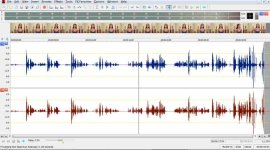
Are we talking about the same clip? I downloaded the 640x340 version and played it back in Sound Forge Pro. Aside from the levels being 'all over the place', it's nothing a little dynamics processing can't fix. I also didn't hear any 'static'.. RF or otherwise. The ambient noise floor is around -40 to -48 dBFS; perfectly acceptable for field interviews. I didn't notice the atypical AGC either.
BTW, I got no sound at all playing it on-line. Therefore I suspect other issues having nothing to do with the G3.
(though due diligence is very necessary frequency selection, gain staging, mics and placement)
tempmp4clip.jpg
 
A couple questions come to mind. How was the sound recorded? Directly to camera or to an external recorder? How did recorded levels look and were they boosted in post? Was the sensitivity set properly on the transmitter? (I'm @ -30 for my Rode Lavs but -9 for less sensitive lavs like an OST 801/ Tram TR50) How was the receiver’s output set?

Gain structure when using wireless is tricky business. I haven't had too many issues with noise like this with my G3's (RF hits is another story...), but I'm also feeding them into a sound devices mixer where a lot of the gain heavy lifting is done.

It was directly into the camera. The levels looked a tiny bit on the low side when recording, which I was doing because I was trying to keep the static type noise down... which probably wouldnt matter in the end, since I'd have to bump it up in post which would do the same thing but... yeah. My transmitter is at -51 and my receiver is at -6.
 
My transmitter is at -51 and my receiver is at -6.

Your transmitter level seems really low. I threw away the lav that came with the G3 system and use a variety of third party mics. Most of the time it's either a TRAM TR50 or an Oscar-Tech OST801 lav mic, with my transmitter set to -18 dB. ( reciever is usually -6 dB or 0 dB, depending on the camera/recorder I am using )
 
You can hear the pumping of the AGC. It could be the compander in the wireless but I doubt it. So what happens is everytime the actor stops talking the AGC is boosting up the gain and also the noise.
but if I'm adjusting the audio levels manually, how is that happening? Is that something that is always running on Canons regardless? I thought it was only older cheaper models that didn't have a manual option. I should have mentioned before, but it's a 5D Mk3.
 
Interesting. I was hearing it on the HD streaming, but not really on the SD so maybe its the encoder. The SD seems to have a much more even noise floor.

And OP yes using manual should kill the AGC (Auto Gain Control). But I did notice the crackle sound that I think you are talking about and that doesn't have anything to do with the noise floor.

It very much sounds like a bad connection. Could be broken wire on the lav or at the connector. Could be less than tight connection at the connector. The 1/8" jacks are not the most robust so you might try a bit of contact cleaner if it looks like it's in the jack. I would set it up and wiggle things to see what is causing it. It's possible that it some weird electronic gunk but my bet is on bad connection someplace. Might just be dirt on the connector. If you always leave the mic plugged in try un pluging and plugging a bunch of times. It's what is called "exercising" the connection. A lot of times if things sit in the same place a long time they will develop a bit of oxide at the connection point and exercising it will scrape that off. Contact cleaner will speed the clean up but it will generally work with out it.

Another possibility if you have had the belt pack on someone who has gotten sweaty is that sweat has gotten in to the transmitter. It's common to stick the transmitter in something waterproof (like a condom) in those situations. Very typical on say musicals where folks maybe dancing and singing. Sweat is very conductive and will short things out. Also if it gets in to the jack and dries it will leave a not great conducting layer of salt. So cleaning is a good first step in that case.
 
- 51dB sensitivity IS extremely low. I don't recall ever setting it that low, even in a yelling scene.
It's not uncommon to hear the compander working on G2/3 in the presence of HF content, but during normal dialog it usually not audible.
 
Last edited:
I'm willing to bet the OP is talking about the relatively high noise floor throughout the entire recording.

TheDingo had it correct; -51 on the transmitter is way too low. Here is a very basic video on how one guy set up his wireless with what I would assume is the lav (ME-2) as the OP was using.

https://www.youtube.com/watch?v=Itp1TLajkPI

I would start with transmitter levels around -20ish and then continuing boosting until you start noticing the AF peak on the transmitter and then back off those levels by -6 or so. The idea is that you want to send as strong a signal as possible to the receiver.
 
My transmitter is at -51 and my receiver is at -6.

Twelve to one, that's your problem. Boost the transmitter level, keep your receiver level, then reduce your camera mic level so you get dialog peaks at around -12dBfs. This should improve things.

What I'm asking you to do is called "gain staging". Search on the term, learn all about it. Once you've optimized this chain as much as you can, whatever is left is, well, permanent. This is what people are talking about when they say that DSLRs have crap audio. Next step up is a recorder to get the audio off the DSLR. Then things will actually start to sound nice.
 
Your transmitter level seems really low. I threw away the lav that came with the G3 system and use a variety of third party mics. Most of the time it's either a TRAM TR50 or an Oscar-Tech OST801 lav mic, with my transmitter set to -18 dB. ( reciever is usually -6 dB or 0 dB, depending on the camera/recorder I am using )

Yeah at some shoot it seemed like the only way to get the levels not to hit red, but that could have been to something else being off. I still have the stock kit mic but I'll give something in your range a go. Thanks!


Interesting. I was hearing it on the HD streaming, but not really on the SD so maybe its the encoder. The SD seems to have a much more even noise floor.

And OP yes using manual should kill the AGC (Auto Gain Control). But I did notice the crackle sound that I think you are talking about and that doesn't have anything to do with the noise floor.

It very much sounds like a bad connection. Could be broken wire on the lav or at the connector. Could be less than tight connection at the connector. The 1/8" jacks are not the most robust so you might try a bit of contact cleaner if it looks like it's in the jack. I would set it up and wiggle things to see what is causing it. It's possible that it some weird electronic gunk but my bet is on bad connection someplace. Might just be dirt on the connector. If you always leave the mic plugged in try un pluging and plugging a bunch of times. It's what is called "exercising" the connection. A lot of times if things sit in the same place a long time they will develop a bit of oxide at the connection point and exercising it will scrape that off. Contact cleaner will speed the clean up but it will generally work with out it.

Another possibility if you have had the belt pack on someone who has gotten sweaty is that sweat has gotten in to the transmitter. It's common to stick the transmitter in something waterproof (like a condom) in those situations. Very typical on say musicals where folks maybe dancing and singing. Sweat is very conductive and will short things out. Also if it gets in to the jack and dries it will leave a not great conducting layer of salt. So cleaning is a good first step in that case.

Thanks for all these tips, I'll get on these asap!
 
Twelve to one, that's your problem. Boost the transmitter level, keep your receiver level, then reduce your camera mic level so you get dialog peaks at around -12dBfs. This should improve things.

What I'm asking you to do is called "gain staging". Search on the term, learn all about it. Once you've optimized this chain as much as you can, whatever is left is, well, permanent. This is what people are talking about when they say that DSLRs have crap audio. Next step up is a recorder to get the audio off the DSLR. Then things will actually start to sound nice.
Thanks ill check it out!
 
Yeah at some shoot it seemed like the only way to get the levels not to hit red, but that could have been to something else being off.

You should NEVER see levels in the red with -18 dB on your transmitter, that's a sure sign that something is wrong with your camera/recorder input levels.

The stock Sennheiser mic isn't terrible, but the $90 Oscar-Tech OST801 lav mic is much better.
 
You should NEVER see levels in the red with -18 dB on your transmitter, that's a sure sign that something is wrong with your camera/recorder input levels.

The stock Sennheiser mic isn't terrible, but the $90 Oscar-Tech OST801 lav mic is much better.

I just got a moment to try out some settings, and dropping it to -18 seems to have had a big positive effect of the noise! However, the AF peak light is going on in some cases when I'm not even speaking much louder than an average person.
 
Back
Top